Google Shopping Campaign Overview & Performance Tracking
All your Standard Shopping and Performance Max campaigns in one sortable table. See campaign type distribution, daily performance trends, and compare KPIs across campaigns without switching between Google Ads views.
No signup required to explore the demo
Every Campaign in One Sortable Table
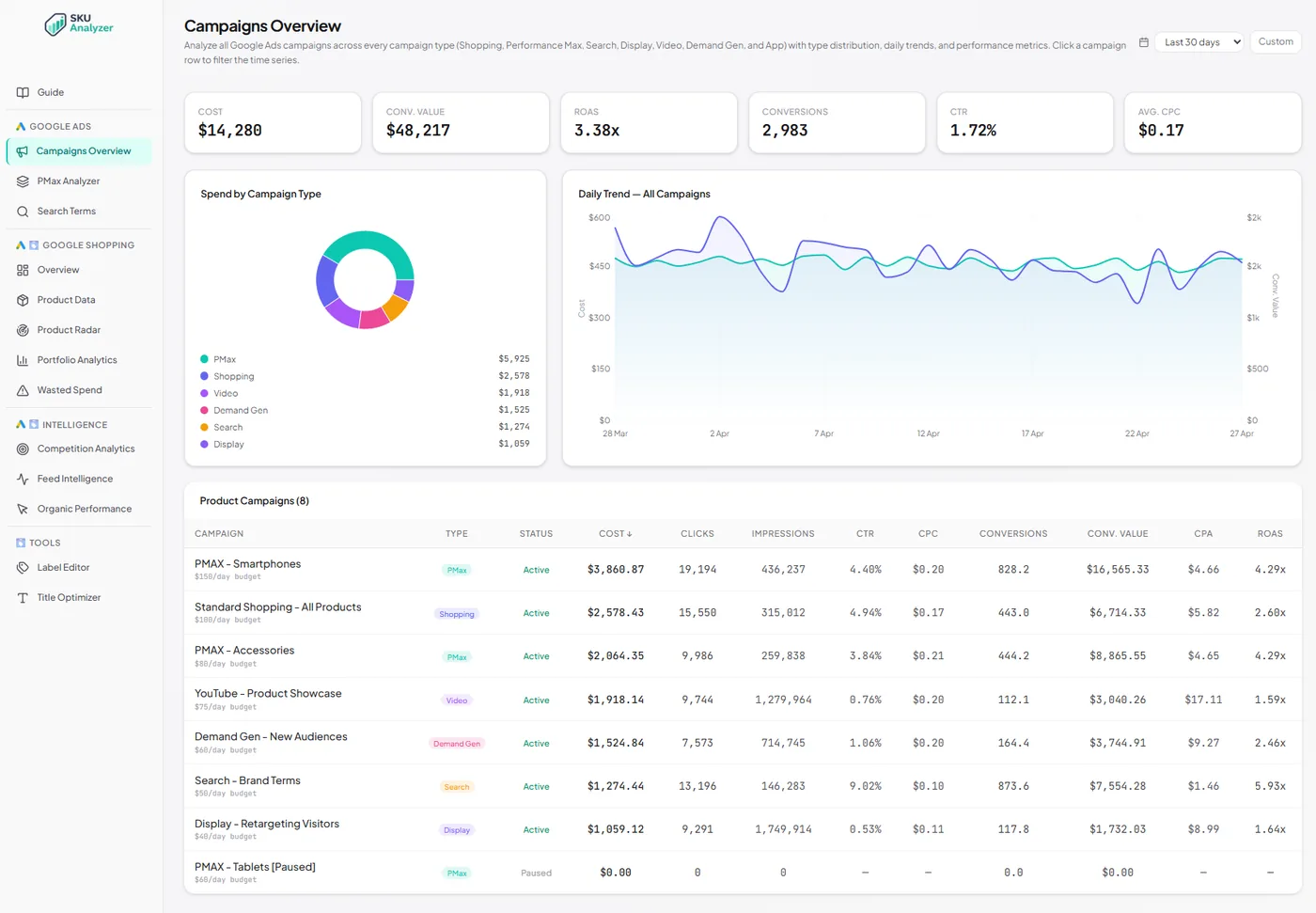
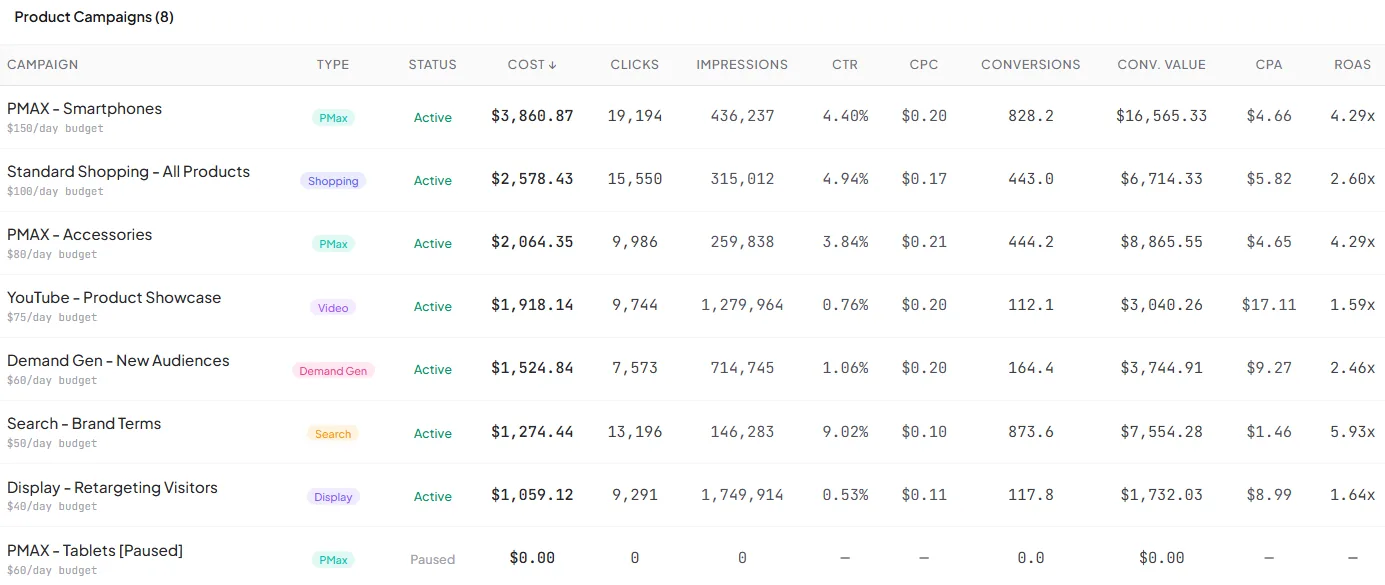
The Campaigns page lists every Standard Shopping and Performance Max campaign in your Google Ads account. Each row shows the campaign name, type, status, cost, clicks, impressions, conversions, revenue, ROAS, CPA, and CPC for the selected date range.
Google Ads makes you navigate between campaign types separately, and comparing a Shopping campaign against a PMax campaign requires manual work. Here, they sit side by side. Sort by ROAS to find your best-returning campaigns, or by cost to see where your budget goes.
The table updates with the date range picker. Compare last 7 days vs. last 30 days to catch campaigns whose performance has shifted recently. Quick column sorting lets you find outliers in seconds.
- Shopping and PMax campaigns in one unified table
- Sort by cost, ROAS, conversions, revenue, or any metric
- Campaign type and status shown inline
- Flexible date range up to 750 days
Campaign Type Distribution, Visualized
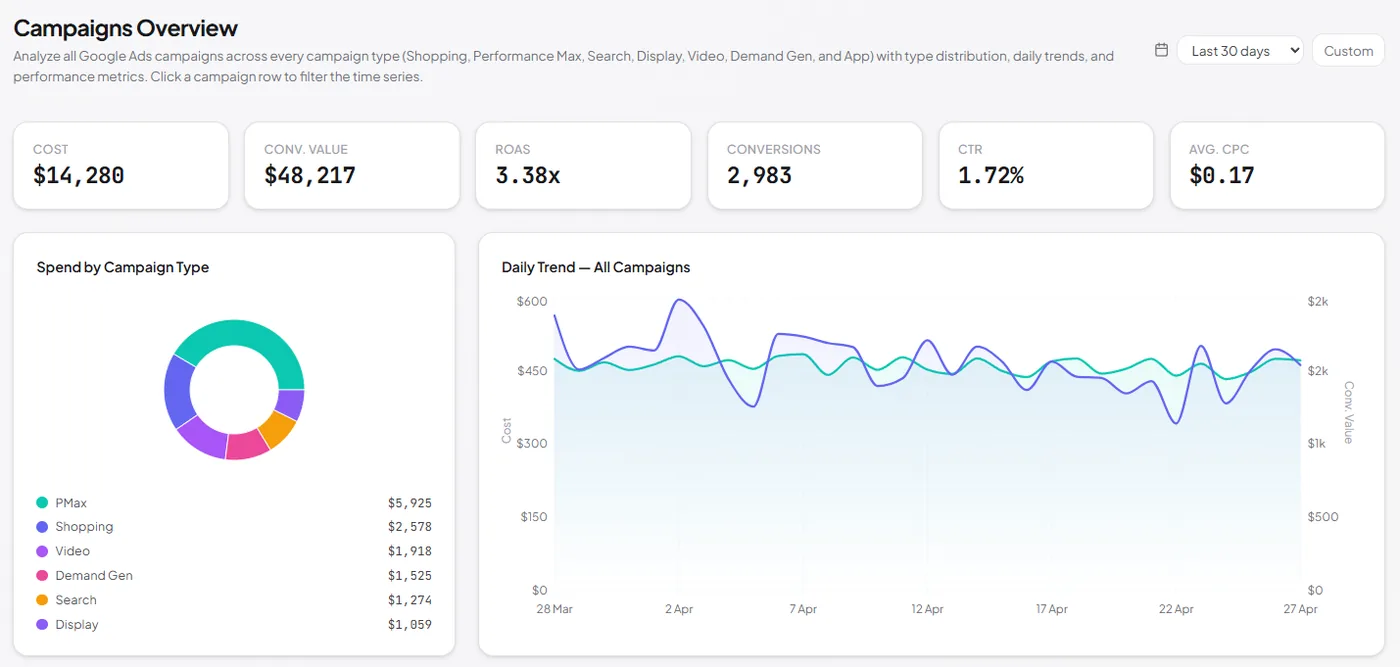
A pie chart shows how your total spend splits between Standard Shopping and Performance Max campaigns. You get an immediate answer to one of the most important strategic questions: how much of your Google Shopping budget goes to each campaign type?
The balance between Shopping and PMax is a core strategic decision. Some advertisers go all-in on PMax. Others keep Shopping for control and use PMax for incremental reach. The distribution chart shows your actual allocation so you can check whether it matches your intent.
Change the date range to see how the split has evolved. If PMax has been gradually taking more of your budget, the chart reveals the trend. Compare it against your ROAS by campaign type to see if the shift is paying off.
- Pie chart of spend by campaign type
- Standard Shopping vs Performance Max split
- Track how the split changes over time
Daily Performance Time Series
A daily time series chart shows aggregated performance across all your campaigns. Track cost, revenue, ROAS, and other metrics day by day to spot trends, seasonality, and anomalies. The chart follows the date range picker, so you can zoom into specific periods.
Nothing catches performance changes faster than a campaign-level time series. When total ROAS drops, you can see exactly which day the shift started. Correlate it with campaign launches, budget changes, or external events to understand what happened.
Hover over any point to see exact daily values. The chart aggregates across all campaigns by default, so you get a single view of your total Google Shopping performance over time.
- Daily chart of cost, revenue, ROAS, and more
- Aggregated across all Shopping and PMax campaigns
- Spot trends, seasonality, and anomalies visually
- Hover tooltips with exact daily values
Frequently Asked Questions
Which campaign types are included?
The Campaign Analytics page shows all Standard Shopping and Performance Max campaigns in your account. Each campaign is listed with its type, status, cost, clicks, impressions, conversions, revenue, and ROAS.
Can I see daily trends per campaign?
Yes. A daily time series chart shows combined performance across all campaigns. You can track how total spend, revenue, and ROAS change day by day. The chart respects the date range selector, so you can zoom into any period.
How does the campaign type distribution work?
A pie chart breaks down your total spend by campaign type: Standard Shopping vs Performance Max. You instantly see what percentage of your budget goes to each campaign type, which helps you understand your overall Google Shopping strategy mix.
How often is campaign data refreshed?
Campaign data syncs daily at 3 AM with a 14-day lookback window, so the last two weeks of data are always fresh and account for Google's conversion lag. Historical data going back up to 750 days is available after a backfill.
Compare all your campaigns in one view
Explore campaign analytics with sample data, or apply for early access to connect your own account.