The Google Ads API is the programmatic route into Google Ads. It can retrieve account objects and performance data, create or change campaigns, and support reporting workflows that would be slow or impossible to maintain through exports. For reporting, most work happens through GoogleAdsService and Google Ads Query Language, usually shortened to GAQL.
Current Google Ads API version
Use the newest major version when starting an integration. Major versions can contain breaking changes and use a new versioned endpoint. Minor releases are backward-compatible additions to the same major endpoint; upgrading the client library is only required when you need those additions.
| Version | Released | Sunset | Status on Aug 12, 2026 |
|---|---|---|---|
| v25 | Jul 22, 2026 | Aug 2027 | Latest major version |
| v24 / v24.2 | Apr–Jun 2026 | May–Jun 2027 | Supported |
| v23 / v23.2 | Jan–Mar 2026 | Feb 2027 | Supported |
| v22 | Oct 15, 2025 | Oct 2026 (tentative) | Upgrade soon |
| v21 | Aug 6, 2025 | Aug 2026 (tentative) | At sunset window |
Check the official release notes for changes and the sunset schedule before deploying. Do not hard-code this table into an integration.
How GAQL is organized
A GAQL report begins with a resource in the FROM clause. That resource sets the implicit row grain and controls which attributes, metrics and segments can legally appear in the query.
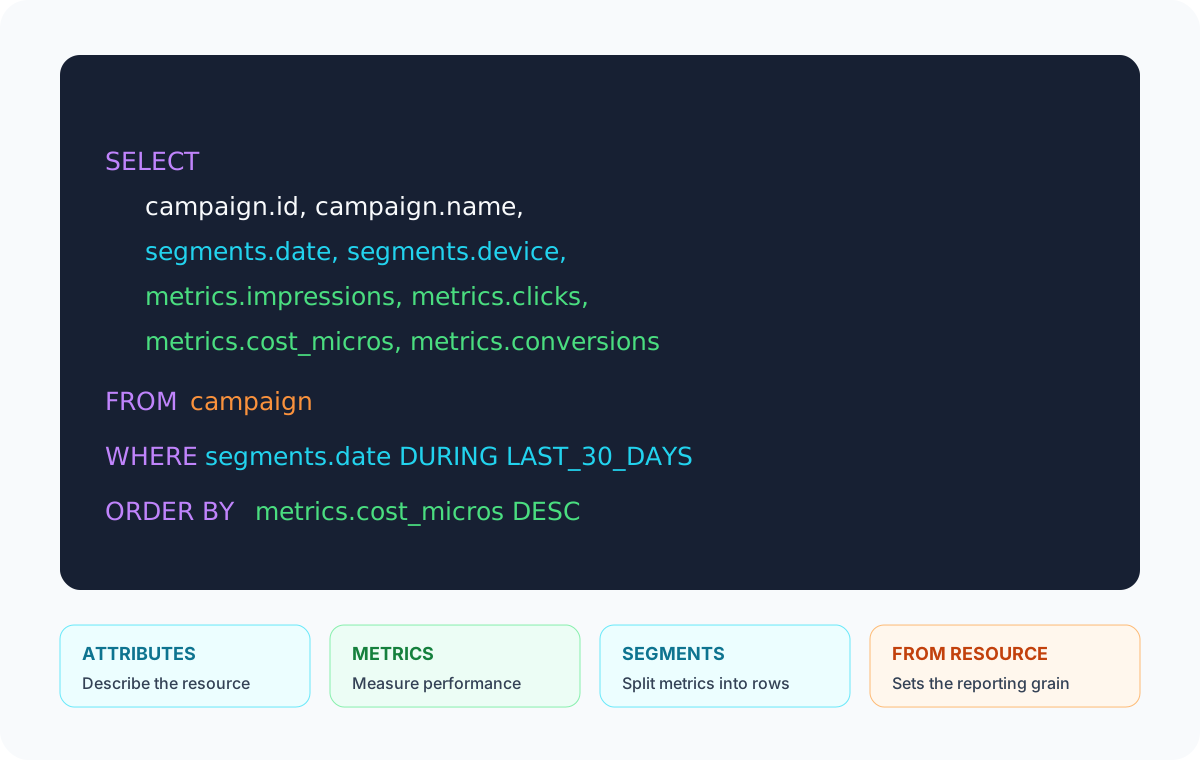
- Resource: the entity or reporting view in
FROM, such ascampaignorsearch_term_view. - Attribute: a descriptive field such as
campaign.name. - Metric: a performance measurement such as
metrics.clicks. - Segment: a dimension such as
segments.devicethat divides metrics into additional rows. - Attributed resource: a related resource whose fields can be selected without changing the primary resource.
Choose the correct reporting resource
Start with the row you want returned, not with a favorite metric. Campaign totals belong on campaign; actual user queries belong on search_term_view; product performance belongs on shopping_performance_view. Choosing the wrong resource creates compatibility errors or data at the wrong grain. The same distinction is visible in SKU Analyzer's campaign reporting and search-term analysis: each begins with a different reporting grain.
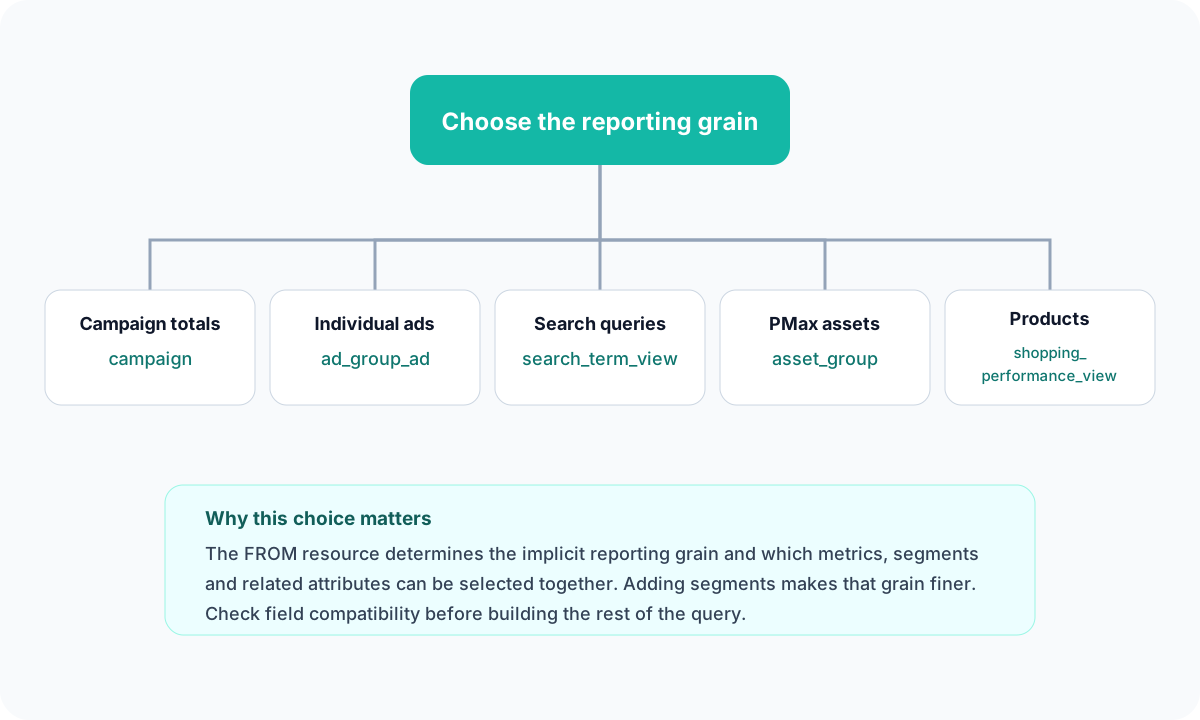
FROM resource determines what one unsegmented result row represents.| You want to report on | Common starting resource | Useful qualifier |
|---|---|---|
| Account or campaign performance | customer or campaign | Add date, device or network segments as needed |
| Ads and creative performance | ad_group_ad | Asset reporting may require an asset-specific view |
| Keywords | keyword_view | Do not confuse keywords with actual search terms |
| User search queries | search_term_view | Low-volume terms may be withheld |
| Performance Max asset groups | asset_group or an asset-group view | See how PMax channel reporting differs from asset-group reporting |
| Shopping products | shopping_performance_view | Use product segments for SKU-level product analysis |
Google Ads API metrics and segments
Product-category segments use Google's versioned product taxonomy, while product visibility at a finer grain needs the approach described in impression share by product.
Metrics answer “how much?” Segments answer “broken down by what?” They are not interchangeable. Adding segments.device to campaign clicks changes one campaign total into separate device rows; adding date as well creates one row for each campaign, device and date combination.
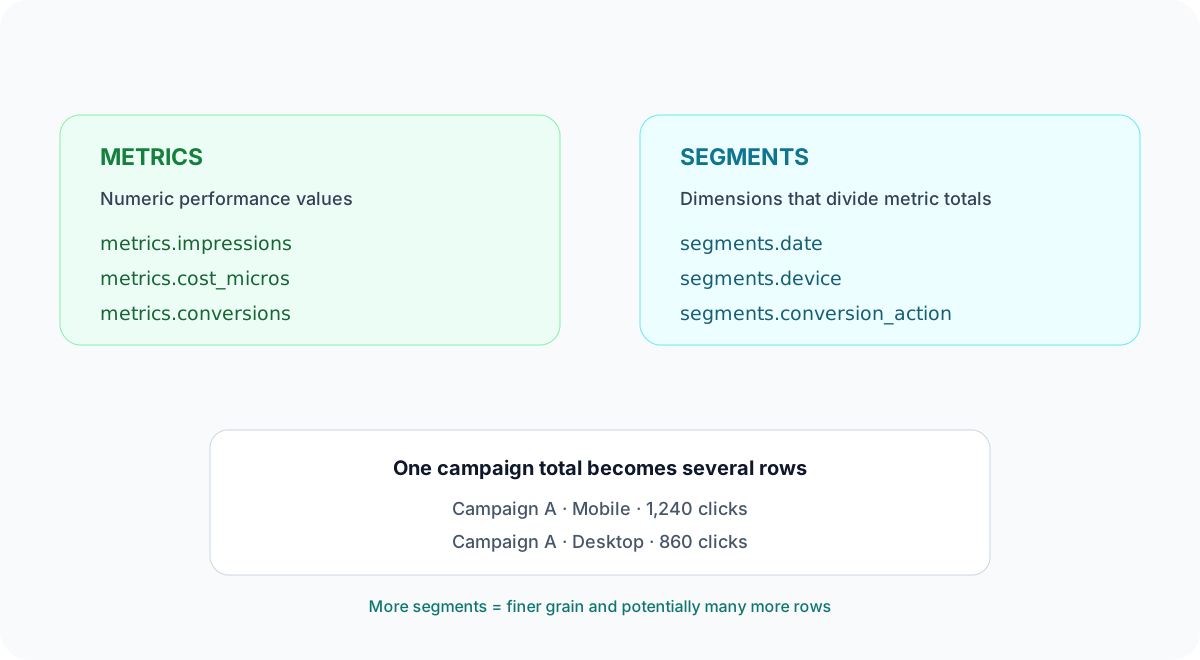
Common metric groups
| Goal | Common fields | Watch for |
|---|---|---|
| Delivery and traffic | metrics.impressions, metrics.clicks, metrics.interactions | Interaction meaning varies by ad type |
| Cost | metrics.cost_micros, metrics.average_cpc | Micros must be divided by 1,000,000 |
| Conversions | metrics.conversions, metrics.all_conversions | Primary-action and attribution settings change what the totals mean |
| Value and profit | metrics.conversions_value, metrics.gross_profit_micros | Profit metrics require cart data and COGS |
| Visibility | metrics.search_impression_share, lost share metrics | Often unavailable or sparse at finer grains |
Common segment groups
Date and time, device, ad network, conversion action, geography, keyword/search context, and product attributes are the most common families. A segment can be selectable with one resource but invalid with another.
Quick field finder
Choose a reporting goal for a safe starting point. This is intentionally small: Google's versioned field reference remains the source of truth for complete compatibility.
Useful GAQL examples
Campaign performance by day
SELECT campaign.id, campaign.name, segments.date,
  metrics.impressions, metrics.clicks, metrics.cost_micros,
  metrics.conversions, metrics.conversions_value
FROM campaign
WHERE segments.date DURING LAST_30_DAYS
ORDER BY metrics.cost_micros DESC
Search terms by campaign
SELECT campaign.name, search_term_view.search_term,
  metrics.impressions, metrics.clicks, metrics.cost_micros,
  metrics.conversions
FROM search_term_view
WHERE segments.date DURING LAST_30_DAYS
Shopping product performance
SELECT segments.product_item_id, segments.product_brand,
  metrics.impressions, metrics.clicks, metrics.cost_micros,
  metrics.conversions, metrics.conversions_value
FROM shopping_performance_view
WHERE segments.date DURING LAST_30_DAYS
SKU Analyzer handles the Shopping reporting pipeline—product-level queries, historical storage and feed attributes—without making you maintain the API integration.
Field compatibility and metadata
A field appearing in the API does not mean it works with every FROM resource. Use the versioned fields reference, Google's interactive query builder, or GoogleAdsFieldService. Its metadata exposes whether a field is selectable, filterable and sortable, plus its selectable_with relationships.
For an automated query builder, retrieve compatibility metadata rather than maintaining a hand-written universal list. That keeps your application aligned with the version it actually calls.
Common reporting mistakes
- Multiplying rows accidentally: each segment creates a finer combination of dimensions.
- Summing ratios: recalculate CTR, CPC and conversion rate from aggregated totals rather than adding or blindly averaging daily rates.
- Ignoring micros: cost fields ending in
_microsare one-millionth of the account currency unit. - Equating zero with unavailable: sparse share and specialized metrics may be null or absent at a selected grain.
- Mixing conversion scopes:
conversionsandall_conversionsintentionally answer different questions. - Ignoring conversion lag: recent days can look worse because later conversions have not arrived yet.
- Fetching without a stable grain: define the intended unique key before storing segmented rows.
The API provides the components for accurate reporting, but it does not decide the correct grain or aggregation logic for you. That part belongs in the reporting model.