SKU-Level Product Analytics for Google Shopping
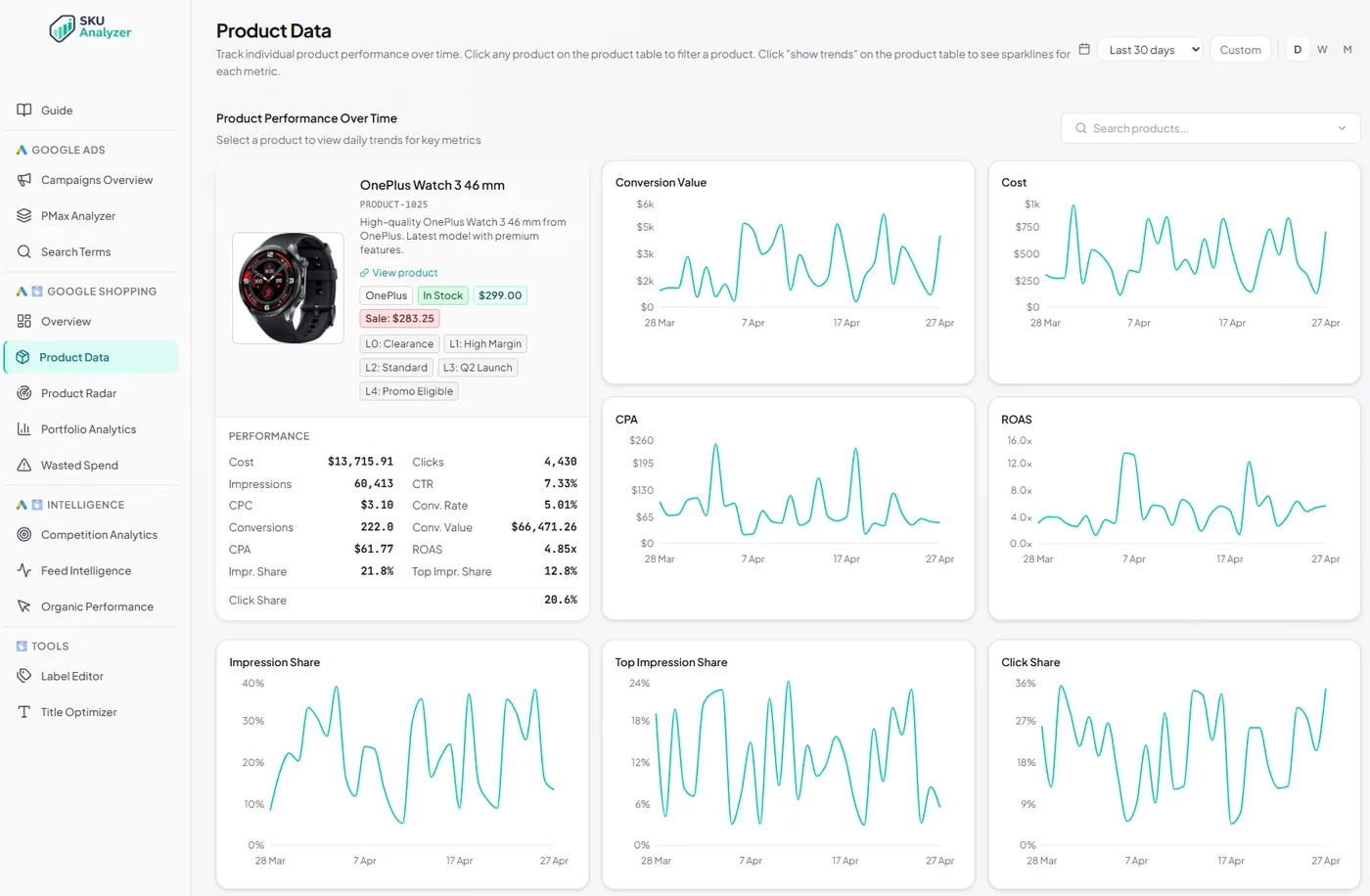
Every product in your Google Shopping catalog with 15+ performance metrics per SKU. Click any product for full daily time series, impression-share trends, and price history. Filter by brand, product type, intelligence label, or any of the five custom-label fields from your Merchant Center feed.
No signup required to explore the demo.
Every product in your catalog
A sortable SKU-level table with everything Google Ads makes you click around to find — plus a per-product drilldown.
-
✓
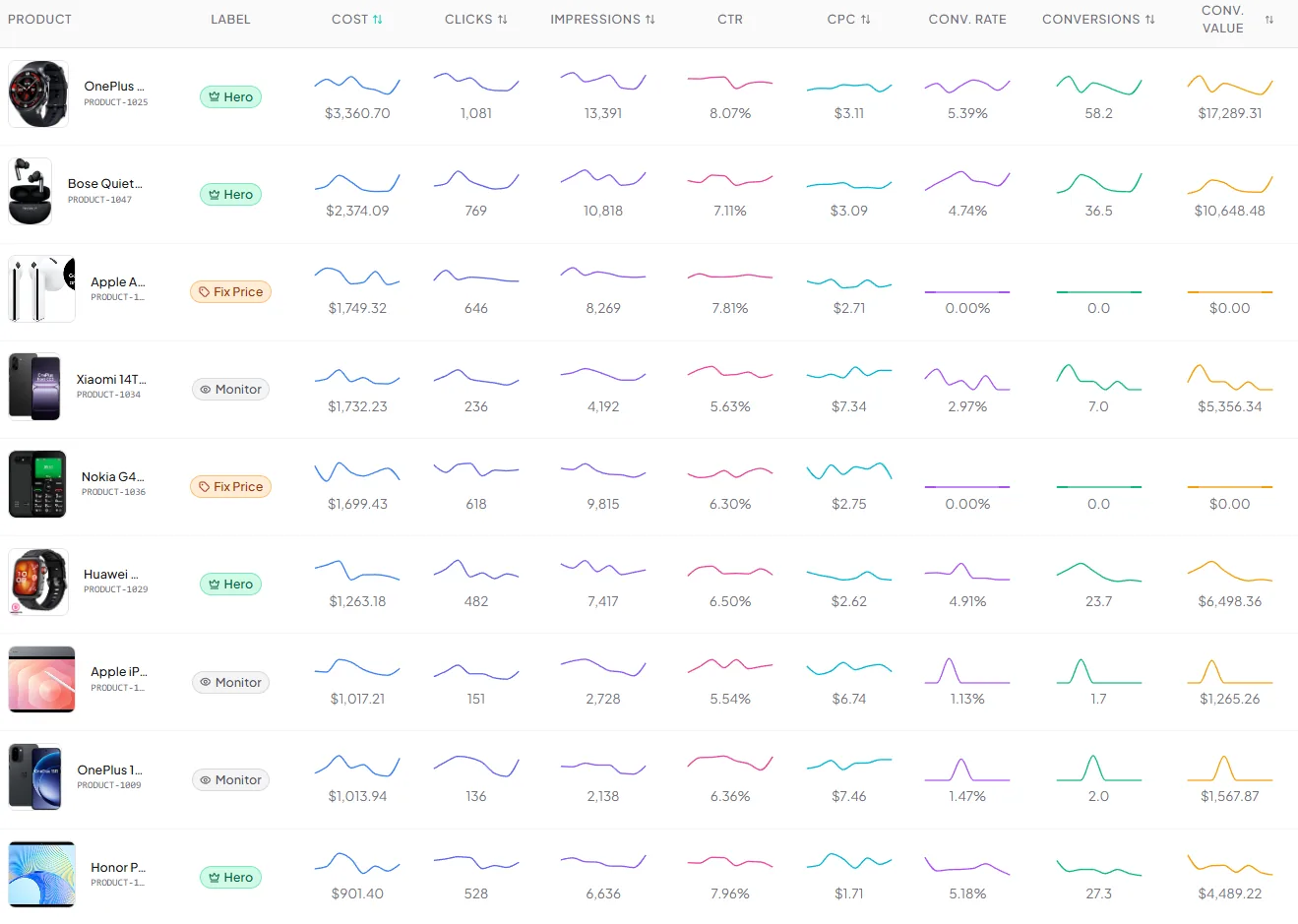
Every SKU in one sortable table — 15+ columns covering cost, clicks, impressions, CTR, CPC, conversions, conv. value, ROAS, CPA, conv. rate, impression share, top impression share, click share, and Merchant Center attributes.
-
✓
Inline sparklines when "Show Trends" is on — every numeric column gets a small chart in the row.
-
✓
Click any product to drill in: daily time series across every metric for that single SKU, controlled by the date-range picker.
-
✓
Impression-share trio per product — Impression Share, Top Impression Share, and Click Share plotted day by day for the selected SKU.
-
✓
Price-history chart built from daily feed snapshots — price over time, sale price on a dashed line, out-of-stock periods shaded.
-
✓
Eight filters: title/ID search, brand, product type, intelligence label, plus all five custom_label fields from your Merchant Center feed.
Net Profit: which products make money after product cost and ad spend
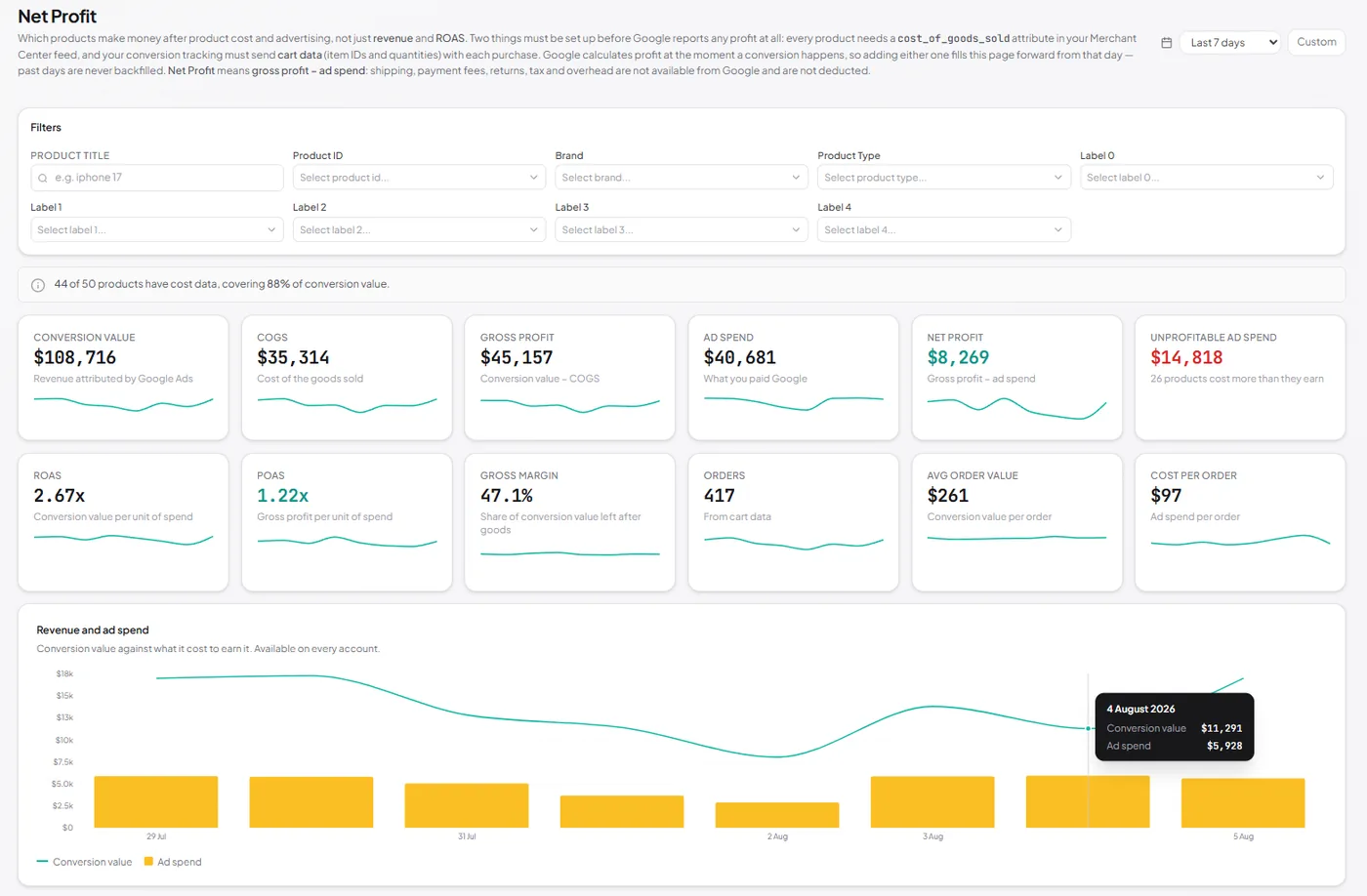
ROAS tells you what a product returns in revenue. It says nothing about what the goods cost you. The Net Profit page subtracts cost of goods and ad spend to leave gross profit, net profit, and POAS — per product, per day.
-
✓
Twelve profitability KPIs — conversion value, COGS, gross profit, ad spend, net profit, unprofitable ad spend, ROAS, POAS, gross margin, orders, average order value, and cost per order, each with its own sparkline.
-
✓
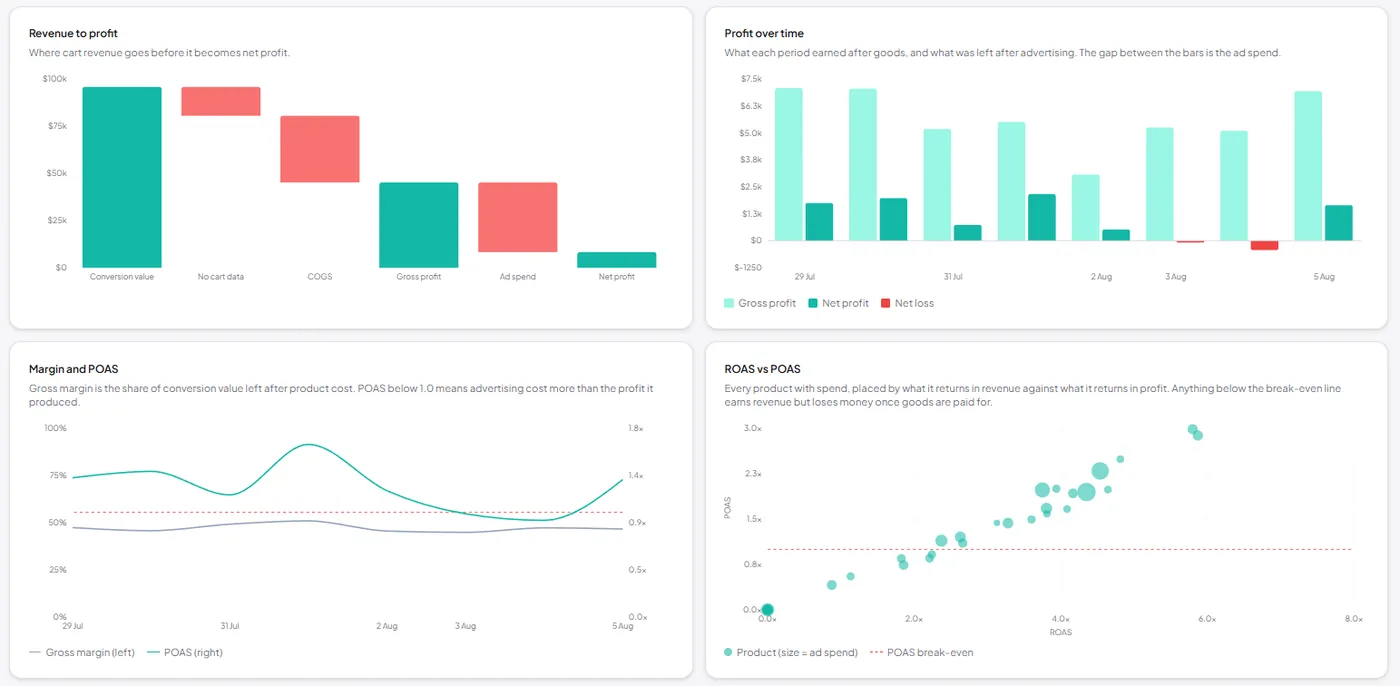
Revenue-to-profit waterfall — conversion value stepped down through the share with no cart data, then COGS, then ad spend, to what is actually left.
-
✓
Profit over time — gross profit against net profit day by day, with loss days marked in red so a bad week is visible rather than averaged away.
-
✓
ROAS vs POAS scatter — every product placed by what it returns in revenue against what it returns in profit, sized by ad spend, with a POAS break-even line. Everything under that line earns revenue and loses money.
-
✓
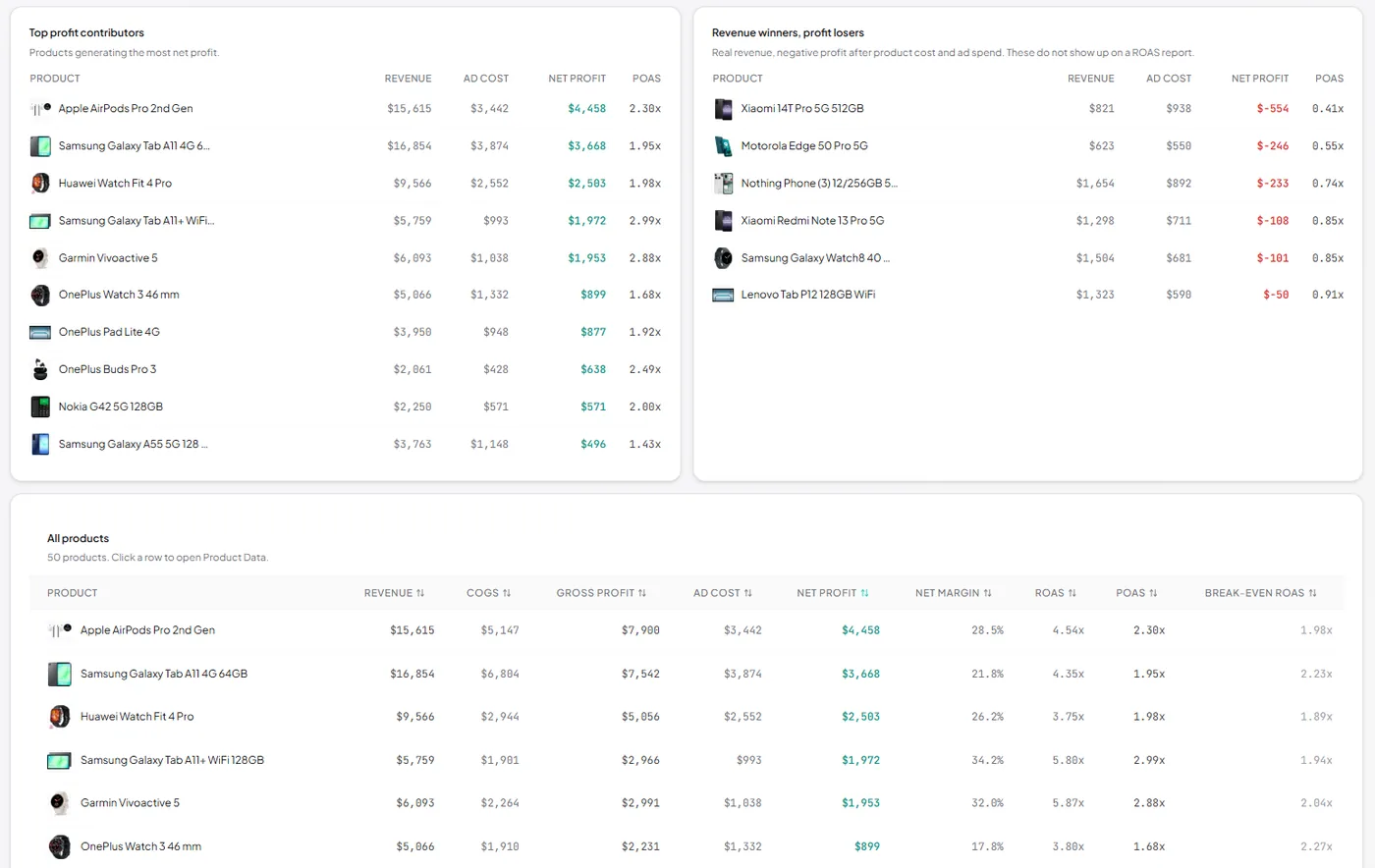
Revenue winners, profit losers — the products a ROAS report will never flag: real revenue, negative profit once goods and ad spend are paid for.
-
✓
Per-product profit table — revenue, COGS, gross profit, ad cost, net profit, net margin, ROAS, POAS, and the break-even ROAS that product would need to stop losing money. Sortable, and filterable by brand, product type, or any custom label.
What this page needs before it can report anything
Required: cost of goods in the feed
Each product needs a cost_of_goods_sold attribute in Merchant Center. Without it there is no margin to calculate, and those products stay unmeasured — never zero-profit. A missing cost is not a 100% margin, and the coverage line at the top of the page tells you what share of conversion value is actually being measured.
Strongly recommended: cart data
Conversion tracking that sends cart data — item IDs and quantities with each purchase — is what lets Google measure profit itself, and it is also where orders, average order value, and cost per order come from. Without it the page falls back to estimating from your feed: price minus cost gives a unit margin, applied to conversion value. Useful, and clearly badged as an estimate, but it assumes items sell at feed price and credits a click's whole basket to the product clicked, so it runs high.
Two things worth knowing
Google calculates profit at the moment a conversion happens, so adding either piece fills this page forward from that day — past days are never backfilled. And net profit here means gross profit minus ad spend: shipping, payment fees, returns, tax, and overhead are not available from Google and are not deducted.
Related reading
Going deeper on the per-SKU metrics in this view, profit included.
- Shopping Analytics Google Shopping Reporting What each Google surface reports per product, and where the gaps are. Read the guide →
- Visibility & Competition Product Impression Share How to read impression share at SKU level and act on what it shows. Read the guide →
- Shopping Analytics POAS: Profit on Ad Spend The measure behind this page's profit view, and why ROAS hides losses. Read the guide →
- Merchant Center Merchant Center Analytics Feed health and product performance data on the Merchant Center side. Read the guide →