Google Shopping Overview Dashboard
See your entire Google Shopping account in one screen. Eight KPI cards with sparklines, product intelligence labels, performance heatmaps, brand breakdowns, and revenue concentration analysis. Everything you need to start your day.
No signup required to explore the demo
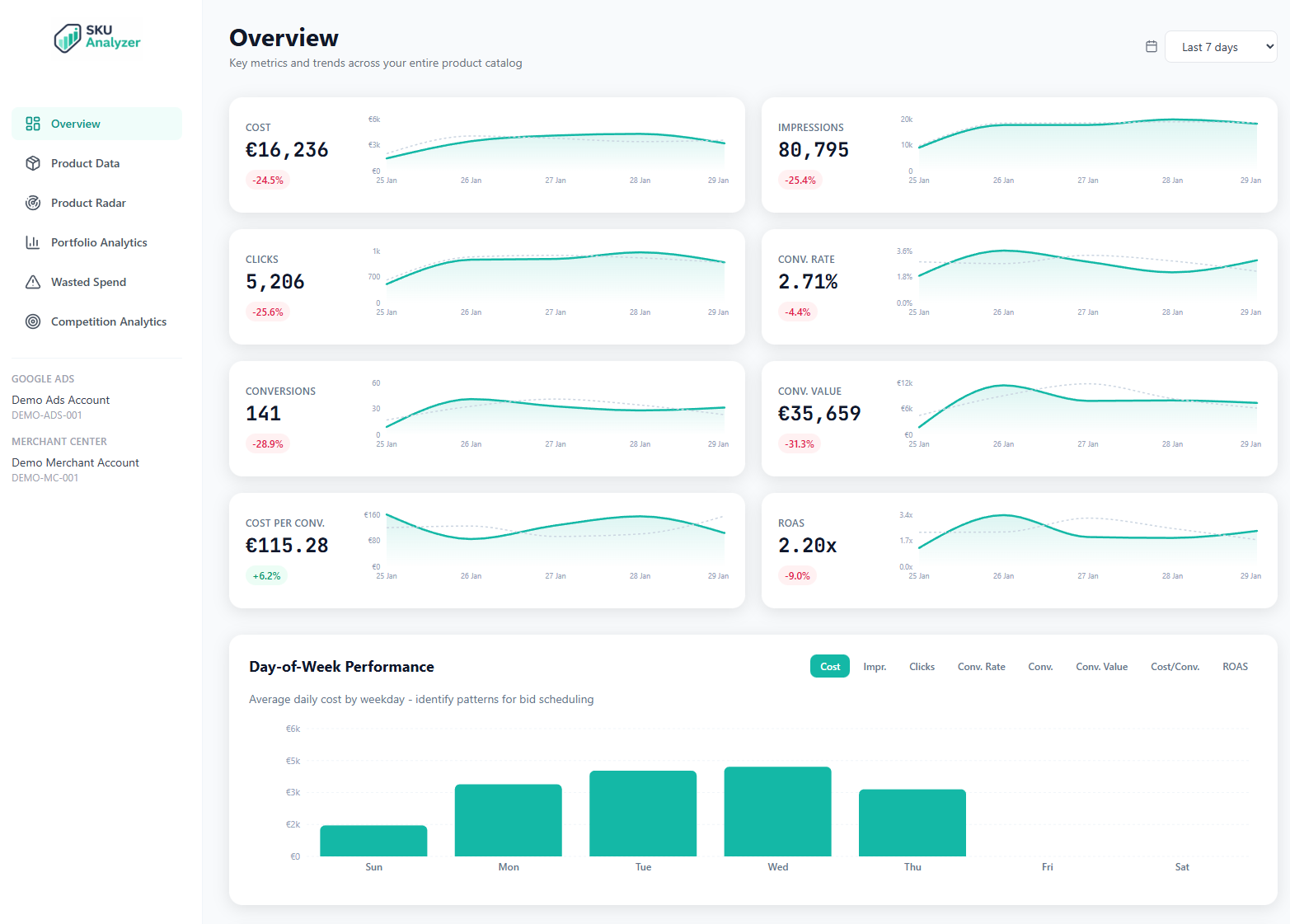
8 KPI Cards with Sparklines and Period Comparison
The top of the overview page shows eight cards for the metrics that matter most: Cost, Revenue, ROAS, CPA, Conversions, Clicks, Impressions, and CTR. Each card includes a 30-day sparkline so you can spot the trend immediately, plus a percentage change badge comparing the selected period against the equivalent previous period.
Instead of pulling numbers from multiple Google Ads reports, you get a single row of cards that tells you whether your account is on track. The sparklines surface patterns that raw numbers alone would hide: a gradual cost increase, a revenue dip mid-month, a sudden CTR drop.
Change the date range and every card recalculates instantly. Compare last 7 days against the prior 7, last 30 against the prior 30, or pick any custom window up to 750 days.
- 8 core metrics with automatic period-over-period comparison
- Inline sparklines showing 30-day trend for each KPI
- Custom date ranges from 7 days to 750 days
- Green/red change badges so you see direction instantly


Product Intelligence Labels
Every product in your catalog is automatically classified into one of eight actionable labels: Hero, Scale, Cash Cow, Opportunity, Fix Price, Fix Listing, Cut, and Monitor. Labels are calculated from the last 14 days of performance data, then refreshed every morning so the classification stays current.
The overview page displays a donut chart showing your label distribution: how many products fall into each bucket and what share of spend they consume. You can see right away whether your catalog is healthy or if too many SKUs are sitting in the Cut or Monitor categories.
Labels are fully customizable. Define your own rules based on any combination of ROAS, CPA, conversions, impressions, click share, and price competitiveness. Or start with the defaults and adjust as you learn your account's patterns.
- 8 label categories updated daily based on live performance
- Donut chart showing product and spend distribution per label
- Custom rule builder for defining your own label logic
- Push labels directly to Merchant Center as custom labels
Day-of-Week Performance Heatmap
The heatmap shows how each day of the week performs across your key metrics. Rows represent days (Monday through Sunday) and columns represent metrics like Cost, Revenue, ROAS, and Conversions. Color intensity reveals which days consistently over- or under-perform.
Nothing else surfaces day-of-week patterns this fast. Maybe your ROAS drops on weekends because purchase intent shifts, or maybe Tuesdays consistently deliver the lowest CPA. These patterns are invisible in standard time-series charts but jump out of a heatmap.
Use the insights to inform your bid adjustments and budget scheduling. If Saturdays consistently produce low ROAS, you have evidence to reduce weekend bids rather than guessing.
- 7-day grid colored by relative performance intensity
- Multiple metrics side by side for day-level comparison
- Spot recurring patterns for bid scheduling decisions


Brand Performance Breakdown
If you sell multiple brands, the overview page breaks down performance by brand automatically using the brand field from your Merchant Center feed. You'll see a table with every brand's cost, revenue, ROAS, conversions, and other key metrics — sorted by whichever column matters most to you.
It answers a question that's surprisingly hard to get from Google Ads alone: which brands in your catalog are actually profitable? A brand might drive high revenue but consume disproportionate spend. Another might have excellent ROAS but be under-invested. The brand table surfaces both situations.
Click any brand to filter the entire dashboard to that brand, including the KPI cards, time series, and product table. Or use the Portfolio Analytics page for deeper cross-dimensional analysis.
- Auto-grouped by Merchant Center brand field
- Full KPI breakdown per brand: cost, revenue, ROAS, CPA, conversions
- Click any brand to filter the entire dashboard
Revenue Concentration Analysis
The Pareto chart on the overview page shows how concentrated your revenue is. It plots products ranked by revenue with a cumulative line, so you can see exactly how many products drive 80% of your total conversion value.
Most Google Shopping accounts follow an extreme Pareto distribution. A small percentage of SKUs generate the majority of revenue. Knowing whether your top 10 products drive 50% or 90% of revenue changes how you manage your catalog. High concentration means a few products are doing all the work, and any issue with them is critical. Low concentration means a healthier spread but potentially more products to monitor.
The chart updates with your date selection, so you can see whether concentration is increasing or decreasing over time by comparing different periods.
- Pareto chart with cumulative revenue line
- See how many products generate 80% of revenue
- Spot catalog concentration risk in seconds


Daily Wasted Spend Tracking
The overview includes a daily wasted spend chart that tracks money spent on products with zero conversions. It separates confirmed waste (products outside the conversion attribution window) from at-risk spend (products still within the window that might convert later).
Most Google Shopping managers want this number but can't easily calculate it. You know some products aren't converting, but how much are they actually costing you each day? The wasted spend chart answers that with a simple area chart showing the daily trend.
The distinction between confirmed and at-risk is important. Google Ads has a conversion lag, and some purchases are attributed days after the click. Cutting products too early means killing winners before they have time to prove themselves. The chart respects this window so you don't over-optimize.
- Daily stacked area chart of wasted spend
- Confirmed waste vs. at-risk spend separation
- Respects conversion lag to prevent premature optimization
Frequently Asked Questions
What KPIs does the overview dashboard show?
The overview dashboard displays 8 key metrics: Cost, Conversion Value (Revenue), ROAS, CPA, Conversions, Clicks, Impressions, and CTR. Each KPI card includes a 30-day sparkline and a percentage change comparison against the previous period.
How often is the dashboard data updated?
Data refreshes automatically every day at 3 AM via a scheduled worker. It pulls the last 14 days of data from Google Ads to account for conversion lag, so your numbers stay accurate even as late-attributed conversions come in.
Can I compare performance across different time periods?
Yes. The date picker lets you select any range up to 750 days. Each KPI card automatically compares the selected period against the equivalent previous period, showing the percentage change so you can spot trends immediately.
See your Google Shopping data clearly
Explore the overview dashboard with sample data, or apply for early access to connect your own account.