Wasted Spend Analysis — Find Zero-Conversion Products
Identify products consuming your Google Shopping budget without generating any conversions. SKU Analyzer separates confirmed waste from at-risk spend still within Google's conversion attribution window, so you don't cut products prematurely.
No signup required to explore the demo
Confirmed Waste vs. At-Risk Spend
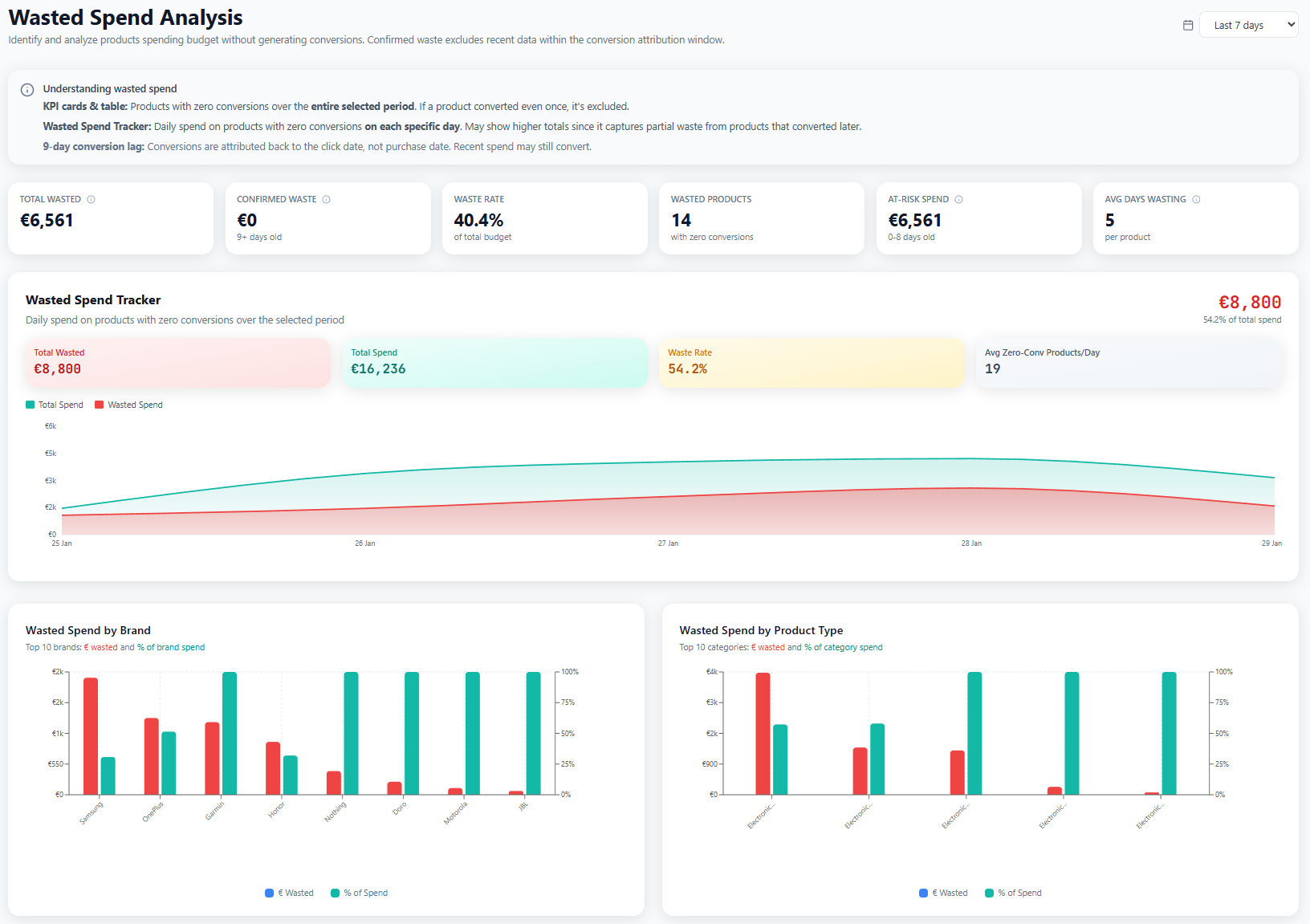
The Wasted Spend page opens with a clear breakdown: how much of your budget went to products with zero conversions, split into confirmed waste and at-risk spend. Confirmed waste covers products that are past Google's conversion attribution window. Those clicks are not coming back. At-risk spend is on products still within the window, where conversions might still be attributed.
That distinction matters because Google Ads has a conversion lag. A click today might convert 3, 7, or even 30 days later depending on your attribution settings. Cutting products based on last-click data alone means killing potential winners before they have time to prove themselves. The confirmed/at-risk split prevents premature optimization.
You also see total wasted spend as both a dollar amount and a percentage of your total budget. When you realize 18% of your spend goes to zero-conversion products, that number alone is enough to start making changes.
- Clear confirmed waste vs. at-risk spend separation
- Respects conversion attribution window
- Total wasted spend as dollar amount and percentage
- Prevents premature product exclusions
Product-Level Wasted Spend Table
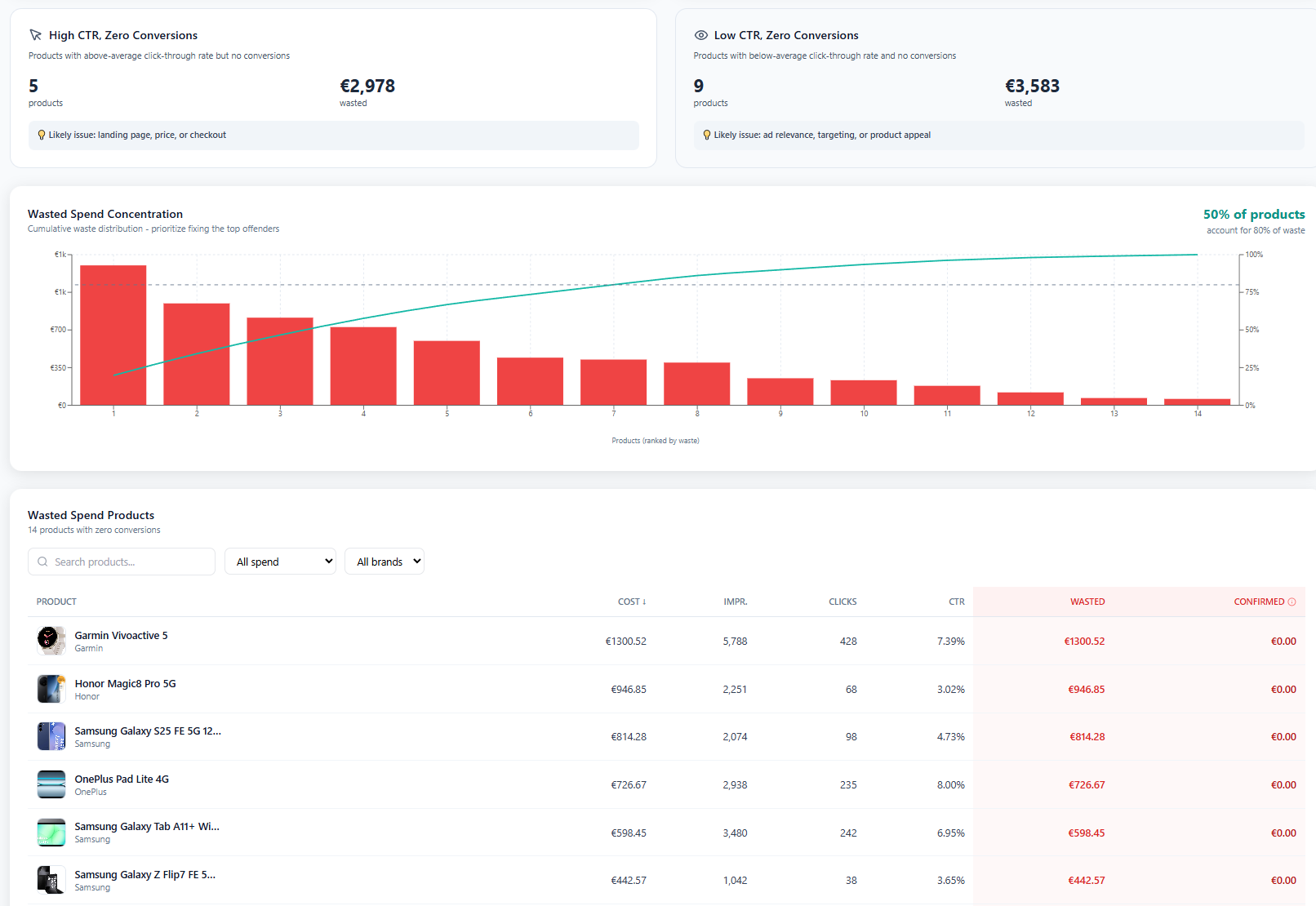
Below the summary, a sortable table lists every product that has spent budget without converting. Each row shows the product title, image, total cost, clicks, impressions, and the waste classification (confirmed or at-risk). Sort by cost to surface your biggest budget drains first.
Think of the table as your action list. Products at the top, with high spend, zero conversions, and past the attribution window, are candidates for exclusion, bid reduction, or investigation. Maybe the product page is broken, the price is wrong, or the product simply doesn't sell online. The table surfaces the problem. You decide the fix.
Product images and titles are shown inline so you can identify products immediately. No need to cross-reference IDs against Merchant Center. You can see what each product is and how much it's wasting right in the table.
- Every zero-conversion product with cost, clicks, and impressions
- Sort by cost to prioritize biggest drains
- Product images and titles shown inline
- Confirmed vs at-risk classification per product
Frequently Asked Questions
What counts as wasted spend?
A product's spend is classified as wasted when it has accumulated cost but zero conversions within the selected date range, AND it is outside Google's conversion attribution window. Products still within the attribution window are classified as "at-risk" because they might still convert.
What is the difference between confirmed waste and at-risk spend?
Confirmed waste is spend on products with zero conversions that are past the conversion attribution window. These clicks are unlikely to ever convert. At-risk spend is on products with zero conversions that are still within the window. Some of these may convert later, so cutting them prematurely could hurt performance.
How does this help me reduce wasted ad spend?
The wasted spend table shows your biggest budget drains, products spending money without converting. Sort by cost to find the worst offenders. You can then exclude these products from campaigns, lower their bids, or investigate why they're not converting (bad landing page, wrong audience, pricing issues).
Does this work with Performance Max campaigns?
Yes. Wasted spend analysis covers products from both Standard Shopping and Performance Max campaigns. Since PMax gives you less control over individual product bids, knowing which products waste budget is especially valuable — you can use listing groups or custom labels to exclude them.
Stop paying for products that don't convert
Explore wasted spend analysis with sample data, or apply for early access to connect your own account.