
For years, promotional image overlays were one of the clearest rules in Google Shopping: no text, no price badges, no discount banners on your product photos. Violate it and your products got disapproved in Merchant Center. The policy was documented in Google's image_link specifications and enforced through automated diagnostics.
Important distinction: Google-generated annotations are labels Google adds around a Shopping listing. Advertiser image overlays are text, badges, or graphics baked directly into the product image you upload.
In 2025, that changed. Merchants started noticing that images with "20% OFF" banners and "NEW PRODUCT" badges were staying live without disapprovals. PPC practitioners began documenting the shift. And then Google rolled out Asset Studio — a tool built into Google Ads that actively generates product images with promotional overlays.
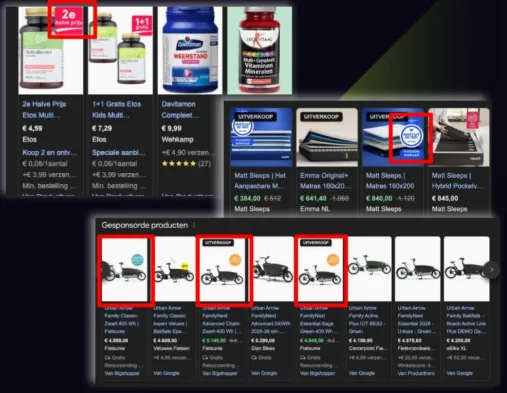
The contradiction is difficult to ignore: Google's own tooling now creates the exact elements its Shopping policy technically still prohibits. But there is a second reading of the same evidence, and it is the one most of the excited LinkedIn posts skip. Google does not audit every policy on every product every day. A violation can serve for months before a sweep catches it. What looks like permission is often just latency.
Read this before you test anything
Image overlays are a grey zone, not a green light. Google's written policy still prohibits them, no official change has been announced, and the downside is not limited to a disapproved product — severe or repeated violations can escalate to Merchant Center suspension and removal from Google Shopping entirely. Everything below describes observed behaviour and calculated risk-taking, not a supported strategy.
This article covers what changed, why the absence of a disapproval is a weak signal, which overlay types carry which level of risk, and how to run a contained test if you decide the upside justifies it — without putting your feed health or your account on the line.
What Are Image Overlays in Google Shopping?
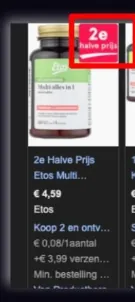
Before getting into what changed, it helps to be precise about terminology. "Image overlays" refers to any visual element added on top of or composited into a product image — as distinct from the system-generated annotations that Google applies on the search results page.
Common overlay types include:
- Promotional text — "SALE", "20% OFF", "NEW", "Free Shipping", discount percentages, and other marketing copy placed directly on the image
- Price callouts — showing the price visually on the image itself, separate from the price listed in your feed data
- Brand logos and watermarks — store or brand logos stamped onto the product photo to prevent image theft or for branding purposes
- Lifestyle cutouts — product images composited into background scenes, common in fashion and home décor
- AI-generated creative overlays — badges, text elements, and promotional graphics added using tools like Google's own Asset Studio
These are distinct from Google's system annotations — the Sale Price Badge, Price Drop Badge, and Merchant Promotions labels. Those appear as visual overlays in Shopping results, but they are generated and applied by Google based on your feed data and pricing history. They are always compliant and are covered separately below.
The Old Policy: Why Google Banned Overlays
Google's prohibition on promotional overlays has been part of the Shopping image policies for years, applying to both the primary image_link attribute and additional images submitted via additional_image_link. The policy also covered watermarks, logos, borders, and decorative elements. For a full breakdown of the underlying image specifications, see the Google Shopping image requirements guide.
The reasoning made commercial sense for Google: Shopping was designed as a clean, comparative surface where product images showed the actual product without marketing noise. Consistent standards also prevented merchants from gaming visibility through attention-grabbing text that competitors could not include. Promotional messaging was supposed to go through Merchant Promotions, where it would appear uniformly as a "Special offer" annotation.
The prohibition is stated explicitly in Google's image_link specifications:
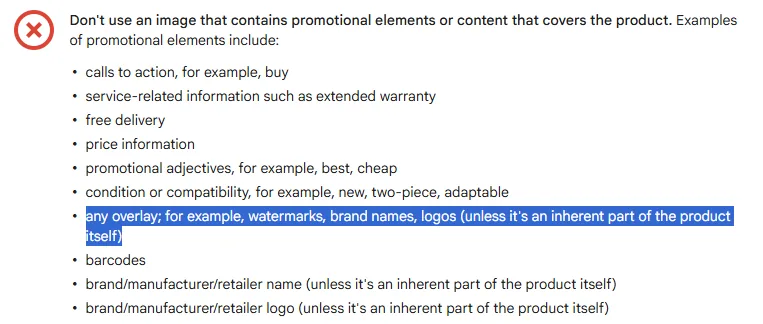
Don't use an image that contains promotional elements or content that covers the product. Examples of promotional elements include:
any overlay; for example, watermarks, brand names, logos (unless it's an inherent part of the product itself)
The following shows exactly what this meant in practice — a product image with a promotional price badge is the type of overlay that would trigger a policy violation:
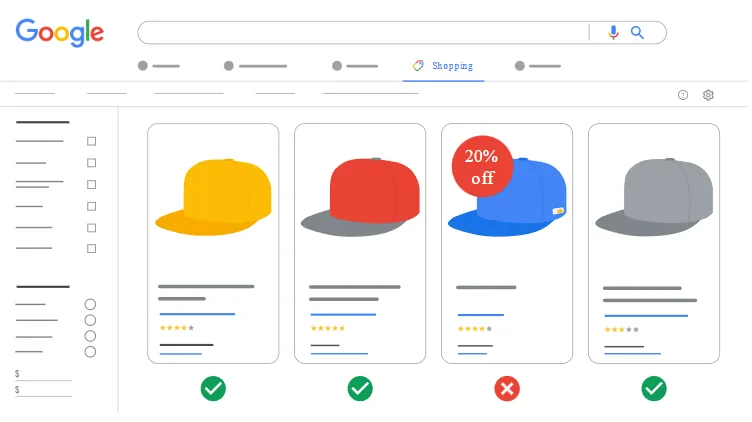
Violations were caught through image analysis in Merchant Center and flagged in Diagnostics as "Text overlay" or "Promotional overlay" errors under Item Issues. Products with these violations would be disapproved until the images were replaced with clean versions. See the feed errors guide for how to diagnose and fix these types of issues.
What Changed in 2025: The Enforcement Shift
Two developments converged in 2025 to shift the overlay landscape — one informal, one significant.
Enforcement relaxation
Research published by Digital Position documented that Google began tolerating promotional overlays that would previously have triggered disapprovals. Images featuring "20% OFF" banners, "NEW PRODUCT" badges, and brand logos were staying live for extended periods without being flagged. The policy text in Google's documentation remained unchanged, but the enforcement machinery was no longer catching violations the way it had.
The likely driver is competitive pressure from Amazon and other marketplaces where product images routinely feature promotional elements. Loosening enforcement is a de facto acknowledgement that visual differentiation matters in Shopping results — even if the formal policy has not been officially revised.
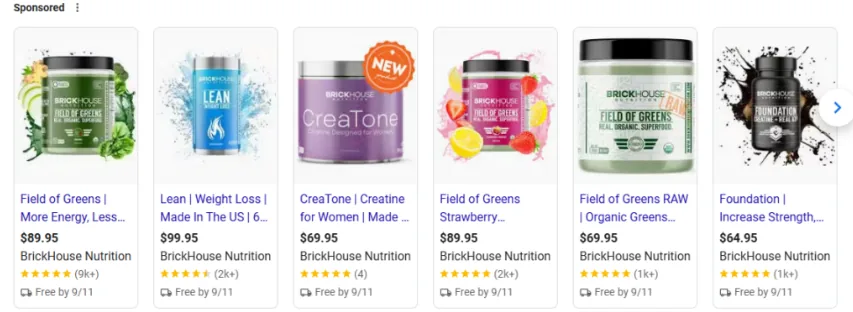
Google Asset Studio
The more significant development was Google's own launch of Asset Studio at Google Marketing Live 2025. Asset Studio is an AI-powered creative tool built directly into Google Ads that helps advertisers generate product images, including images with promotional overlays.
Asset Studio can generate lifestyle imagery around existing product photos, add promotional text and badges, and produce ad creative at scale using generative AI. The feature is available through the Assets section in Google Ads and has been rolling out to advertisers throughout 2025. It was confirmed live for Google Ads users in mid-2025.
The contradiction is hard to avoid: Google built and shipped a first-party tool that creates the exact type of images its Shopping policy technically prohibits. Whether this represents a planned policy evolution or an inconsistency across product teams, the practical effect is the same — overlays are in active use, and Google's own tooling enables them.
Google Asset Studio: What It Does
Asset Studio sits inside Google Ads under the Assets section. It uses Google's generative AI models to help advertisers create and iterate on creative assets without relying on external design tools.
For product images specifically, Asset Studio can:
- Generate lifestyle imagery around existing product photos — removing white backgrounds and placing products into contextual scenes
- Add promotional text, discount badges, and branded visual elements to product images
- Scale creative production across large catalogs through AI-assisted variation
- Produce multiple creative variants quickly for A/B testing in Performance Max campaigns
Assets created in Asset Studio are primarily used as image assets in Performance Max campaigns. Product images can also be exported and uploaded to Merchant Center as additional_image_link images, giving shoppers alternate views that may include promotional context alongside the clean primary image.
The Grey Zone: Why "Not Disapproved" Doesn't Mean "Approved"
Everything above is real. Overlays are running live, Google shipped a tool that makes them, and merchants are reporting performance gains. It would be easy to read that as a quiet policy change. It probably isn't, and the difference matters enormously if you are the one holding the account.
Google's policy checks are sampled, not continuous
The core misunderstanding behind the "overlays are fine now" narrative is an assumption that Merchant Center evaluates every product against every policy on a rolling basis. It does not. Policy enforcement runs as periodic sweeps, and which policies get checked, on which accounts, at what frequency, is not something merchants can see or predict. A product can serve for months carrying a violation simply because nothing has looked at it through that particular lens yet.
A feed specialist put it bluntly in the comments under the Ruben Runneboom post shown at the top of this article — the same thread that circulated most of the "overlays are fine now" screenshots:
"Don't expect these to stay approved. This is a misunderstanding of how Google performs policy checks. It can take months, even years, before you get flagged, because it depends on when Google checks for specific issues. Google does not check every policy, every day. Hence why certain merchants can get away with issues for periods of time. Don't fall into a false sense of safety. You will get flagged and disapproved eventually, and if your violation is severe, expect a suspension."
Comment on Ruben Runneboom's LinkedIn post
This reframes the entire evidence base. Screenshots of overlay ads serving in Shopping results prove that enforcement has not reached those products. They do not prove the policy changed, and they say nothing about what happens on the next sweep. The 2025 observations may reflect a deliberate loosening, or they may be nothing more than violations slipping through the cracks at greater volume than usual. From the outside, those two situations look identical, right up until they don't.
The downside is not a disapproval
If the worst case were a handful of disapproved products that you fix and resubmit, overlays would be an easy call. That is not the worst case. Google's enforcement escalates: item-level disapprovals first, then account-level warnings, then Merchant Center suspension. Deliberately and systematically publishing images that violate a documented policy across a whole catalogue is exactly the pattern that reads as intentional circumvention rather than an honest mistake, and it is treated accordingly.
Suspension takes down your Shopping ads and your free listings at the same time. For a retailer where Shopping drives the majority of revenue, that is a business-threatening event, and reinstatement is neither fast nor guaranteed. Weigh a possible CTR improvement against that, not against the cost of re-uploading some images.
What Google support actually says
A second comment on the same thread is the most useful data point in the whole discussion, because it contains both the upside and the caveat straight from Google's own reps:
"One of my clients just tested it by adding 'earn loyalty program points', and the products where he added it had significantly higher CTRs as well as ROAS. Disclaimer: the test only ran for two weeks, but the uplift was visible already. You can try it, but it is a bit of a grey zone. They checked with Google support, who replied that they wouldn't report it internally, but that there is still a possibility you can get banned from Google Shopping entirely."
Comment on Ruben Runneboom's LinkedIn post
Read that carefully. The performance signal is genuine and consistent with what Digital Position reported. But the support answer is not an approval, it is an individual rep declining to escalate while explicitly naming a ban as a live possibility. Support saying "I won't report this" carries no weight with the automated systems that actually run enforcement sweeps, and it is not a commitment that binds Google. Anyone treating that exchange as clearance has misread it.
How to hold this honestly
The realistic position is that overlays currently carry a low-but-real probability of a high-severity outcome, on an unknown and possibly long timeline. That is a very different risk shape from most feed experiments, where a bad result shows up within days and costs you nothing permanent. Size your exposure accordingly: a small subset of products you could afford to lose, never the whole catalogue, and never on an account you cannot afford to have suspended.
Official Annotations: What Google Has Always Allowed
Before getting into the riskier territory of merchant-uploaded overlays, it is worth clarifying what Google has always allowed: system-generated annotations. These appear as visual elements in Shopping results but are applied by Google — not by the merchant — based on feed data and pricing history. They cannot violate image policies because they are not part of the image file.
See Google's full annotations and badges reference table for everything currently supported.
-
Sale Price Badge — Shown when your product has a sale price 5–90% lower than the original, and that original price has been stable for at least 30 days. Activate by adding both
priceandsale_priceattributes to your feed. See Google's sale price annotation documentation. - Price Drop Badge — Shown automatically when Google detects a significant price reduction (typically 20%+) relative to a previously stable price. No merchant action required — Google's systems apply this based on price history. See Google's price drop badge documentation.
- Merchant Promotions — Coupon codes, discounts, and percentage-off offers displayed as a "Special offer" label. Configured through Merchant Center or a dedicated Merchant Promotions feed. Zero risk of image disapproval.
Lowest risk first
If your goal is promotional visibility in Shopping results, official annotations should be your first move. They are system-generated, policy-compliant, and require only feed data changes — no image editing required. Overlay testing makes sense as an additional layer once annotations are already set up.
Overlay Type Guide: Safe, Risky, and Prohibited
The table below summarises the current state for the most common overlay types. "2025 status" reflects observed enforcement behaviour, not official policy — the formal policy has not been updated.
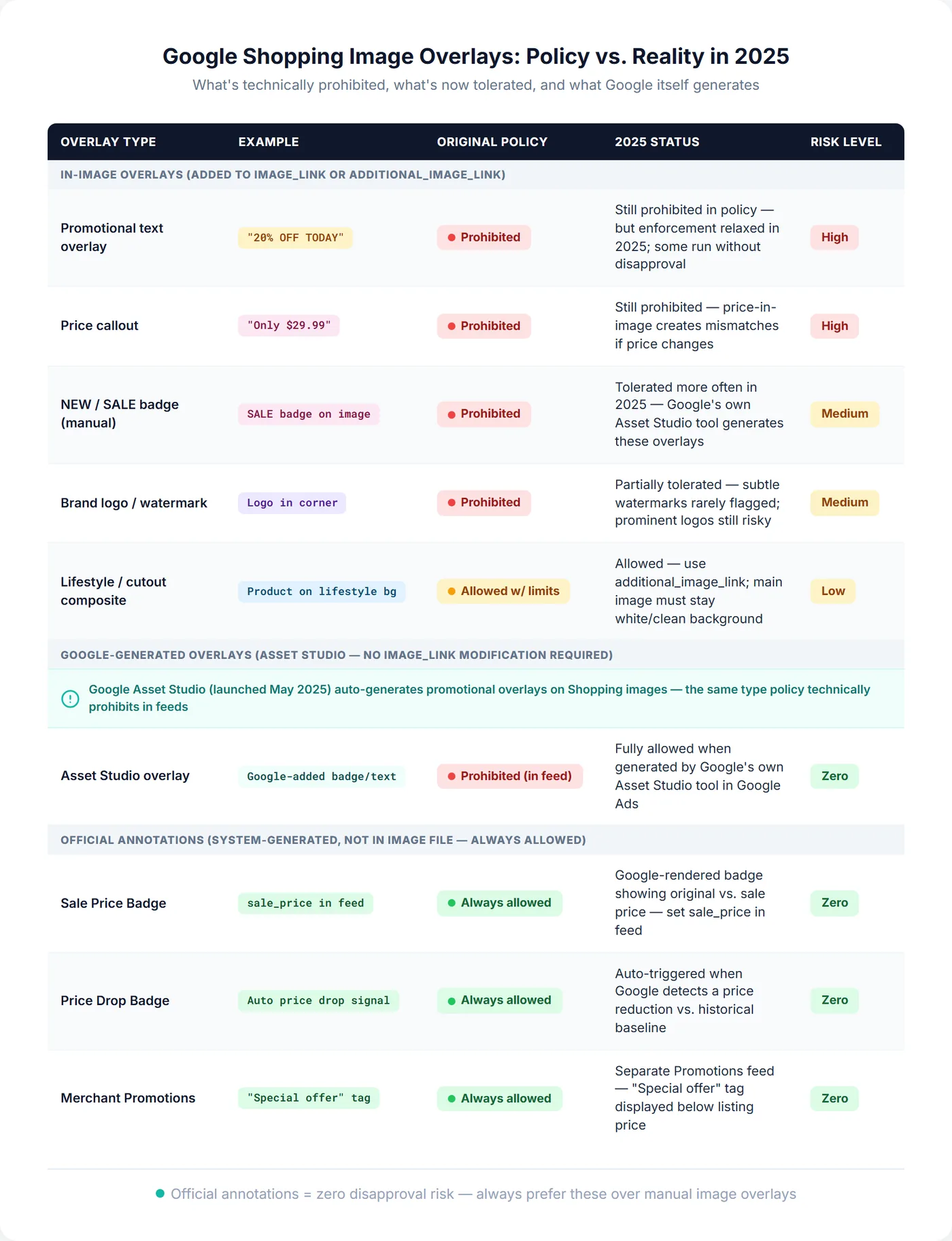
A few practical notes on the riskier categories. Brand logos carry the highest disapproval risk because Merchant Center's image analysis is specifically tuned to detect them — they were the original enforcement target. Promotional text and price callouts sit in a middle zone: widely tolerated at the moment, but not guaranteed and not sanctioned. Asset Studio overlays are the least exposed of the overlay categories because the images come from Google's own tools, though "least exposed" still means exposed — the ranking here is relative, and only official annotations sit genuinely outside the risk.
The Click-Through Rate Case for Overlays
The same Digital Position write-up is also the clearest public data point on whether overlays actually pay. After adding "nothing wild, just simple product splashes and a few 'NEW PRODUCT' icons" to Shopping images across a number of their accounts, they reported CTR jumping over 15% on those listings — enough that they rolled overlays out as a best practice across their portfolio.
Treat that as a signal, not a benchmark. It's one agency's before-and-after: no control group, sample size, or test duration is published, and "a number of our accounts" is as specific as it gets. The mechanism is at least intuitive — in a row of visually uniform product thumbnails, any differentiation draws the eye, and a coloured badge in the corner breaks the pattern — but the honest read is that overlays are worth testing on your own catalog, not that 15% is a number you should expect.
Overlays work best in categories where products are visually similar — electronics accessories, household goods, apparel basics — and where promotional framing aligns with buyer intent. In premium or highly differentiated product categories, clean images often outperform promotional ones because the visual noise undermines perceived quality.
None of this changes the risk calculus, though, and it is worth being explicit about that. A CTR gain is a recurring, measurable benefit; a suspension is a rare, catastrophic one. The two do not net out into a single "worth it" number, and a two-week uplift tells you nothing about what a policy sweep does in month eight. What the performance evidence does justify is a contained test on products you have chosen deliberately — not a catalogue-wide rollout on the strength of someone else's screenshots. Measuring the impact at the product level is straightforward with product-level analytics: compare CTR on modified products against a clean control group over the same period.
How to Add Overlays to Your Shopping Images
First, a precondition: only attempt this on a feed that is already healthy. If you are carrying a meaningful number of disapprovals or open policy issues, adding overlay images widens a surface area that is already a problem, and it makes your account look worse at exactly the moment you would rather it looked unremarkable. Clear the existing issues first.
Assuming that, there are two approaches, with meaningfully different risk profiles.
Option 1: Google Asset Studio (lower risk)
Using Google's own tooling is the more defensible path. Images generated by Asset Studio are less likely to be flagged, and if they are, that reflects a genuine policy clarification rather than you having hand-built a violation. It is a weaker form of protection than it sounds, but it is the best available.
- Open Google Ads and navigate to Assets in the left sidebar
- Select Asset Studio
- Select a product image as your starting point
- Use the AI generation tools to add promotional elements, lifestyle backgrounds, or badge overlays
- Download the generated asset
- Upload the image to Merchant Center as an
additional_image_linkvalue — not the primaryimage_link— to reduce disapproval exposure on the main product image
Option 2: Direct overlay (Higher risk)
If you choose to add overlays to images manually using design tools:
- Test on a small batch of 10–20 products first — do not modify your entire catalog at once
- Use
additional_image_linkrather than the primaryimage_linkfor overlay versions - Monitor Merchant Center Diagnostics closely for the first 7–14 days after upload
- Check the Item Issues section for "Text overlay" or "Promotional text" errors
- Keep clean original versions of all images ready for immediate reversion if needed
Check Automatic Image Improvements before you upload
Whichever route you take, one Merchant Center setting will quietly decide whether your test runs at all. Automatic Image Improvements attempts to strip promotional overlays, watermarks, and other non-product elements from uploaded images, using the same detection systems that powered the original overlay enforcement. If it is enabled, it may remove the overlays you just added, and you will spend a week wondering why nothing changed. Check under Growth > Manage Programs for the Image Improvements card.
Worth noting that the feature cuts both ways. Left on, it can clean up stray overlay images from an old campaign before they ever become a manual disapproval, which is a genuinely useful safety net. Turning it off to preserve a deliberate test also removes that net. If your test is small and time-boxed, leaving the feature enabled account-wide and accepting that it constrains what you can test is often the better trade.
Choosing Test Products and Monitoring the Result
Pick the test group on two criteria. It needs enough traffic to produce a readable CTR signal within a couple of weeks, which points at high-spend, competitive products rather than the long tail — low-impression products will not generate statistically meaningful data no matter how long you wait. And it needs to be a group you could stand to lose, because the point of containing a test is that the containment holds if enforcement arrives. Those two criteria pull against each other, which is the honest tension in this whole exercise.
Do not start unless you can actually watch it. The window immediately after upload is when flagging is most likely to surface, and an unmonitored overlay test is just an undetected violation. If you cannot check Diagnostics regularly for the next two weeks, delay until you can. Once the images are live, track:
- Merchant Center Diagnostics — Check Item Issues daily for new "Text overlay", "Promotional overlay", or "Promotional text" errors. Any sudden spike signals that images are being flagged. See the feed errors guide for how to interpret and resolve these.
- CTR at the product level — If overlays are working, you should see a measurable improvement on the modified products. Compare CTR on test products against a clean control group over the same two-week window using product-level analytics.
- Impression share — A drop in impression share without a disapproval suggests the images may be receiving lower quality scores rather than outright flagging. See the impression share troubleshooting guide for how to investigate unexpected drops.
- Feed Intelligence — Feed Intelligence tracks availability changes and feed stability over time, giving you a clear before/after baseline to measure the impact of image changes on overall feed health.
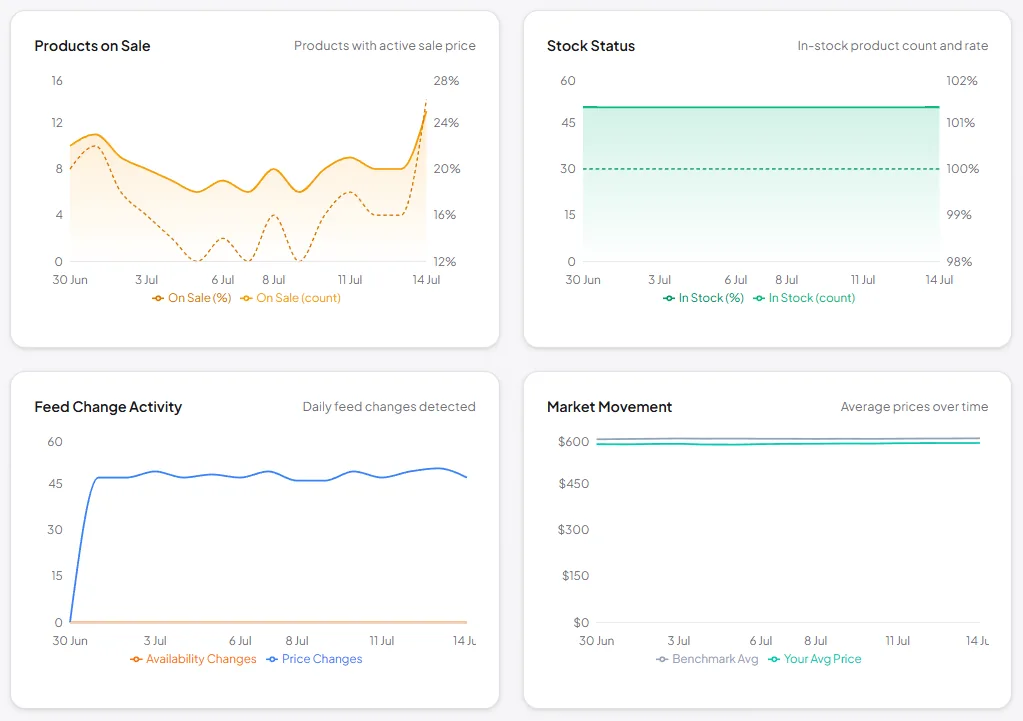
If disapprovals appear, revert immediately rather than waiting to see how far it spreads. A cluster of overlay disapprovals feeds into your overall account quality signals, and the gap between "some items flagged" and "account warning" is where you still have control. Keep clean original versions of every image accessible so reverting takes minutes.
One thing a two-week monitoring window cannot do is clear you. If enforcement sweeps run on a timescale of months, then a quiet fortnight is the expected outcome whether your images are fine or not, and it should not be read as a result. That is the awkward part of testing in a grey zone: the test measures CTR, which is what you wanted to know, but it cannot measure the risk, which is what actually matters. Decide in advance how long you are willing to leave overlays live, and treat every month past the test window as ongoing exposure rather than accumulated safety.
Frequently Asked Questions
Are image overlays officially allowed in Google Shopping?
No. Google's policy documentation still prohibits promotional overlays, watermarks, and text on product images submitted via image_link and additional_image_link, and no official change has been announced. What changed in 2025 is that overlay images started staying live longer without being flagged. That is an enforcement observation, not permission — Google checks policies in periodic sweeps rather than continuously, so a violation can serve for months before it is caught. Treat overlays as a grey zone with real downside, not an approved strategy.
Can I get my Merchant Center account suspended for image overlays?
Yes. Enforcement escalates from item-level disapprovals to account-level warnings to suspension, and systematically publishing images that violate a documented policy across a catalogue can be treated as intentional circumvention rather than an honest mistake. Suspension removes both your Shopping ads and your free listings, and reinstatement is neither fast nor guaranteed. One practitioner reported that Google support, when asked directly about an overlay test, said they would not report it internally but confirmed there was still a possibility of being banned from Google Shopping entirely. A support rep declining to escalate is not clearance.
My overlay images have been live for months with no disapproval. Does that mean they're safe?
No, and this is the most common misreading of the situation. Google does not evaluate every product against every policy every day. Which policies get checked, on which accounts, at what frequency, is not visible to merchants, and the interval can run to months or longer. An extended quiet period is exactly what you would expect to see whether your images are compliant or merely uninspected, so it carries almost no information. Time served is not evidence of approval.
What is the difference between a product image overlay and a Google Shopping annotation?
A product image overlay is a visual element (text, badge, logo) added to your image file before it is submitted to Merchant Center. A Google Shopping annotation — such as the Sale Price Badge, Price Drop Badge, or Merchant Promotions label — is applied by Google on the search results page based on your feed data. Annotations appear as visual overlays in Shopping results but are never part of your image file, so they cannot violate image policies and carry zero risk.
Can Google automatically remove overlays from my images?
Yes. Merchant Center's Automatic Image Improvements feature can detect and remove promotional text, watermarks, and other overlays from uploaded images. Check whether this is enabled under Growth > Manage Programs in Merchant Center. If you want overlay images preserved, you may need to disable this feature for the products you are testing.
Does using Google Asset Studio guarantee my overlay images will be approved?
No. Asset Studio is an ad creation tool in Google Ads, and images generated there are primarily intended for use as campaign creative assets rather than as primary product feed images in Merchant Center. That said, images generated by Google's own AI are less likely to be flagged than manually created overlays. Using Asset Studio images in additional_image_link — rather than as the primary image_link — reduces disapproval risk further.
Should I add overlays to all my product images?
No. Start with a small test group of 10–20 products with healthy click performance. Add overlay images as additional_image_link variants rather than replacing primary images. Monitor Merchant Center Diagnostics for 7–14 days before expanding. If the test shows CTR improvement without disapprovals, cautiously expand to more products. If you see issues, revert immediately and use official annotations (Sale Price Badge, Price Drop Badge, Merchant Promotions) instead.