
Your product title is the most influential element in your Google Shopping feed. It decides which searches your products match, and whether shoppers click once they show up. But how do you know your current titles are the best version? Most advertisers guess. A/B testing replaces the guess with a number.
Title testing in Google Shopping has one wrinkle that trips up most people: you cannot split-test a title the way you split-test a landing page. Google will only ever serve one title per product at a time, so every title test is a before-and-after on the same products. That makes how you apply the change, and when it actually starts serving, as important as the change itself. This guide covers why to test, the three ways to push a title change and their trade-offs, and how to read the result.
Why A/B Test Your Product Titles?
Titles are the primary signal Google uses to match products to search queries. When a shopper searches for "men's waterproof hiking boots size 11," Google scans your title (along with other feed attributes) to decide whether your product is relevant. A title that contains those terms gets shown. One that says "Outdoor Boot - Model X742" does not.
But relevance is only half of it. Once your product appears, the title has to earn the click. That gives a title change two independent levers, which is why the wins compound:
- Better query matching increases impressions, expanding your reach to searches you were previously invisible for
- A 5% CTR improvement across 1,000 products means hundreds of extra clicks per day at the same cost
- More qualified clicks improve conversion rates, because shoppers who click a specific, accurate title know what they are getting
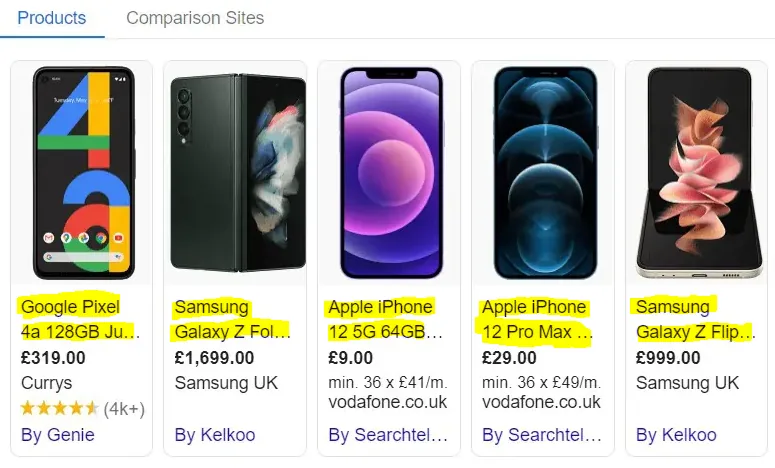
Look again at the highlighted titles in the screenshot at the top of this guide. What actually reaches the shopper is two or three words and an ellipsis — "Google Pixel 4a 128GB Ju…" is doing all the work. Everything after the cut-off is invisible to someone scanning the results, but it still counts for query matching. That split is exactly why one title change can move impressions and CTR in opposite directions, and why you want to measure both.
Without testing you are just asserting. Maybe brand-first beats category-first. Maybe adding the color lifts CTR. Maybe shorter titles win for your catalog. These are all plausible, they contradict each other, and the answer is different for different catalogs. That is exactly the kind of question a test settles and an opinion does not.
Three Ways to Apply a Title Change
Before you can test anything, the new title has to reach Merchant Center. There are three routes, and they differ enormously in how fast the change takes effect, how easily you can undo it, and how much collateral damage a failed test does.
Option 1: Edit the Titles in Your Primary Feed
The obvious route — change the titles in your ecommerce platform and let them flow through — is the worst one for testing. It is slow: the change has to move through your store, regenerate the feed file, wait for Merchant Center's next fetch (often daily), then get processed. It is destructive: you have overwritten your real product data, so reverting means another full round trip. And it is indiscriminate: your titles are now different everywhere the feed is used, not just in the test.
Option 2: A Supplemental Feed (the one to use)
A supplemental feed overrides specific attributes on specific products without touching your primary feed. That is exactly the shape of a test: source data untouched, override limited to the products you enrol, and reverting is just removing the supplemental entries. It is also the fastest route if pushed through the Merchant API rather than uploaded on a schedule — an API push updates the item immediately instead of waiting for the next fetch.
Option 3: Feed Management Platforms
Tools like DataFeedWatch and Channable transform titles at scale by rule — "if category = Apparel, prepend brand name" — which is genuinely useful for rolling out a format you have already settled on. The gap is measurement: they change the title but generally will not tell you what it did to that product's impressions, CTR, or ROAS. You still pull that comparison from Google Ads yourself.
The delay nobody accounts for
Saving a new title does not change the ad. The title has to reach Merchant Center, get processed, and then propagate to serving — and depending on the route you picked, that can take anywhere from hours to several days. Edit your primary feed on a Monday and your ads may still be running the old title on Wednesday. This matters more than it sounds: if you count Day 1 of your test from the moment you clicked save, the first days of your "test period" are really still measuring the old title, and they drag your result toward no-change.
You cannot make this delay zero — even an instant API push still has to propagate to serving. So you do two things: pick the fastest, most deterministic route, and make the measurement window long enough that a day or two of blur barely moves the average. That is the real argument for the 30+30 model below. Over a 5-day test, two fuzzy days is 40% of your data; over 30 days it is under 7%.
| Approach | Speed to serve | Revert | Impact tracking |
|---|---|---|---|
| Primary feed edit | Slowest — store, then feed rebuild, then scheduled fetch | Full round trip again | Manual export and comparison |
| Feed management tool | Depends on the tool's sync schedule | Disable the rule, wait for resync | Limited or none |
| Supplemental feed via API | Fastest — item updates immediately, then serving propagates | Delete the supplemental entries | Depends on your analytics |
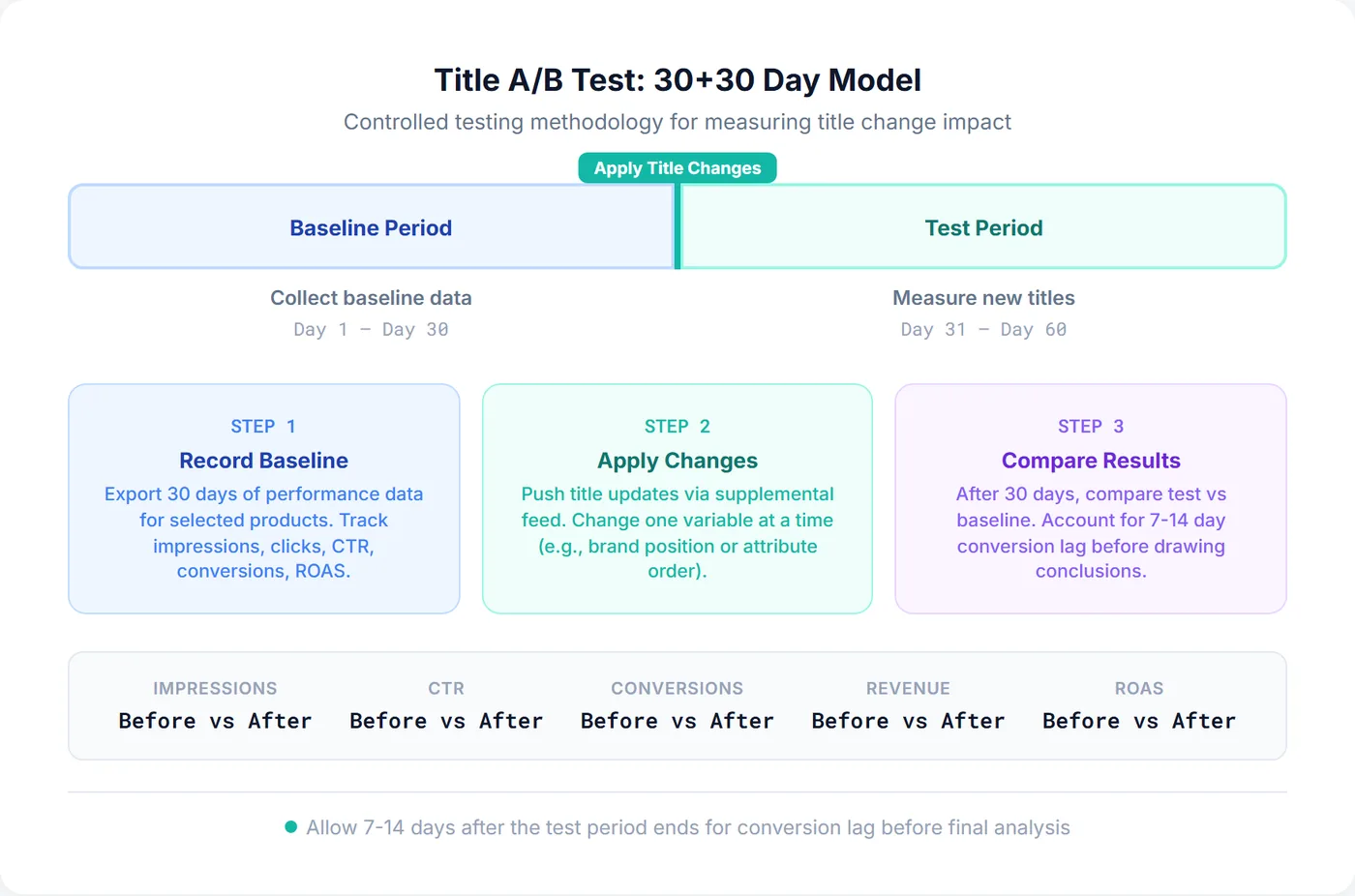
SKU Analyzer's Title Optimizer takes the third route: it builds title variants from feed variables, pushes them to a separate supplemental datasource via the Merchant API, and records the push date — so the before/after boundary is a logged date rather than a guess about when you last touched the feed. Reverting deletes the supplemental entries and your primary feed is never touched.
The 30+30 Day Testing Model
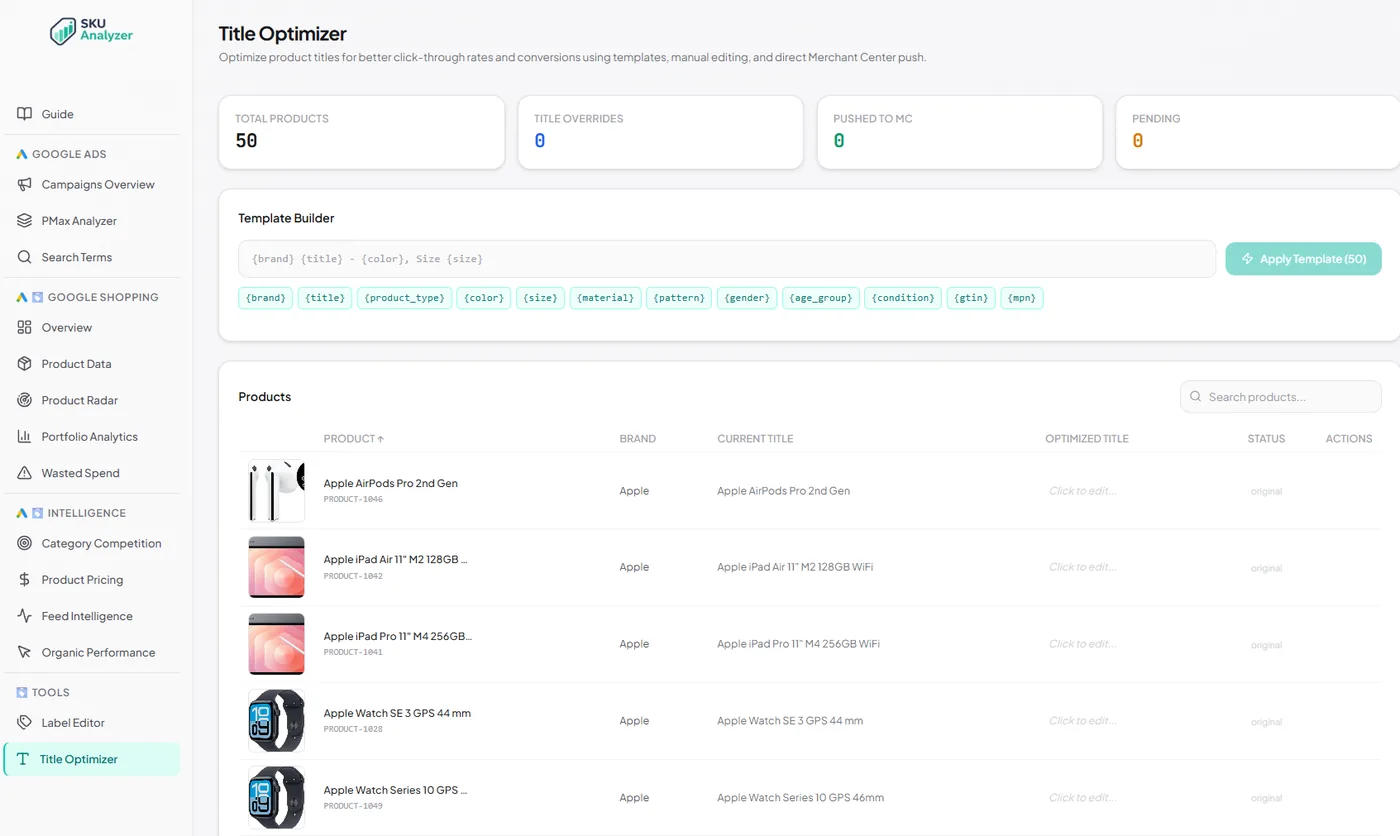
Because Google serves one title at a time, the workable design is 30 days of baseline data, then the title change, then 30 days of test data on the same products. Thirty days is not arbitrary: it captures at least four full weekly cycles, so weekend-versus-weekday swings and pay-cycle effects average out instead of masquerading as a result. It is also long enough to absorb the propagation blur described above.
- Days 1–30 — baseline. Record current performance for your test products: impressions, clicks, CTR, conversions, revenue, and ROAS, daily and per product.
- Day 31 — switch. Push the new titles via supplemental feed and note the date.
- Days 31–60 — test. Collect the same metrics. Hold everything else constant: bids, budgets, targeting, price.
- Day 61 — compare. Baseline versus test, in aggregate and per product.
One correction to make before you read anything: conversion lag. Shopping conversions often take 7 to 14 days to fully report, so a click on Day 25 of your baseline may not register its conversion until Day 35 — inside your test period. Left alone, this flatters the baseline (its conversions have all landed) and penalises the test (its most recent ones have not). Either wait an extra 7 to 14 days past Day 60 before judging conversion metrics, or read CTR and impressions first for an early signal and let the revenue numbers settle.
What to Test
Keep every variant within Google's product title requirements and recommendations, so the test measures wording and ordering rather than a policy or data-quality difference.
The highest-value variables are the ones that change which queries you match, not the ones that just reword the same information. Adding attributes that were missing entirely — color, size, material, gender — is usually the biggest single win, because it opens you up to long-tail searches with high purchase intent that you were previously invisible for. Beyond that, brand position and keyword order matter because Google weights the front of the title most heavily. For the full treatment of what makes a good title in the first place, see the product title optimization guide; use search terms reports to find the language your customers actually use.
| Test Variable | Example A | Example B | What It Tests |
|---|---|---|---|
| Brand Position | Nike Men's Running Shoes Air Zoom | Men's Running Shoes Nike Air Zoom | Whether leading with brand improves CTR for known brands |
| Attribute Addition | Samsung Galaxy S24 Phone | Samsung Galaxy S24 Phone - 256GB - Phantom Black | Whether adding specs increases long-tail impressions and qualified clicks |
| Keyword Order | Bluetooth Wireless Headphones Over-Ear | Wireless Headphones Bluetooth Over-Ear | Whether leading with the higher-volume term captures more searches |
| Title Length | Patagonia Better Sweater Fleece Jacket Men's Full-Zip Industrial Green Size Large Recycled Polyester | Patagonia Better Sweater Fleece Jacket - Men's - Green - L | Whether concise titles improve CTR by avoiding truncation |
Running a Clean Test
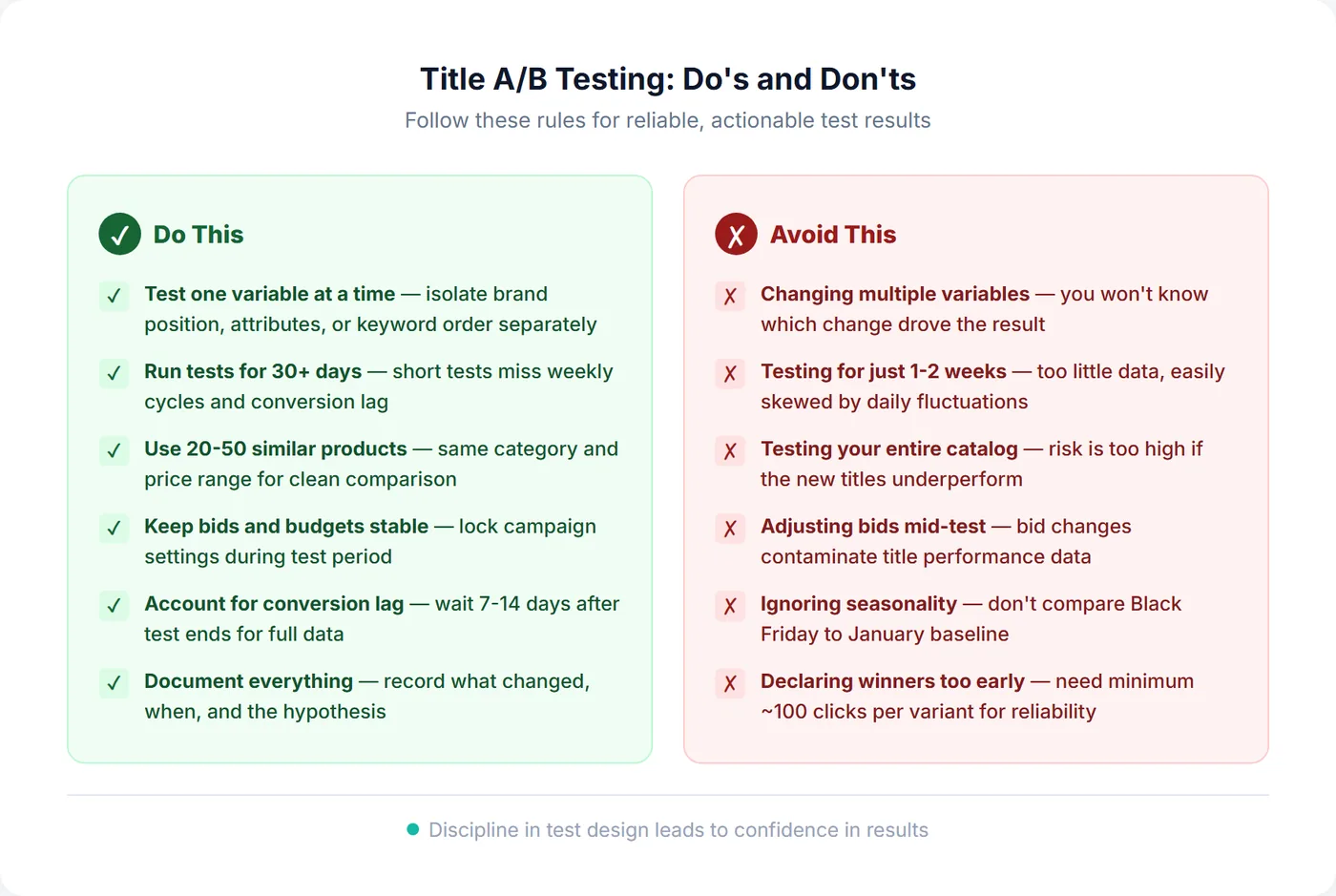
The method is simple; the discipline is where tests go wrong. Four decisions do most of the work.
Pick 20–50 similar products
Enrol a cohort that shares a category, price range, and performance tier, with enough traffic to produce a signal (roughly 3 to 5 clicks per day each). Mixing your best sellers with your long tail, or apparel with electronics, produces baselines too different to compare. Three products is not a test — at that sample size random variation dominates entirely. Testing your whole catalog at once is the opposite mistake: if it loses, everything loses. Win, then roll out in phases.
Change exactly one thing
If you move the brand, add three attributes, and shorten the title all at once, a win tells you nothing actionable, because you cannot tell which change caused it. Isolate one variable per test and run the others sequentially.
Write the hypothesis down first
"Let's see what happens" is not a hypothesis. State what you are changing, why you expect it to work, and which metric should move: "Moving the brand to the front of our electronics titles will increase impressions ~15%, because brand + product is the dominant search pattern in this category." Committing to the metric in advance stops you from going hunting for whichever number happened to go up.
Freeze everything else
Bid strategy changes, budget changes, and price changes during the test period all move the same metrics your title change moves, and you will not be able to separate them afterwards. Lock what you can and write down what you cannot. Then leave it alone for the full 30 days — a strong first weekend is not a result.
Reading the Result
Having data is not the same as having an answer. Three habits separate a real read from a wishful one.
Look at per-product results, not just the average
The aggregate gives you the headline; the per-product breakdown tells you whether to believe it. If 5 of 30 products improved dramatically and 25 did nothing, you have not found a better title format — you have found something specific about those 5 products, and rolling it out catalog-wide will disappoint.
Rule out the boring explanations first
Before crediting the title, check nothing else moved: seasonality between the two windows, price changes, bid or budget adjustments, a competitor going out of stock or launching a promotion. Any of these will happily produce a "result" that has nothing to do with your titles.
Know what actually counts as a win
A test wins when CTR improves without conversion rate dropping, when impressions rise while CTR holds, or when revenue grows at the same or better ROAS. The trap is the false win: a title that lifts CTR 20% and drops conversion rate 25% is not a winner, it is a magnet for unqualified clicks. On sample size, the working rule is at least 100 clicks per period per cohort — relative CTR changes of 10–15% are usually real at 30 days, anything under 5% needs more products or more time.
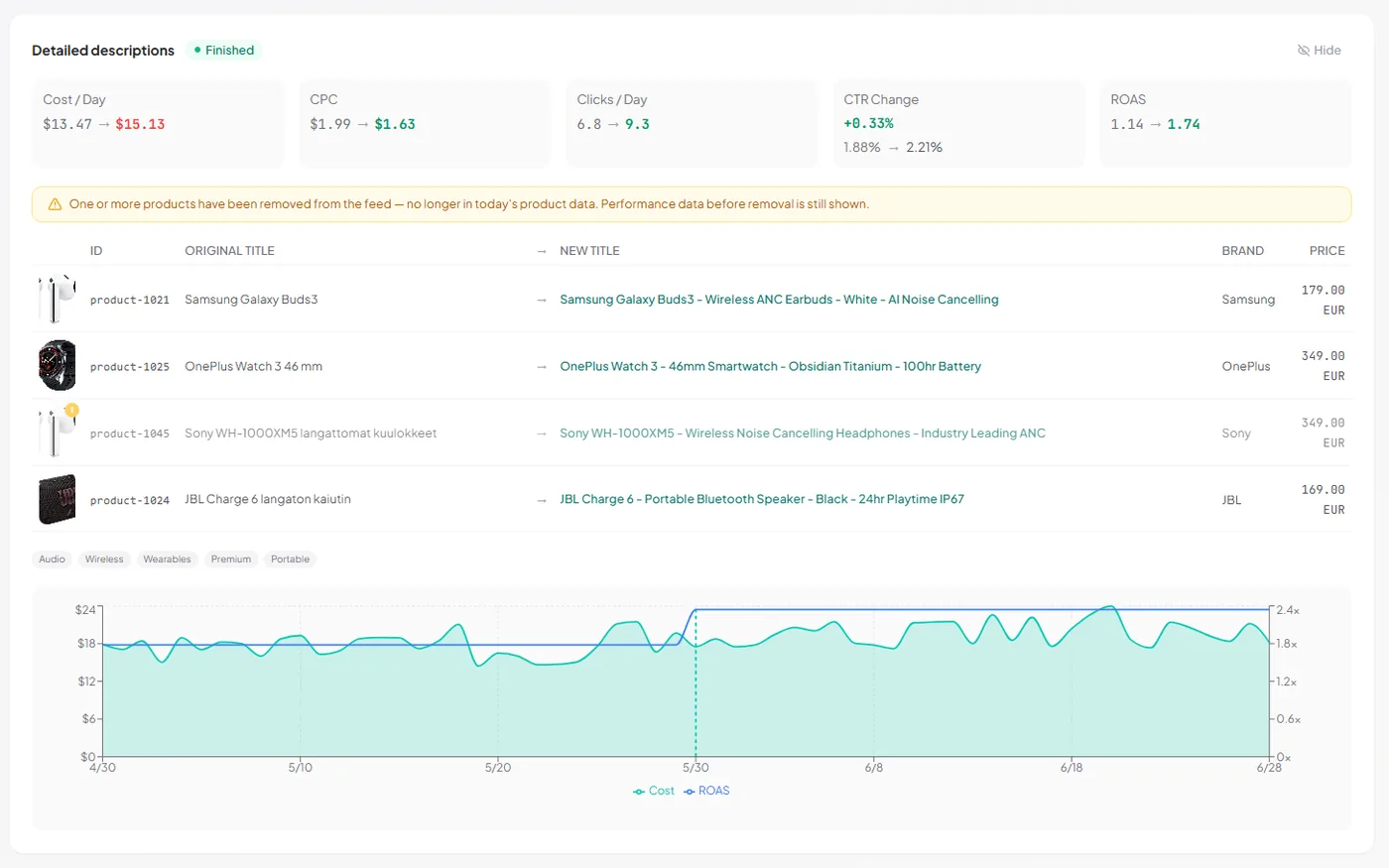
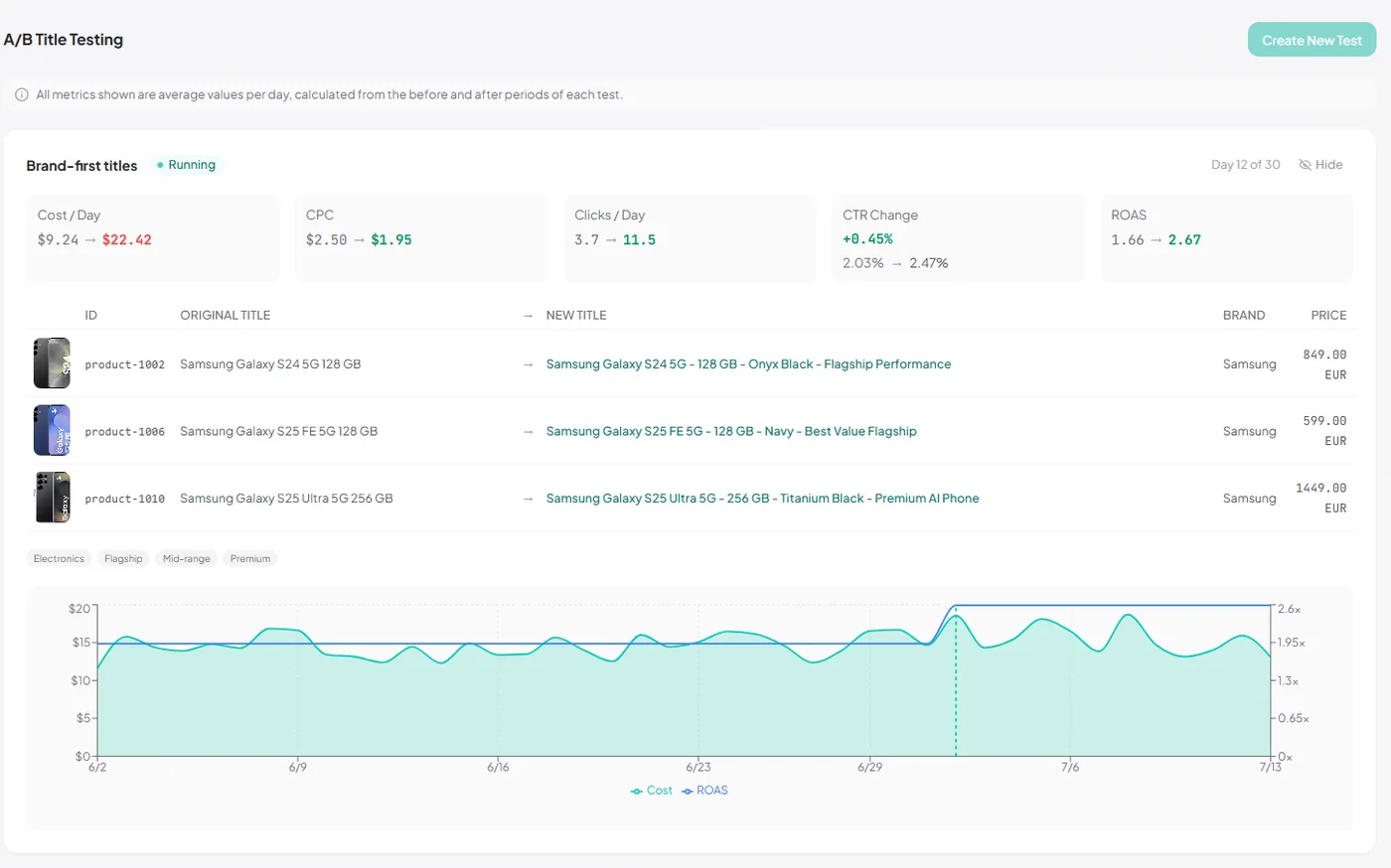
Note the per-day framing in the panel above — cost, clicks, and CPC are averaged per day across each window rather than totalled. That matters when the two periods are not the same length yet, which is the normal state of a test that is still running.
Frequently Asked Questions
How long does it take for a new title to actually show in my ads?
It depends entirely on how you applied it. A supplemental feed pushed through the Merchant API updates the item in Merchant Center right away, then needs time to propagate to serving. Editing titles in your primary feed is much slower: the change has to move through your store, regenerate the feed file, wait for Merchant Center's next scheduled fetch (often daily), and then get processed — so it can be days before the new title is live. Never assume the switch happened the moment you clicked save; it is the main reason short title tests produce nonsense.
Why can't I run a proper split test with two titles at once?
Because a product in Merchant Center has exactly one title at a time. There is no mechanism to serve title A to half the traffic and title B to the other half for the same product, the way you would split-test a landing page. That leaves two options: before-and-after on the same products (the 30+30 model), or splitting a cohort into two similar product groups and giving each a different title — which introduces a new problem, since no two product groups perform identically to begin with. Before-and-after on the same products is usually the cleaner comparison.
How many products should I include in a title test?
Aim for 20 to 50 products per test. This provides enough data for meaningful results without risking your entire catalog. Choose products from the same category with similar performance levels so the comparison is fair. Testing fewer than 10 products makes it hard to draw conclusions, while testing too many makes it difficult to isolate what caused performance changes.
Can I run multiple title tests simultaneously?
Yes, but only on separate product groups. Never enroll the same product in two tests at once—overlapping changes make it impossible to attribute results to a specific change. Run one test per product cohort, and use custom labels to tag which products are in which test for clean segment reporting.
How do I know if my results are statistically significant?
As a practical rule, you need at least 100 clicks per period (baseline and test) to draw meaningful conclusions. Look for CTR changes of at least 10 to 15% relative to be confident the change is real and not random noise. If results are marginal (under 5% change), extend the test period or add more products to increase the sample size.
Should I test titles on Shopping ads and free listings separately?
Ideally, yes. Free listings and paid Shopping ads can have different click behaviors because the audience intent varies. However, since title changes apply to your product feed and affect both channels simultaneously, most advertisers test them together and analyze the combined impact. If you have enough traffic volume, segment your results by channel for deeper insights.
What if my test results are inconclusive?
Inconclusive results usually mean insufficient data or too small an effect size. First, check that you had at least 100 clicks in each period. If data volume is sufficient but results are flat, the title change likely does not matter for that product set—which is itself a useful finding. Try a bolder change (different structure, not just word order) or test on products with higher traffic where small effects are easier to detect.