
Your product title is the single most important element in your Google Shopping feed. It determines which searches your products appear for, how prominently they rank, and whether shoppers click. Yet most titles are an afterthought—pulled straight from the website with no optimization for Shopping.
The Perfect Title Formula
Structure that maximizes visibility and clicks
Before (weak title)
Running Shoes
After (optimized title)
Nike Air Zoom Pegasus 40 Men's Running Shoes - Black/White - Size 10
This guide covers the structure that works, category-specific formulas, the mistakes that get products disapproved, and — the part most guides skip — how to actually test whether a title change helped. Title optimization is a core part of any broader product feed optimization strategy and of a wider Google Shopping optimization framework spanning feed, bids, and campaign structure. If you are still setting up, start with the complete beginner's guide to Google Shopping.
Why Product Titles Matter So Much in Google Shopping
Unlike text ads where you write ad copy, Shopping ads are generated automatically from your product feed. The title you provide directly becomes your ad. It does three things:
1. Query Matching (Visibility)
Google uses your title to understand what your product is and match it to relevant searches. A title that says "Running Shoes" might match generic searches, but "Nike Air Zoom Pegasus 40 Men's Running Shoes" matches specific searches where intent is higher.
Products with low impressions often have titles that don't contain the terms shoppers are searching for.
2. Ranking (Position)
Your title affects your Ad Rank in Shopping auctions. Better matching and higher expected CTR (which good titles improve) contribute to better positions. This impacts your impression share and whether you appear in top positions.
3. Click-Through Rate (Engagement)
Shoppers scan Shopping results quickly. A clear, specific title helps them immediately understand what you're selling. Vague titles get skipped; specific titles get clicks.
The Visibility-CTR Connection
Titles impact both visibility AND engagement. A title optimized only for matching (stuffed with keywords) might get impressions but low CTR. A title optimized only for readability might miss searches. The best titles achieve both—they match relevant queries and clearly communicate value to shoppers.
Google's Title Requirements
Before optimizing, understand what Google requires and allows. The rules below come from the title attribute in Google's product data specification, which is worth reading in full before a large-scale rewrite:
Character Limits
| Limit | Characters | Notes |
|---|---|---|
| Maximum | 150 characters | Hard limit—anything beyond is cut off |
| Displayed | ~70-100 characters | What typically shows in ads (varies by device) |
| Recommended | 70-150 characters | Use full space; front-load key info |
What's Required
- Accurate description: Title must describe the actual product
- Variant specificity: Include variant details (color, size) for variant products
- Language match: Title must be in the language of the target country
What's Prohibited
- Promotional text: "Sale", "Free Shipping", "Best Price", "20% Off"
- ALL CAPS: Except for acronyms (USB, LED, etc.)
- Excessive punctuation: !!!, ???, ***, etc.
- Foreign characters: For attention (unless part of brand name)
- Keyword stuffing: Repeating keywords unnaturally
Disapproval Risk
Titles with promotional text or excessive caps will be disapproved. If you notice products suddenly disapproved, check your titles first. Review Merchant Center diagnostics for title-related issues.
The Universal Title Formula
While the exact structure varies by category, most successful titles follow this general pattern:
Brand + Product Type + Key Attributes + Model/Variant
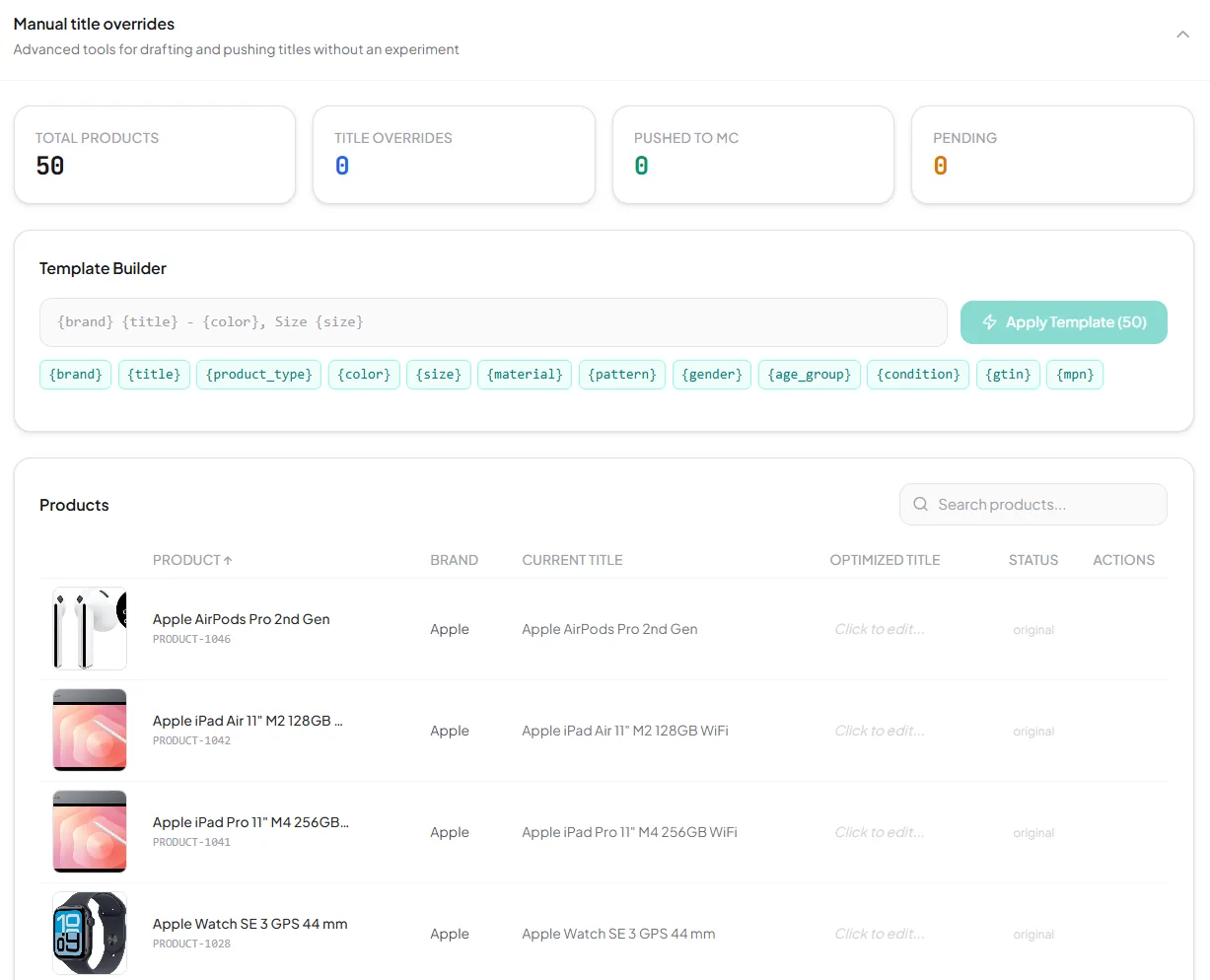
In practice you don't write that formula out product by product — you express it once as a template of feed variables and let it fill itself in from the attributes you already have. This is what that looks like in SKU Analyzer's Title Optimizer: the pattern {brand} {title} - {color}, Size {size} at the top, the available feed variables underneath it, and every affected product's current title next to the title the template would produce, before anything is pushed.
Breaking Down Each Element
| Element | What to Include | Example |
|---|---|---|
| Brand | Manufacturer or brand name | Nike, Samsung, IKEA |
| Product Type | What the product is (generic category) | Running Shoes, Smart TV, Bookshelf |
| Key Attributes | Important characteristics shoppers search for | Men's, 55-inch 4K, 5-Shelf Oak |
| Model/Variant | Specific model name, size, color | Air Zoom Pegasus 40, QN55Q60C, Black |
Order Matters
Put the most important information first. Since only ~70 characters display, frontload what matters most for your product category:
- Known brands: Lead with brand (Nike, Apple, Sony)
- Unknown brands: Lead with product type (what it is)
- Technical products: Include model numbers early
- Fashion: Include gender and key style early
Category-Specific Title Formulas
Title requirements vary by product category. Here are optimized formulas for major categories.
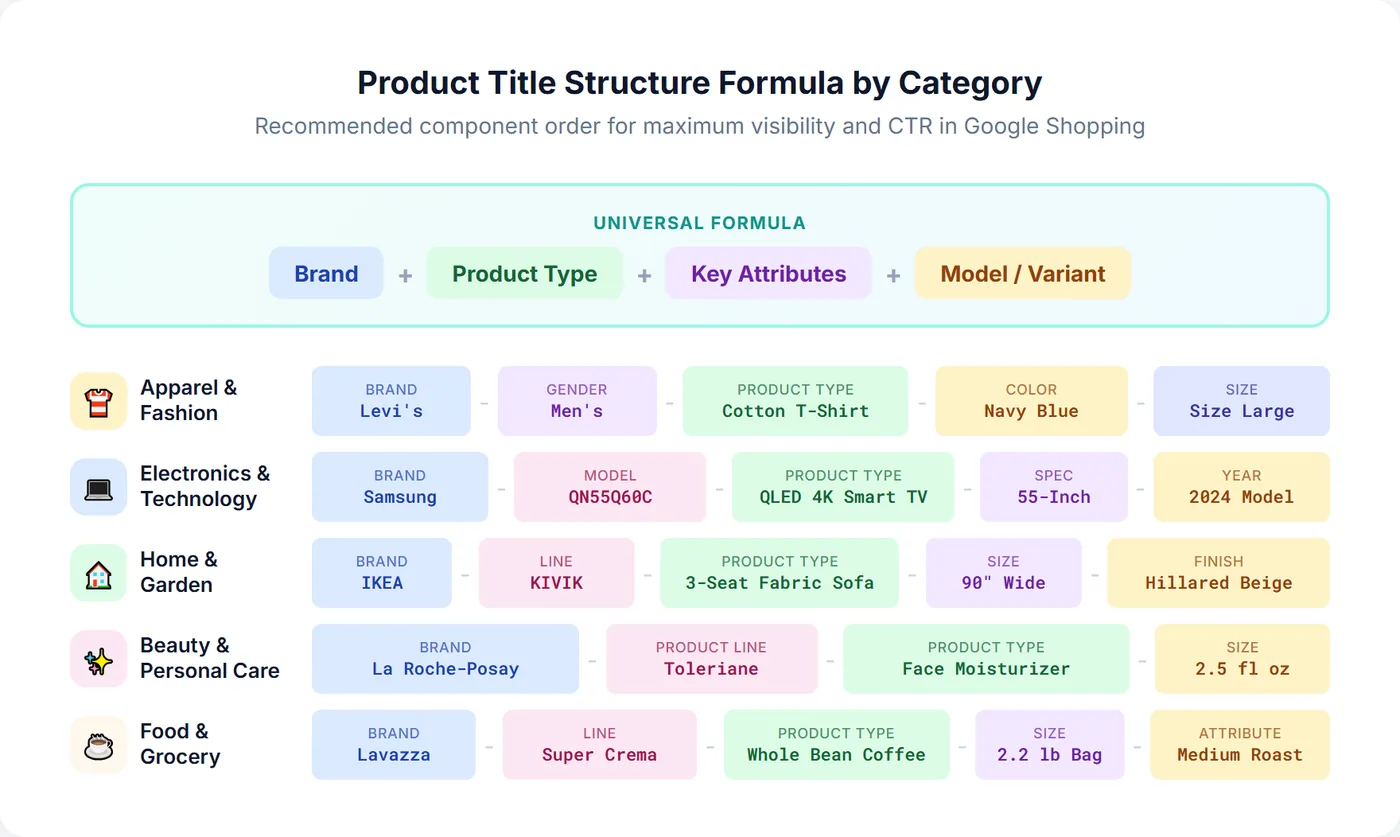
Apparel & Fashion
Formula: Brand + Gender + Product Type + Material/Style + Color + Size
| Before | After |
|---|---|
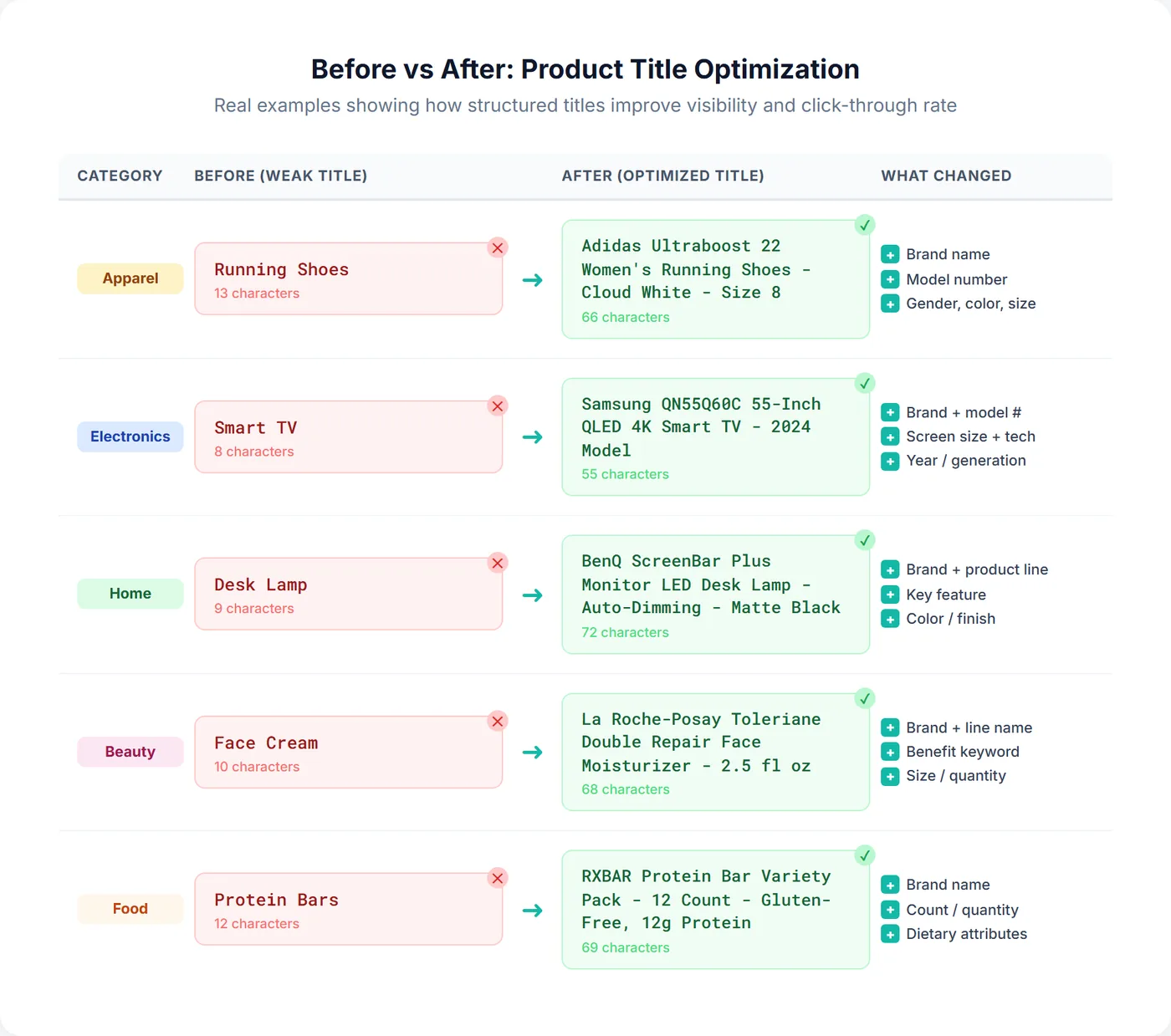
| T-Shirt | Levi's Men's Classic Cotton T-Shirt - Navy Blue - Size Large |
| Women's Dress | Zara Women's Midi Wrap Dress - Floral Print - Size Medium |
| Running Shoes | Adidas Ultraboost 22 Women's Running Shoes - Cloud White - Size 8 |
Key attributes for fashion: Gender, size, color, material, style (casual, formal), fit (slim, relaxed), season (if applicable). Using custom labels alongside optimized titles lets you segment these products by season or margin for more precise bidding. Make sure your product images also meet Google Shopping image specifications, since images and titles work together to drive clicks.
Electronics & Technology
Formula: Brand + Model + Product Type + Key Spec + Secondary Spec
| Before | After |
|---|---|
| Smart TV | Samsung QN55Q60C 55-Inch QLED 4K Smart TV - 2024 Model |
| Laptop | Apple MacBook Pro 14" M3 Pro Chip - 18GB RAM 512GB SSD - Space Gray |
| Headphones | Sony WH-1000XM5 Wireless Noise-Canceling Over-Ear Headphones - Black |
Key attributes for electronics: Model number, screen size, storage capacity, RAM, processor, connectivity (wireless, Bluetooth), year/generation. For electronics categories, benchmarking your prices against competitors is especially important since shoppers often compare prices across retailers before clicking.
Home & Garden
Formula: Brand + Product Type + Material + Dimensions/Size + Color/Finish
| Before | After |
|---|---|
| Sofa | IKEA KIVIK 3-Seat Fabric Sofa - 90" Wide - Hillared Beige |
| Garden Hose | Flexzilla Pro 100ft Expandable Garden Hose - 3/4" Brass Fittings - Green |
| Desk Lamp | BenQ ScreenBar Plus Monitor LED Desk Lamp - Auto-Dimming - Matte Black |
Key attributes for home: Dimensions, material, capacity, number of pieces, finish/color, style (modern, traditional), room type
Beauty & Personal Care
Formula: Brand + Product Line + Product Type + Key Benefit + Size/Quantity
| Before | After |
|---|---|
| Face Cream | La Roche-Posay Toleriane Double Repair Face Moisturizer - 2.5 fl oz |
| Shampoo | Olaplex No. 4 Bond Maintenance Shampoo - Repairs Damaged Hair - 8.5 oz |
| Perfume | Chanel Coco Mademoiselle Eau de Parfum Spray - 3.4 oz / 100ml |
Key attributes for beauty: Product line/collection, benefit (hydrating, anti-aging), skin/hair type, size, scent (for fragrances)
Food & Grocery
Formula: Brand + Product Type + Flavor/Variety + Size/Count + Special Attributes
| Before | After |
|---|---|
| Coffee | Lavazza Super Crema Espresso Whole Bean Coffee - 2.2 lb Bag - Medium Roast |
| Protein Bars | RXBAR Protein Bar Variety Pack - 12 Count - Gluten-Free, 12g Protein |
Key attributes for food: Flavor, size/weight, count/quantity, dietary (organic, gluten-free, vegan), roast level, origin
Google Shopping Title Optimization Best Practices
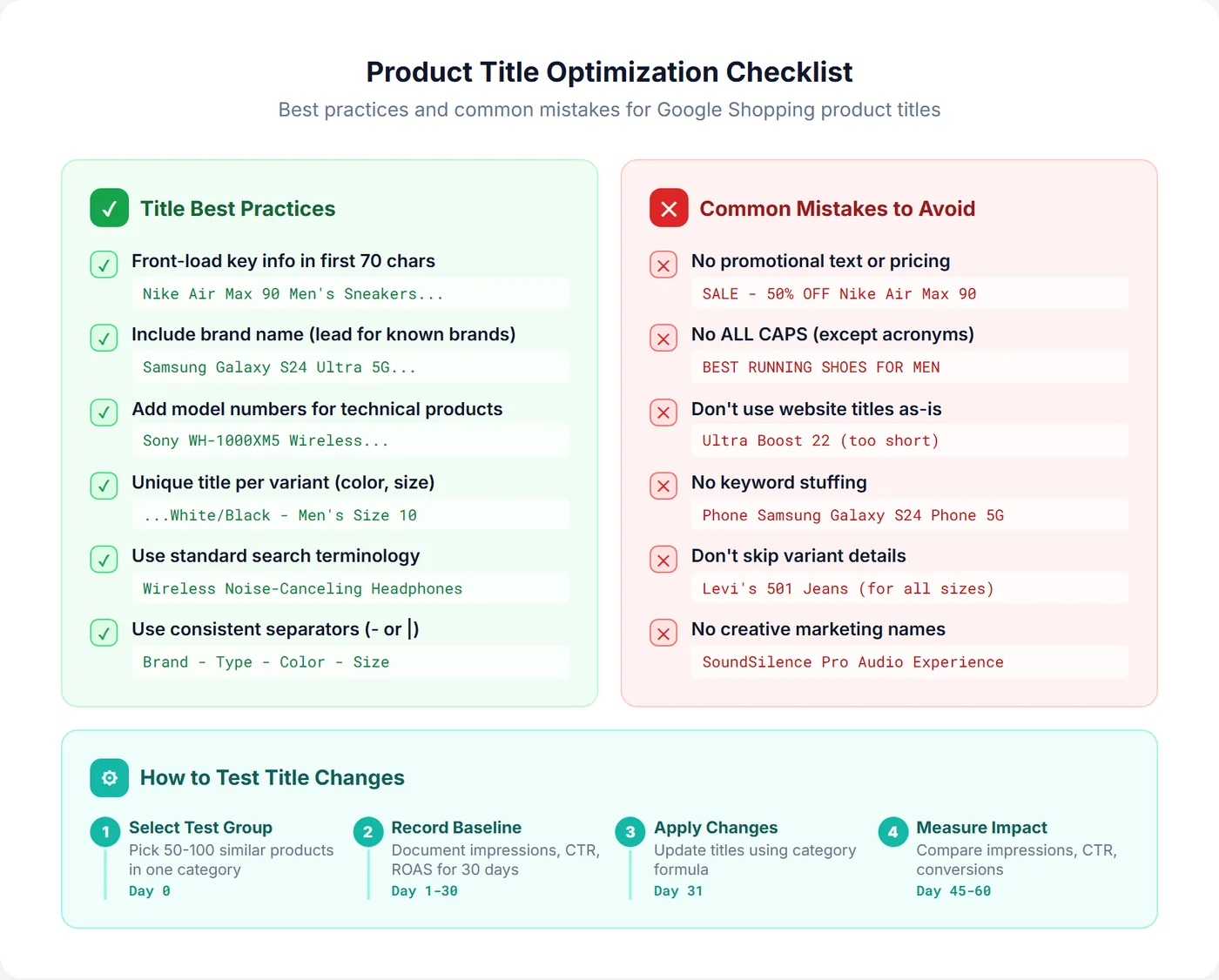
1. Front-Load the Most Important Information
Put critical details in the first 70 characters since that's what displays in most Shopping placements. Don't bury important attributes at the end.
- Good: "Nike Air Max 90 Men's Sneakers - White/Black - Size 10"
- Bad: "Sneakers Men's Size 10 White/Black Nike Air Max 90"
2. Use Natural Language, Not Keyword Stuffing
Your title should read naturally. Keyword-stuffed titles look spammy and may hurt CTR even if they match searches.
- Good: "Samsung Galaxy S24 Ultra 5G Smartphone - 256GB - Titanium Black"
- Bad: "Samsung Phone Galaxy S24 Ultra Phone 5G Phone Smartphone Black"
3. Be Specific About Variants
Each variant should have a unique, specific title. Generic titles for all variants hurt matching and confuse shoppers.
- Good: "Levi's 501 Original Fit Jeans - Men's - Dark Stonewash - 32W x 32L"
- Bad: "Levi's 501 Jeans" (for all size/wash variants)
4. Include Model Numbers for Technical Products
Many shoppers search by model number. Including it captures high-intent searches.
- Include: "Sony WH-1000XM5" not just "Sony Headphones"
- Include: "KitchenAid KSM150PS" not just "KitchenAid Stand Mixer"
5. Use Standard Terminology
Use terms shoppers actually search for, not internal jargon or creative marketing names.
- Good: "Wireless Noise-Canceling Headphones"
- Bad: "SoundSilence Pro Audio Experience Device"
6. Don't Include Information That's Shown Elsewhere
Price is displayed separately in Shopping ads. Don't waste title space on:
- Price or discounts
- Shipping information
- Your store name (unless it's the brand)
Pro Tip: Separator Characters
Use consistent separators to improve readability. Common choices: hyphens (-), pipes (|), or commas. Pick one style and stick with it across your feed. Example: "Nike Air Max 90 - Men's - White/Black - Size 10"
Common Title Mistakes to Avoid
Mistake 1: Using Website Titles As-Is
Website product titles are optimized for on-site search and navigation, not Google Shopping. They're often too short or miss searchable attributes.
Website title: "Ultra Boost 22"
Shopping title: "Adidas Ultraboost 22 Women's Running Shoes - Core Black - Size 7"
Mistake 2: Skipping Variant Details
Using the same generic title for all variants means you're competing with yourself and confusing shoppers about what they'll receive.
Mistake 3: Promotional Language
These will get your products disapproved. For more on avoiding disapprovals, see the guide to common feed errors:
- "SALE - 50% OFF Nike Air Max 90"
- "FREE SHIPPING - Samsung TV"
- "BEST PRICE iPhone 15 Pro"
Mistake 4: ALL CAPS for Emphasis
ALL CAPS looks spammy and violates Google's policies (except for legitimate acronyms like LED, USB, HDMI).
Mistake 5: Truncated or Duplicate Titles
Some feeds have technical issues causing titles to be cut off or duplicated across products. Audit your feed regularly to catch these problems early.
Mistake 6: Missing Brand Name
For branded products, the brand name is often searched. Omitting it means missing those searches.
How to Test a Google Shopping Title Change
Rewriting titles is the easy part. Knowing whether the rewrite helped is where most title projects quietly fail, because the obvious ways of checking all end up measuring something other than the titles. Below are the five approaches people actually use, and the specific thing each one cannot tell you.
Five Ways to Test a Title Change — and What Each One Gets Wrong
| Method | Controls for | What it can't tell you |
|---|---|---|
| Roll out everywhere, watch account metrics | Nothing | Anything. Budget, seasonality, competitor bids and product mix all moved during the same window. This is what most advertisers actually do, and it is why so many teams believe titles "didn't do much". |
| Before/after on the same products | Product mix | Seasonality. It only works if the date the new title went live in ads is logged rather than guessed — otherwise the "before" period quietly contains days of the new title, or vice versa. |
| Matched holdout (change half, hold half) | Time period | Whether the two halves were ever comparable. Shopping traffic concentrates in a handful of SKUs, so a single product going out of stock or getting undercut on price can swing the whole group. |
| Google Ads campaign experiments | — | This one doesn't apply at all. Experiments split campaign settings — bids, strategies, targeting. Your title comes from the Merchant Center feed, which sits outside that framework, so there is nothing for an experiment to split. Worth stating plainly, because it is the first thing most people reach for. |
| Feed-tool rule-level A/B | Rollout at scale | Per-product impact. The rule fires and the titles change, but nothing reports back what it did to that individual SKU's CTR, conversions or ROAS — only that the rule ran. |
Two of these fail for the same underlying reason: a new title does not reach live ads the moment you save it. Depending on how you apply the change it can take several days to propagate, and any performance recorded in that window still belongs to the old title. For the full method — the three ways to apply a title change, how long each takes to go live, and a 30-day baseline against a 30-day test period — see the guide to A/B testing Google Shopping titles.
Metrics to Track
| Metric | What It Tells You |
|---|---|
| Impressions | Are you matching more searches? |
| Click-Through Rate | Are titles more compelling to shoppers? |
| Conversion Rate | Are you attracting more qualified traffic? |
| Search Terms Report | Are you matching the right searches? New terms that are irrelevant belong in negative keyword management, not in the win column |
What Good Results Look Like
There is no benchmark lift to aim for — the size of the change depends entirely on how bad the original titles were, how competitive the category is, and how much search volume the products have. Ignore anyone quoting a universal percentage. What you are looking for is the shape of the result:
- Impressions up, on the changed products only: the new titles are matching searches the old ones missed. If unchanged products moved by a similar amount, something else caused it.
- CTR up or flat while impressions rise: the extra matches are relevant. CTR falling as impressions climb means the titles are matching searches the product doesn't deserve.
- Conversion rate stable or up: you attracted qualified traffic, not just more of it. Rising clicks with a falling conversion rate is a title that oversells.
- New, more specific search terms: the clearest signal that the added attributes are doing work.
If impressions drop after title changes instead of improving, see the guide on recovering from feed update issues.
This is the level the comparison has to happen at: the same products, a logged change date, and clicks, CTR, conversion value and ROAS measured against the baseline period rather than against the account. Below is a title experiment running in SKU Analyzer — the exact original and new titles included in the test, the per-day metrics against their 30-day baseline, and a time series with a marker on the day the new titles were submitted to Google, so the propagation gap is visible instead of averaged away.
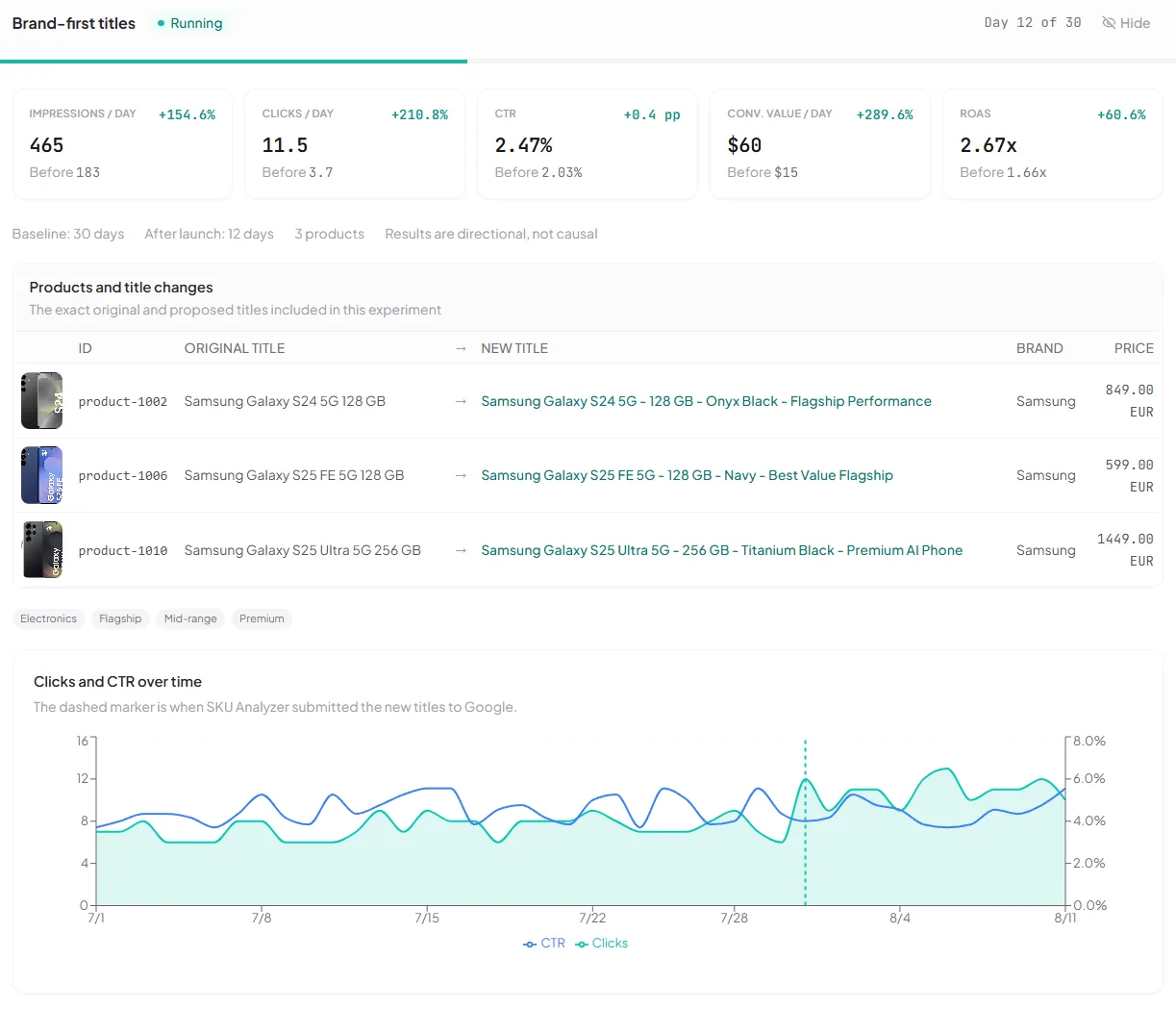
Whatever tool you use, the requirement is the same — performance tracked per product rather than per campaign. Without it you are reading the account and calling it the titles.
Google Shopping Title Optimization Tools
For small catalogs, manual editing in Merchant Center — or a feed rule that prepends the brand or appends the color — works fine. As the catalog grows, a title optimizer or a broader product feed management tool can construct titles at scale. The column that separates them is the last one: whether anything reports back on what the change did.
| Tool | Approach | MC Push | Impact Tracking | A/B Testing |
|---|---|---|---|---|
| SKU Analyzer | Template builder with feed variables + inline per-product editing | Direct to MC via supplemental feed | Before/after per product (clicks, conversions, revenue, ROAS) | 30-day baseline + 30-day test with daily time series |
| Manual / Spreadsheet | Edit in MC or re-upload feed | Native | None | None |
| DataFeedWatch | AI-generated titles (10 languages) | Via feed rules | None | Feed-level A/B |
| ProductHero Products AI (alternatives) | AI suggestions, bulk editing, side-by-side preview | Direct to MC | None | None |
| Channable | Rule-based feed transformation | Via feed rules | None | None |
The biggest gap in most title optimization workflows is knowing whether your changes actually helped. You can restructure thousands of titles, but without per-product before/after tracking, you're optimizing blind. If you're investing significant effort in title optimization, look for a tool that can measure impact at the product level — not just overall campaign metrics.
Frequently Asked Questions
What is the ideal length for Google Shopping product titles?
Google allows up to 150 characters, but only 70-100 characters typically display in Shopping ads. Put the most important information (brand, product type, key attributes) in the first 70 characters. Use the remaining space for secondary details that help with matching but may be truncated in the ad display.
Should I put the brand name first in Google Shopping titles?
It depends on brand recognition. For well-known brands (Nike, Apple, Sony), lead with the brand name as shoppers search for it. For lesser-known brands, lead with the product type (what it is) so shoppers know what they're looking at. Test both approaches if unsure.
How do I optimize titles for products with variants?
Include the specific variant attributes in each title—don't use generic titles for all variants. "Nike Air Max 90 - White/Black - Men's Size 10" is better than "Nike Air Max 90". This ensures each variant matches relevant searches and helps shoppers identify exactly what they're clicking on.
Can I use promotional text in Google Shopping titles?
No. Google prohibits promotional text like "Sale", "Free Shipping", "20% Off", or "Best Price" in product titles. Using promotional language can result in product disapprovals. Use Merchant Promotions to highlight deals instead—they display as special annotations on your ads.
How often should I update my product titles?
Review titles quarterly or when you notice performance issues (low impressions or CTR). Avoid frequent changes that prevent you from measuring impact. When testing, change titles for a subset of products, wait 2-4 weeks for data, then compare performance before and after.
Can I A/B test product titles with Google Ads campaign experiments?
No. Campaign experiments split campaign settings — bids, bid strategies, targeting — not feed attributes. Your product title comes from the Merchant Center feed, which sits outside the experiment framework, so there is nothing for an experiment to split. To test a title you have to change the title itself on a subset of products and measure those products against a baseline period or an unchanged holdout group.
How do I know whether a title change actually worked?
You need per-product before-and-after data and a logged change date. Account-level metrics move for a dozen reasons at once — budget, seasonality, competitor activity — so a shift in overall impressions or CTR tells you almost nothing about the titles. Record impressions, clicks, CTR, conversions and ROAS for the changed products over a baseline period, note the exact date the new titles went live in ads (not the date you saved them), then compare the same products over an equal-length period afterwards.