
Google has started switching on AI performance insights, a new report in Merchant Center that shows how your products surface in AI Mode, AI Overviews in Search, and the Gemini app. Announced at Google Marketing Live in late May, it reached its first real merchant accounts this week. It's the first time any Google product has exposed query-level data for AI Overviews and AI Mode. Not Search Console. Not Google Ads. Merchant Center got it first.
This guide covers what's in the report, where to find it, what the first hands-on screenshots show, and what you can realistically do with it while the rollout is this early.
Early days
AI performance insights is a pilot, live for a limited number of US accounts as of mid-July 2026. Everything below reflects the first public screenshots and Google's official documentation. Module names, metrics, and availability can still change before the wider rollout.
What Google Shipped, and When
Google announced AI performance insights on May 27, 2026, in the same Marketing Live push that introduced conversational attributes. The announcement promised a report showing "how your brand is discovered across Google's generative AI ecosystem", with availability "in the coming months" for the US, Canada, Australia, India, and New Zealand. Coverage from Search Engine Land and PPC Land at the time was working from Google's mockups, because nobody had the actual report.
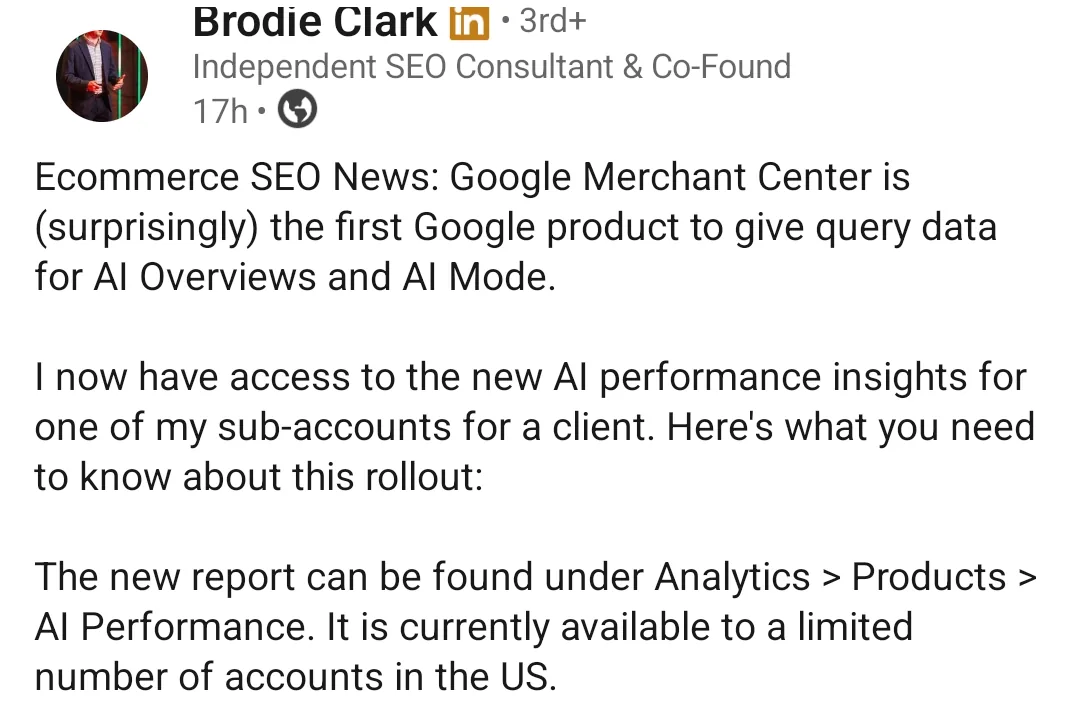
That changed on July 14, when SEO consultant Brodie Clark got access for a client account and posted the first real screenshots on LinkedIn, picked up the same day by Search Engine Roundtable. His framing explains why this rollout matters beyond Shopping circles:
"Google Merchant Center is (surprisingly) the first Google product to give query data for AI Overviews and AI Mode."
— Brodie Clark, Independent SEO Consultant (source)
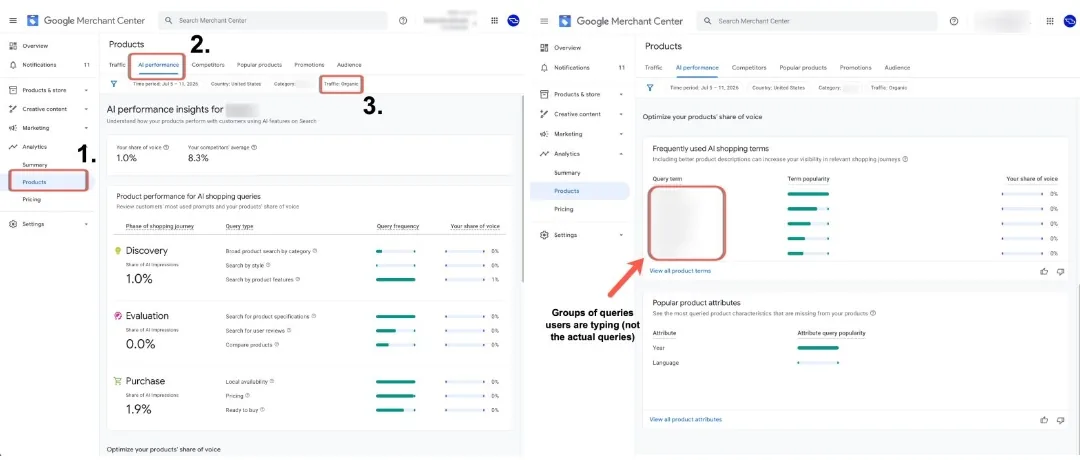
The report lives under Analytics → Products → AI performance in Merchant Center. Three things define its scope:
- Organic only. The data covers free listings surfacing in AI experiences, the same inventory behind Google's free product listings. Paid Shopping and PMax traffic isn't in this report.
- Three AI surfaces. AI Mode, AI Overviews in Search, and the Gemini app. Google's official help doc groups them as "shopping journeys starting from" those surfaces.
- Impressions and share, not clicks. There's no click, CTR, or conversion data. The report answers "how visible am I?", not "what did it earn?"
Inside the Report: The Four Modules
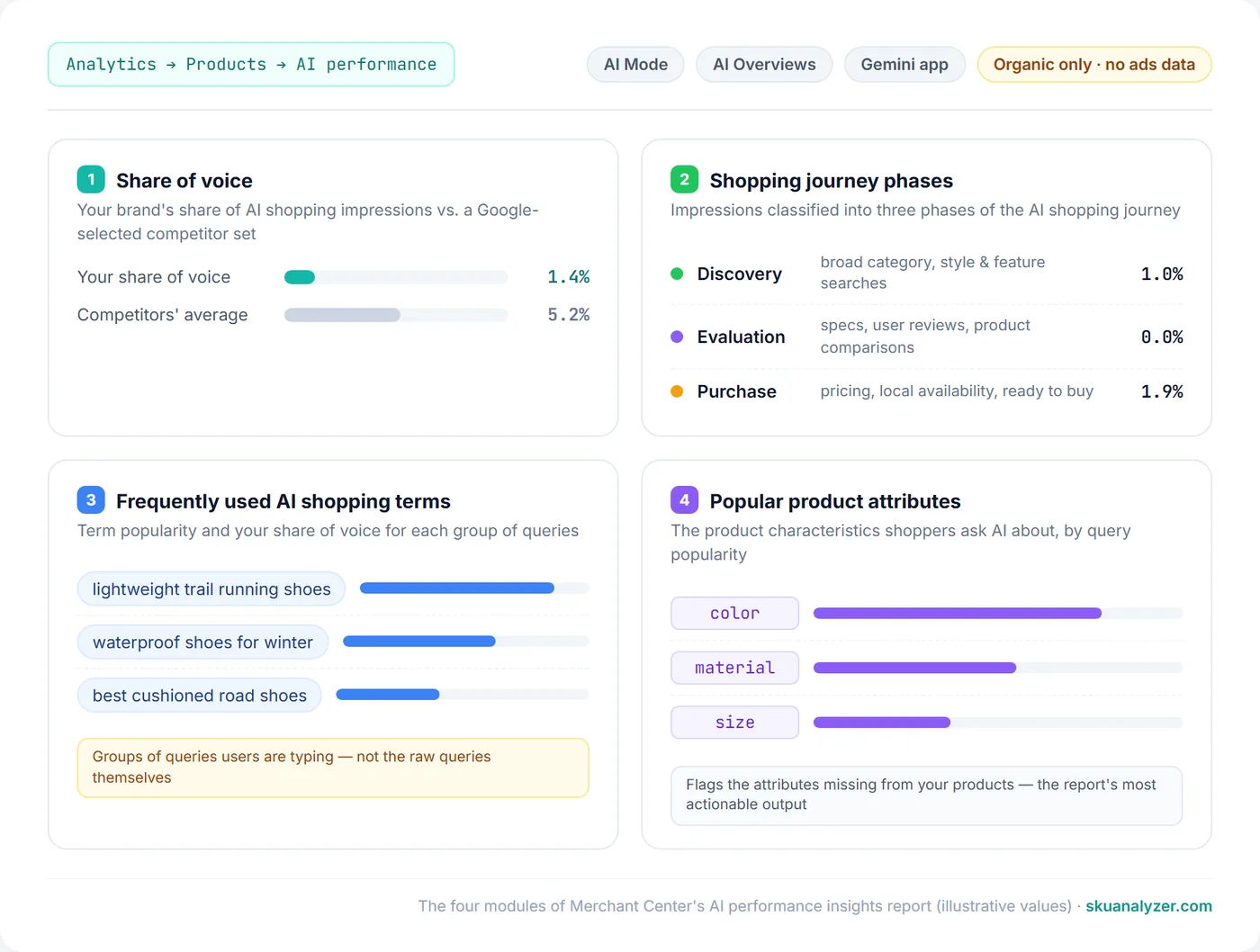
The report is organized into four modules, filterable by product category, time period, country, and traffic type. Here's what the live version shows, based on the first screenshots and Google's documentation.
1. Share of voice
Your brand's share of AI shopping impressions, benchmarked against a competitor set that Google selects for you. In the screenshots above, the account holds a 1.0% share of voice against a competitors' average of 8.3%. Two quirks worth knowing from the help documentation: if your products don't collect enough impressions, share of voice reads zero, and if Google hasn't defined competitors for your account, it reads 100% — neither number means what it appears to.
2. Shopping journey phases
The scorecard classifies conversational queries into three phases and reports your share of AI impressions in each:
- Discovery — early-stage exploration: broad product searches by category, style, or feature.
- Evaluation — mid-stage comparison: product specifications, user reviews, comparing products.
- Purchase — late-stage intent: local availability, pricing, ready-to-buy queries.
This is a genuinely new lens. Standard Shopping reporting has never split visibility by intent stage — a product could be strong in comparison queries and invisible in ready-to-buy ones, and nothing in Google Ads or Merchant Center would have told you.
3. Frequently used AI shopping terms
Brodie Clark called this the most interesting part of the report. It lists the query themes where your products surface in AI features, each with a popularity indicator and your share of voice for that term. The catch: these are groups of queries, not the raw text shoppers typed. Google describes them as representations of query themes, closer to topic clusters than to a search terms report.
4. Popular product attributes
The most actionable module. It shows which structured attributes (color, material, size, and so on) shoppers ask AI about in your categories, and flags the attributes missing from your own products. Google pairs this with an attribute completeness score, so the module doubles as a to-do list for feed optimization: these are the fields AI surfaces want and your feed doesn't have.
Why Merchant Center Got This Before Search Console
The obvious question is why AI query data landed in a feed tool before it landed in Google's flagship search reporting product. SEOs have been asking for AI Overviews segmentation in Search Console since AI Overviews launched; what they got is aggregate data folded into normal Search results with no way to isolate it. Merchant Center now offers more: query themes, journey phases, and a share-of-voice benchmark, specifically for shopping.
The practical read is that Google needs merchants to care about AI surfaces. AI Mode already appears on a meaningful slice of shopping journeys — AI Overviews show on roughly 14% of shopping queries — and Google has spent 2026 shipping merchant-side infrastructure for it: conversational attributes for product understanding, the Universal Commerce Protocol for checkout, and now reporting to make the whole thing measurable. A visibility report is how you convince a merchant the channel exists.
It also confirms where the data comes from. The report covers organic AI visibility, which means the inventory doing the work is your free listings, the channel most Shopping advertisers still treat as an afterthought. If AI surfaces pull from free listings, then free listing performance stops being a curiosity metric and becomes the baseline for how you'll show up in AI shopping.
The Honest Limitations
The first hands-on account of the report came with a caveat that's worth quoting rather than paraphrasing:
"In its current form, similar to the recent rollout of AI reporting in Search Console, there isn't a great deal of actionability behind the data, though it is good to see at least some form of query data being included."
— Brodie Clark (source)
Specifics to keep in mind before treating the numbers as strategy input:
- No raw queries. Query groups only. You can't harvest these into keyword lists or negatives.
- No outcomes. Impressions and share of voice, no clicks or conversions. You can't tie AI visibility to revenue from inside the report.
- Black-box competitor set. Google picks the comparison brands and you can't edit them, so share of voice is only as meaningful as a competitor list you can't see or verify.
- No API, no export, no history guarantee. The report is UI-only for now. Nothing in the Merchant API or Reports API exposes this data yet, so there's no way to warehouse it or trend it beyond what the UI shows.
- Pilot-sized availability. A limited number of US accounts today; Google's announcement page lists Australia, Canada, India, and New Zealand as next. No timeline for Europe has been published.
What to Do While It Rolls Out
You can't opt into the pilot, but the levers the report will eventually grade you on are all feed-side and available today.
- Check whether you already have it. Merchant Center → Analytics → Products. If there's an AI performance tab next to Traffic, you're in the pilot. US accounts first.
- Fix attribute completeness before the report tells you to. The product attributes module grades structured data coverage: color, material, size, and category-specific fields. Auditing those now is plain feed optimization with a new payoff attached.
- Add conversational attributes to your top products. Google's own recommendation for improving AI-surface visibility runs through the six conversational attributes, especially Q&A pairs and popularity rank. Same supplemental-feed mechanism, same join key, no risk to product approval.
- Get a baseline on your free listing performance. The AI report measures organic visibility, so your existing free listing clicks and impressions are the closest thing you have to its outcome data. SKU Analyzer's Organic Performance page tracks them per product, filterable by brand, product type, and label, so when AI visibility data arrives for your account, you'll know whether it moves anything.
- Keep titles descriptive, not keyword-stuffed. Conversational queries lean on natural product language. A title testing workflow that measures CTR before and after a change is a safer path than rewriting the catalog on instinct.
Frequently Asked Questions
Where do I find AI performance insights in Merchant Center?
Log into Merchant Center and go to Analytics > Products > AI performance. If the tab isn't there, your account isn't in the pilot yet — the report is currently limited to a subset of US accounts, with Australia, Canada, India, and New Zealand planned next.
Does the AI performance report include Shopping ads data?
No. The report covers organic AI visibility only — free listings surfacing in AI Mode, AI Overviews, and the Gemini app. Paid Shopping and Performance Max traffic is excluded, and there is no click or conversion data in the report, only impressions and share of voice.
Can I see the actual queries shoppers type into AI Mode?
Not the raw queries. The report shows groups of queries — themes like a product category plus a feature — with a popularity indicator and your share of voice for each group. It's still more query-level AI data than Search Console currently gives, which is why the report got so much attention.
How is share of voice calculated in AI performance insights?
Your brand's AI shopping impressions divided by the total impressions across you and a competitor set that Google selects automatically. You can't edit the competitor set. If your products don't get enough impressions, share of voice shows zero, and accounts with no defined competitors show 100%.
How do I improve how my products show up in AI shopping results?
Feed completeness is the lever Google points at. The report's product attributes module flags which structured attributes (color, material, size) shoppers query but your products are missing. Filling those gaps, adding conversational attributes, and keeping titles descriptive are the concrete actions available today.
AI performance insights is a pilot report with real limitations, but it settles one argument: Google considers AI shopping visibility a thing merchants should measure, and it's building the reporting before most merchants have asked for it. The preparation is worth doing regardless of when the tab reaches your account: complete attributes, honest titles, and a baseline on your organic performance. SKU Analyzer covers the measurable side of that today: free listing performance, feed history, and per-SKU analytics for the products AI surfaces will be judging. And once Google rolls the report out broadly and exposes the data through an API, AI performance tracking will be added to SKU Analyzer alongside the rest of your organic data.