
At Google Marketing Live 2026, Google quietly added six new product fields to Merchant Center called Conversational Attributes. They are optional, they do not affect product approval, and they exist for one reason: helping Google's AI surfaces (AI Mode in Search, Gemini, and other agent-driven shopping experiences) actually understand and recommend your products when a shopper asks a real question in plain language.
This guide explains the six attributes, shows example values across different product categories, and walks through how to submit them via supplemental feed or the Merchant API.
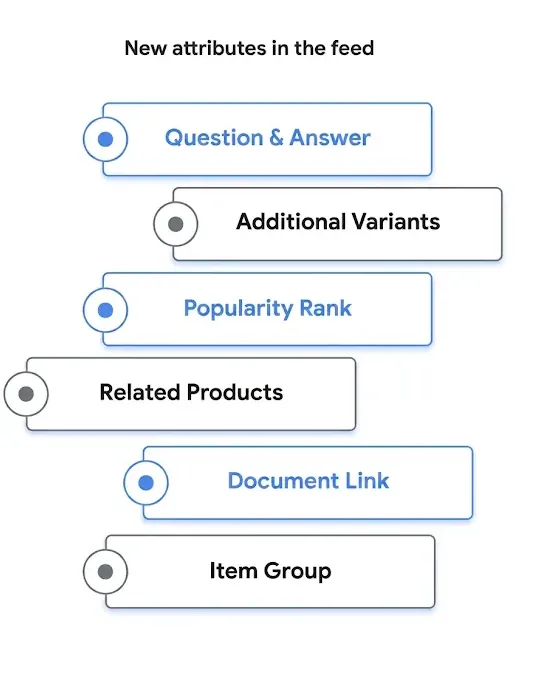
What Google Actually Said
From the Google Marketing Live 2026 announcement post:
"Strong product descriptions are critical for brands to get discovered in the AI era. Now, retailers globally can use conversational attributes to update their product descriptions to reflect the more conversational way people search."
— Google, Marketing Live 2026 Shopping update (source)
The framing is important. Google is not asking merchants to rewrite their primary feed. The six new fields live in a separate, optional layer that sits next to your existing product data and is read mostly by Google's AI models, not by the classic Shopping ad serving stack. The official spec lives in Google's help center under How to use conversational attributes, which is the canonical reference for field names, formats, and limits used in this guide.
The launch was first surfaced publicly when Hana Kobzóvá spotted the new help pages and posted about them, and was then covered by Search Engine Land and Search Engine Roundtable within a day.
The Six Conversational Attributes
Each attribute solves a specific problem an AI assistant runs into when trying to recommend a product. Below is the at-a-glance reference. Section-by-section examples follow.
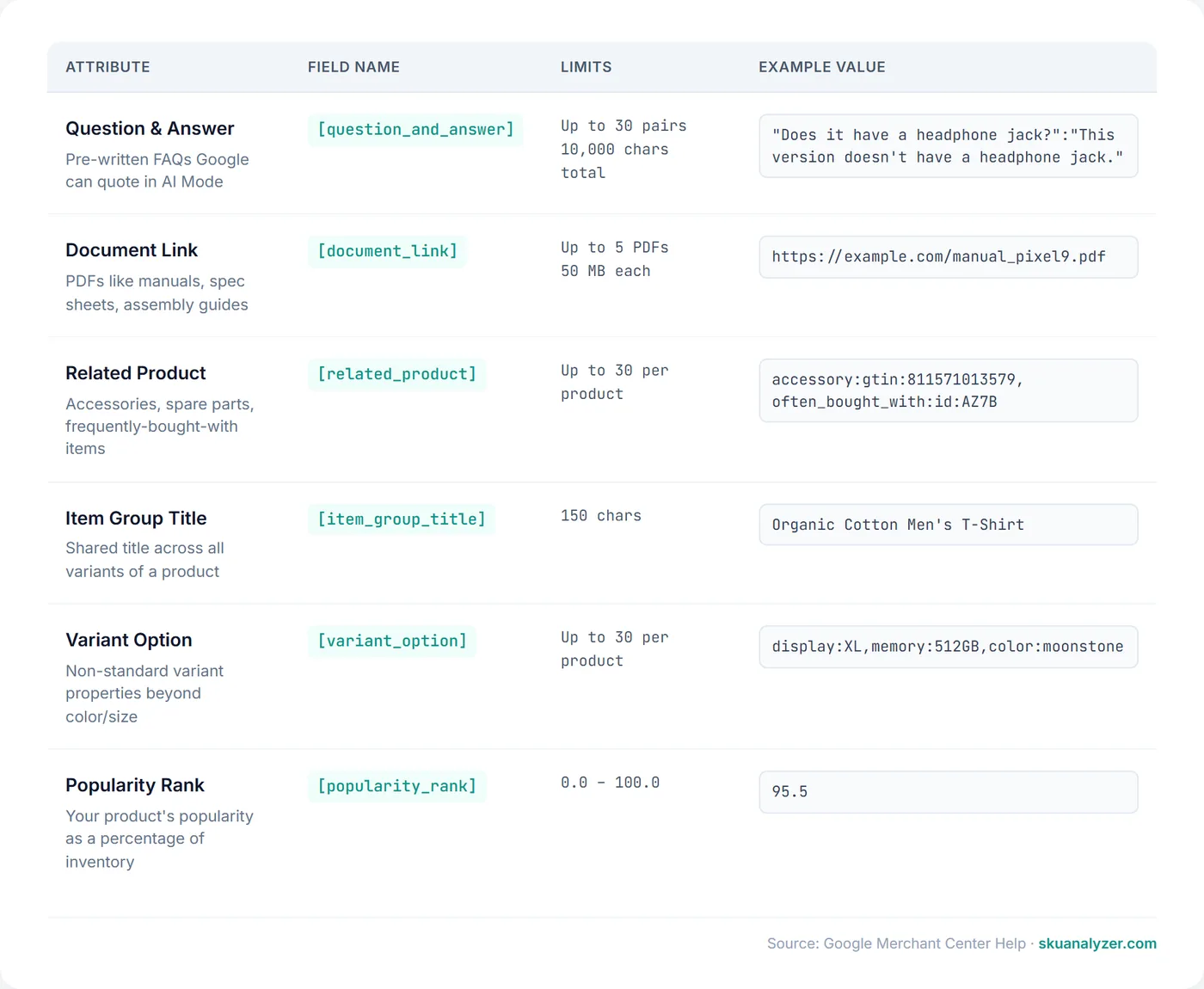
1. Question and Answer [question_and_answer]
Pre-written FAQs about the product, structured as key-value pairs. Google can quote these directly when AI Mode is answering a shopper's question. The limit is 30 pairs per product, with a total of 10,000 characters across all pairs.
Examples across different product types:
Electronics — smartphone:
"Does it have a headphone jack?":"This version doesn't have a headphone jack.",
"Does it support Bluetooth?":"It has full Bluetooth 6.0 support.",
"Is it dust and water resistant?":"Yes, it's rated IP68 for dust and water resistance up to 1.5 m for 30 minutes."
Tools — cordless drill:
"Is a battery included?":"No, this is the bare tool. Compatible with the 20V MAX battery system.",
"What's the maximum torque?":"610 in-lbs of max torque.",
"Can I use it for masonry?":"Yes, with a masonry bit. Hammer mode is built in."
Apparel — t-shirt:
"Is it preshrunk?":"Yes, the fabric is preshrunk so the size you order is the size you keep after washing.",
"Does it run true to size?":"Most customers find the fit true to size. Size up for a relaxed fit."
2. Document Link [document_link]
URLs to PDF documents like product manuals, spec sheets, assembly instructions, or warranty documents. Up to 5 PDFs per product, max 50 MB each. Multiple URLs are comma-separated.
Examples:
https://example.com/manuals/pixel9-quickstart.pdf

https://example.com/specs/dewalt-dcd791d2-spec-sheet.pdf,
https://example.com/manuals/dewalt-dcd791d2-manual.pdf

https://example.com/assembly/ikea-malm-bed-assembly.pdf
The use case Google has in mind is AI Mode being able to answer questions like "where can I find the manual for this washing machine" or "what's the warranty period on this dishwasher" by pulling directly from the linked document.
3. Related Product [related_product]
Links to other products in your catalog using one of three relationship types: accessory, required_part, or often_bought_with. Each related product is referenced by id (your offer_id) or gtin. Up to 30 related products per item.
Examples:
Electronics — camera body needs lens and SD card:
required_part:gtin:0884338087325,
accessory:id:SDXC-128GB-V60,
often_bought_with:id:SLING-BAG-BLK
Tools — drill ships bare, needs battery:
required_part:id:BAT-20V-5AH,
accessory:id:DRILL-BIT-SET-25,
often_bought_with:id:DEWALT-CHARGER-FAST
Coffee machine consumables:
accessory:gtin:7613032437961,
often_bought_with:id:DESCALER-500ML,
often_bought_with:id:WATER-FILTER-V3
4. Item Group Title [item_group_title]
A shared title used across all variants of a product, up to 150 characters. This is the "umbrella" title an AI surface can use when grouping variants together rather than listing every SKU separately. It pairs naturally with structured per-variant titles.
Examples:
Organic Cotton Men's T-Shirt

DeWalt 20V MAX XR Brushless Cordless Drill/Driver

Apple iPhone 17 Pro — 5G Smartphone
5. Variant Option [variant_option]
For variant-identifying properties that don't fit the standard variant attributes (color, size, material, pattern, age_group, gender). Up to 30 name/value pairs per product. Common use cases are storage capacity on electronics, frame size on bikes, or shoe width on footwear.
Examples:
Smartphone:
display:6.1in,memory:256GB,color:moonstoneBicycle:
frame_size:54cm,wheel_size:700c,gearing:Shimano 105Running shoe:
width:wide,drop:8mm,cushion:max6. Popularity Rank [popularity_rank]
A percentile from 0.0 to 100.0 indicating how popular this product is relative to the rest of your inventory. 95.5 means this SKU is in the top 4.5% of your catalog by popularity. Google uses this as a signal for queries like "what's your best-selling running shoe" or "what's the most popular espresso machine under $1000."
You decide what "popularity" means for your catalog — trailing 30-day unit sales, revenue rank, page views, or a blended score. The important thing is that the percentile is reasonably current and consistent across SKUs.
Example values:
95.5    ← top sellers
72.0    ← mid-tier
12.3    ← long tail
Why Google Built These Now
The short answer is that shoppers are starting to talk to Google the way they would talk to a salesperson on the floor. PPC Land reports that AI Mode queries average roughly three times the length of traditional Shopping searches, and they often include constraints, intents, and comparisons that classic keyword targeting was never designed for.
A traditional Shopping ad system can match the query "running shoes" to your product because the title includes that phrase. It cannot, on its own, answer "what's a good neutral running shoe with extra cushion for a heavy runner under $150." That requires structured data about cushion level, drop, width, weight rating, popularity, and price — the kind of attributes that conversational fields were designed to carry.
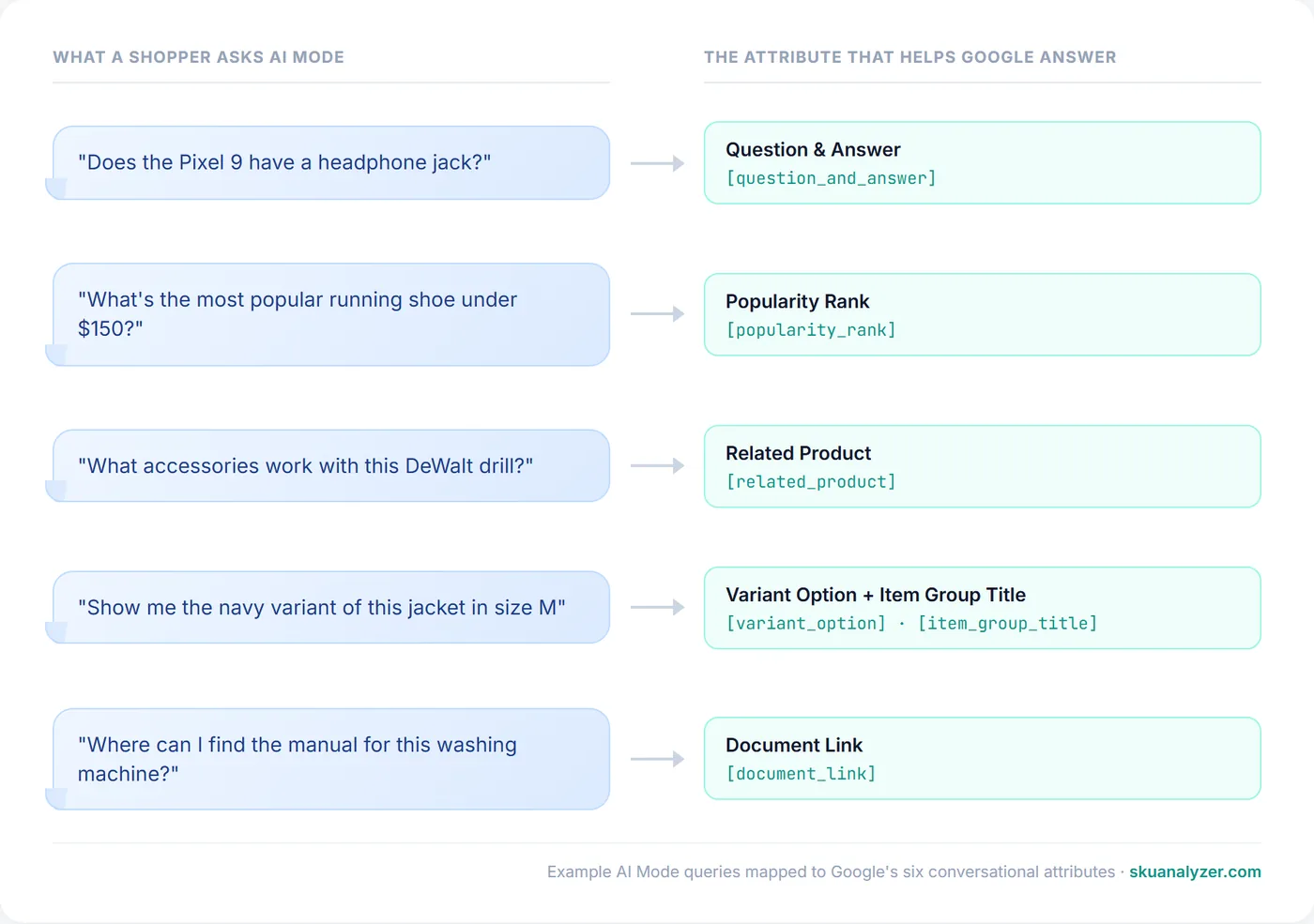
This is the same shift covered in the guides on AI Overviews now appearing on 14% of shopping queries and the new shopping ad format in AI Mode. Conversational attributes are the feed-side preparation for the same trend.
How to Submit Conversational Attributes
Google supports two delivery paths, and you can mix them. The official help article details both: How to use conversational attributes.
Option 1: Supplemental data source
The easier path. Upload a TSV, XML, or Google Sheet to Merchant Center as a supplemental feed and map the conversational attribute columns to the field names above. The supplemental source layers on top of your primary feed using id (offer_id) as the join key, so each row only needs the SKU plus the attributes you want to add.
A minimal TSV with two conversational attributes looks like this:
id    popularity_rank    item_group_title
SKU-001    95.5    Organic Cotton Men's T-Shirt
SKU-002    87.2    Organic Cotton Men's T-Shirt
SKU-003    34.1    Organic Cotton Men's T-Shirt
This is the same mechanism used by tools like SKU Analyzer's custom labels supplemental feed — layering structured data on top of the primary feed without touching it.
Option 2: Merchant API
If your catalog changes frequently, or you already store this data in a PIM or product database, the Merchant API is cleaner. Conversational attributes go on the ProductInput resource through the same supplemental data source you'd otherwise upload as a file. The advantage is real-time updates and no file-format headaches.
Neither path affects product approval
Google is explicit on this: submitting conversational attributes via either delivery method does not affect the approval status of existing products. They are additive metadata. If you misformat one, you do not lose Shopping eligibility for the SKU; the attribute is simply ignored.
Where to Start: A Practical Priority Order
All six fields are optional, but they are not equal in payoff. Based on what kinds of conversational queries actually show up in AI Mode shopping sessions:
- Question and Answer — highest leverage. Q&A pairs directly answer the kind of long-form questions that AI Mode receives. If you already have a product-page FAQ, you have most of this data.
- Popularity Rank — cheap to compute, hard for AI to derive otherwise. Powers "best" and "most popular" queries.
- Variant Option + Item Group Title — essential for any catalog with many variants. Without these, AI surfaces have to guess at variant structure.
- Related Product — high value for cross-sell-friendly queries ("what accessories work with this") but more work to maintain.
- Document Link — lowest urgency unless you sell anything that comes with a manual, spec sheet, or assembly guide. For DIY, appliances, and tech, it's table stakes.
For most catalogs, getting question_and_answer and popularity_rank live on the top 100 SKUs by spend is the cheapest, fastest way to start showing up in AI Mode results.
Where This Fits in Google's 2026 Shopping Push
Conversational attributes are one of several Marketing Live 2026 announcements aimed at the same target: making Google's AI surfaces a viable shopping channel. The others worth knowing about:
- The Universal Commerce Protocol, Google's open standard for enabling checkout directly inside AI Mode and Gemini.
- UCP product feed readiness, the broader feed checklist for agentic commerce.
- Direct Offers in AI Mode, the new ad format for personalized deals inside conversations.
- Ask Advisor, an AI assistant inside Merchant Center that helps merchants act on the data they're already collecting.
UCP handles checkout. Direct Offers handle paid placement. Conversational attributes handle the product understanding underneath all of it. Together they make up Google's bet that shopping inside AI surfaces is where a meaningful share of ecommerce discovery is heading.
The Google Ads team's recent LinkedIn post, "Product data: not just for Shopping ads anymore", makes the case bluntly: the same structured feed that drives your Shopping campaigns is now the foundation for every AI shopping experience Google is building.
Practical Next Steps
- Audit your top 100 SKUs by spend. Conversational attributes deliver the most value where you already have traffic. Check the feed optimization guide for the broader fix-and-prioritize framework.
- Pull Q&A content from your product pages. Most ecommerce sites already have FAQ blocks or chat transcripts. Reformat them into the key-value structure and ship them as a supplemental feed.
- Compute popularity rank weekly. Use trailing 30-day unit sales or revenue. Recompute as part of your normal feed refresh.
- Decide on supplemental feed vs Merchant API. Start with a supplemental TSV if you've never pushed to MC via API before. Switch later if you outgrow it.
- Track AI Mode reporting as it matures. Google has started rolling out the AI performance insights report in Merchant Center — the first reporting on how products surface in AI Mode and AI Overviews, currently piloting with US accounts.
Frequently Asked Questions
Are conversational attributes required for Google Shopping?
No. They are completely optional and complement your existing Merchant Center product data. Not submitting them will not affect your Shopping ads or product approval. They only matter for visibility in AI-driven surfaces like AI Mode in Search, Gemini, and conversational shopping experiences.
Will adding conversational attributes affect my product approval status?
No. Google explicitly states that submitting conversational attributes through a supplemental data source or the Merchant API does not affect the approval status of your existing products. They are additive metadata and don't modify your primary feed.
How do I submit conversational attributes — feed or Merchant API?
Both work. Supplemental data sources (TSV, XML, or Google Sheets uploaded to Merchant Center) are easier to start with. The Merchant API is better for catalogs that change frequently or for syncing data already stored in a PIM or product database.
Which conversational attribute should I prioritize first?
Start with question_and_answer and popularity_rank. Q&A answers the long-form queries AI Mode receives, and popularity rank gives Google a direct signal for "best" and "most popular" queries. Variant option and item group title come next, especially for catalogs with many variants.
How do conversational attributes relate to UCP and agentic commerce?
They sit alongside the Universal Commerce Protocol as the data layer for AI-driven shopping. UCP handles checkout and identity inside AI surfaces; conversational attributes handle product understanding. Together they let Google's AI surfaces find your products, describe them accurately, answer shopper questions, and complete purchases without leaving the conversation.