
Channable is a capable feed management platform with 3,000+ channel templates, a sophisticated rules engine, and optional PPC automation. For agencies and large multi-channel sellers, it is hard to beat.
But if you run a small ecommerce store selling on Google Shopping and maybe Facebook or Amazon, Channable can feel like renting a warehouse when all you need is a storage closet. Pricing is modular and scales with your product count and number of channels, and most of those 3,000+ templates will never apply to your business. You end up paying for breadth you do not use.
This guide compares five Channable alternatives that are better suited to small ecommerce stores, and it tries to be honest about where the differences are real and where they are just marketing. One thing worth saying up front: the "Channable has more channels" argument is mostly noise at small-store scale. Channable advertises 3,000+ channel templates and DataFeedWatch advertises 2,000+, but these are unaudited vendor counts measuring different things, and every tool below covers the handful of channels a small store actually sells on. Price, platform fit, and how much optimization control you get are the differences that will affect you.
Why Small Stores Look for Channable Alternatives
Channable is an excellent platform. It handles complex multi-channel syndication, offers a visual rules engine that non-technical users can learn, and its PPC automation features save agencies significant time. None of that changes the fact that it is often overkill for a small store.
Here is what typically drives small merchants to look elsewhere:
- Modular pricing that adds up: A Channable subscription is a Core plan (feed management and rules) sized by the items, projects, and channels you need. Marketplaces, PPC, repricing, and Creatives are separate paid modules on top. The entry Core price looks approachable, but it is not what you pay once you switch on the pieces the platform is known for.
- Unused channel templates: Those 3,000+ templates are great for agencies managing diverse client portfolios. If you only sell on Google Shopping and Facebook, you are paying for breadth you will never use.
- Learning curve for the rules engine: The rules engine is powerful, but power comes with complexity. Small teams without a dedicated feed specialist may spend hours configuring rules that simpler tools handle with a few clicks.
- PPC automation you may not need — and are not getting for free: Channable's campaign generation is genuinely useful for large accounts, but it is a paid add-on module rather than part of the Core plan. If you already manage campaigns directly in Google Ads or use a separate bid management tool, you can drop that module and the comparison with cheaper tools narrows considerably.
The bottom line: Channable is built for scale and multi-channel complexity. If your needs are simpler, a focused alternative can give you what you need at a fraction of the cost and setup time.
What to Look for in a Channable Alternative
Before jumping to specific tools, it helps to know what actually matters for a small ecommerce store evaluating feed management options:
- Transparent pricing: You should be able to see exactly what you will pay before signing up. Hidden costs and "contact us" pricing are red flags for small budgets.
- Google Shopping and Meta support: These are the two channels that matter most for most small stores. The tool needs to handle both well, with proper attribute mapping and format compliance.
- Easy setup: If it takes a week to configure your first feed, something is wrong. Look for tools with pre-built templates for your ecommerce platform.
- Shopify or WooCommerce integration: Direct integration with your platform means less manual work and fewer sync issues. Check if the tool has a native app or plugin for your store.
- Feed optimization features: At minimum, you need title rules, description editing, and the ability to generate custom labels for campaign segmentation.
- Error monitoring: The tool should alert you when products get disapproved or when feed errors appear in Google Merchant Center.
Pro Tip
Nearly every tool below runs a free trial rather than a free plan. Test your top two choices with your actual product catalog before committing, and check what the advertised entry price actually includes — feed tools routinely meter extra SKUs, extra channels, and marketplace connections as separate line items.
1. DataFeedWatch: Best Overall Channable Alternative
DataFeedWatch is the strongest all-around alternative for small and mid-size stores. It balances powerful optimization features with an interface that marketing teams can use without developer help. If you are leaving Channable because of cost or complexity, DataFeedWatch is likely where you should land. For a detailed side-by-side comparison, see the DataFeedWatch vs Channable guide.
Why It Works for Small Stores
DataFeedWatch focuses heavily on Google Shopping, which is where most small ecommerce stores spend the majority of their ad budget. Its Google-specific tooling is the strongest part of the product, and channel breadth is not the trade-off it is often assumed to be: DataFeedWatch advertises 2,000+ shopping channels, marketplaces, and affiliate networks across 60 countries, so for a small store the practical difference against Channable's 3,000+ is close to zero.
- A/B testing for product titles: Test different title formats and see which drives better click-through rates. For a more analytics-driven approach, see how title optimization with impact tracking works. This feature is uncommon in the mid-market segment and worth the investment if you do a lot of title testing.
- Custom label generation: Automatically assign custom labels based on margin, performance, price range, or any other attribute. This makes campaign segmentation in Google Ads much easier. If labeling is your main need, also consider ProductHero and its alternatives.
- Feed auditing: The tool scans your feed for common errors and suggests fixes before you submit to Merchant Center. This alone can save hours of troubleshooting.
- Visual rule builder: Create transformation rules with a point-and-click interface. No coding required, and the learning curve is gentler than Channable's.
Pricing
DataFeedWatch's entry Shop plan is $64/month for up to 1,000 SKUs on one shop, with a 15-day free trial. Plans scale by SKU count and number of shops — Merchant runs $84/month for up to 5,000 SKUs across two shops, and Agency $239/month. Most small stores land between $64 and $200/month depending on catalog size, and SKUs above your plan limit cost extra. If you are also evaluating DataFeedWatch competitors, see the DataFeedWatch alternatives roundup.
Limitations
- No PPC automation or campaign generation — though this is a thinner advantage for Channable than it sounds, since Channable's PPC module is a paid add-on rather than part of its Core plan
- Pricing can climb if you manage multiple shops, and overage SKUs are billed on top
- Costs more at entry than every other tool on this list
Best For
Small to mid-size stores focused on Google Shopping and Meta, in-house marketing teams that want strong optimization tools without excessive complexity, and anyone who values title A/B testing.
2. GoDataFeed: Best Budget Option
GoDataFeed is the most affordable dedicated feed management tool on this list. If budget is your primary concern and you need a reliable tool that covers the basics without extras you will not use, GoDataFeed delivers.
Why It Works for Small Stores
GoDataFeed covers the channels that matter most for small US-based ecommerce stores: Google Shopping, Amazon, Facebook, Walmart, and eBay. The interface is straightforward, and setup is faster than most competitors because the tool avoids overloading you with options you do not need.
- Smart feeds: Automated optimization applies best practices to your feed without manual rule creation. Good for stores that do not have a feed specialist on staff.
- Rule builder: Create filters and transformations when you need them, with a simple interface that gets the job done.
- Inventory sync: Real-time stock updates prevent the costly mistake of advertising out-of-stock products.
- Error alerts: Get notified when feed issues pop up so you can fix problems before they affect your campaigns.
Pricing
GoDataFeed plans start at $39/month for the basic tier, with a recommended Plus plan at $99/month, a 14-day trial, and no contract. Read the metered add-ons before you budget, though: extra SKUs are $5/month per additional 1,000, each extra PPC channel is $29/month, and each marketplace channel is $99/month — more than the Plus plan itself. GoDataFeed is genuinely the cheapest entry point on this list for a single-channel store, but a store adding Amazon and Walmart is not paying $39.
Limitations
- Fewer advanced optimization features compared to DataFeedWatch
- Marketplace channels are billed per channel, so multi-marketplace selling gets expensive fast
- Rules engine is less flexible for complex transformations
Best For
Budget-conscious small stores, merchants with smaller catalogs (under 2,000 products) who need reliable feed management, and sellers focused on Google Shopping and Amazon in the US market.
3. AdNabu: Best for Shopify Stores
AdNabu takes a different approach from the other tools on this list. Instead of being a standalone platform, it is a purpose-built Shopify app that lives inside your Shopify admin. If your store runs on Shopify and you primarily sell through Google Shopping, AdNabu simplifies feed management to the point where it feels almost automatic.
Why It Works for Small Stores
AdNabu eliminates the friction of connecting an external tool to your store. Because it is a native Shopify app, product data syncs automatically, and you manage everything from a familiar interface.
- AI-powered feed optimization: AdNabu uses AI to suggest title improvements, fill in missing attributes, and optimize your product descriptions for search relevance.
- Automatic product scoring: Each product gets a feed quality score so you can quickly see which items need attention.
- Multi-language and multi-currency support: Useful for Shopify stores selling internationally through Google Shopping.
- Bulk editing: Make changes across hundreds of products at once without editing them one by one.
Pricing
AdNabu has the only genuine free plan on this list. Its Starter tier is $0/month for up to 100 products and a single target country, free outright for stores under 10 orders per month and $4.99 + 6 cents per order above that. Paid plans are flat rather than metered: Basic is $39.99/month with unlimited products and orders, unlimited countries and languages, and feeds for Meta, Bing, Pinterest, TikTok, and Snapchat alongside Google. Advanced is $99.99/month and Plus $249.99/month, and annual billing saves roughly 20%.
Limitations
- Shopify only. If you use WooCommerce, BigCommerce, or another platform, this is not an option.
- The free Starter tier caps at 100 products and one country, so it suits a test rather than a real catalog.
- Less flexibility for complex, custom rule creation compared to DataFeedWatch or Channable
Best For
Shopify store owners who want a simple, native solution for Google Shopping feed management without leaving their Shopify admin. The flat unlimited-product pricing makes it especially strong for large catalogs, and the free tier is a real way to try feed management before paying anything.
4. Simprosys Google Shopping Feed: Lowest Paid Entry Point
Simprosys offers Google Shopping feed apps for Shopify, WooCommerce, Wix, and Shopline. It will not match the depth of DataFeedWatch or Channable, but it covers the basics at the lowest price of any paid tool here — and unlike AdNabu, it is not locked to one platform.
Simprosys does not have a free plan
It is widely described as having one, including in earlier versions of this guide, but Simprosys offers a 21-day free trial rather than a free tier. The cheapest ongoing plan is $4.99/month. If you specifically want a feed app that costs nothing indefinitely, AdNabu's Starter tier is the option on this list that actually does that.
Why It Works for Small Stores
Simprosys is the cheapest way to put a properly managed feed in front of Google without committing real money. At $4.99/month for a 500-product store it costs less than a tenth of DataFeedWatch, and it reaches platforms AdNabu does not.
- Broad platform support: Shopify, WooCommerce, Wix, and Shopline, which gives it wider reach than AdNabu's Shopify-only app.
- Multi-channel beyond Google: Submits to Microsoft/Bing, Meta, and Pinterest as well as Google Shopping.
- Basic feed optimization: Edit titles, descriptions, and product types in bulk. Nothing fancy, but functional.
- Google Merchant Center sync: Direct submission to Merchant Center with scheduled updates.
Pricing
Pricing is tiered by the number of products published in your store: $4.99/month up to 500 products, $8.99 for 501–1,000, $13.99 for 1,001–5,000, and $17.99 for 5,001–10,000, billed in USD with roughly 10% off annually. Some features are charged separately — AI feed optimization is $1.00 per 25 products as a one-time charge, XML feeds run $1.75–$6.30/month, and you get three Markets feeds before extras are billed per feed.
Limitations
- No free plan — a 21-day trial, then $4.99/month minimum
- Limited optimization features compared to dedicated feed tools
- No advanced rules engine or transformation capabilities
- You will likely outgrow it as your store scales
Watch the error monitoring
Ultra-low-cost tools tend to be thin on error monitoring. If your feed breaks, you may not find out until you check Merchant Center yourself. Budget time to audit your feed regularly if you go this route.
5. Native Platform Apps (Shopify Google Channel, WooCommerce Product Feed)
Before spending money on any feed tool, consider whether your ecommerce platform's built-in Google Shopping integration is enough. Both Shopify's Google Channel app and WooCommerce's product feed plugins can get your products into Google Merchant Center at zero additional cost.
Why It Works for Small Stores
If you have a small catalog, sell on one or two channels, and your product data is already clean, a native app may be all you need. There is no additional monthly fee, no extra tool to learn, and no integration to maintain.
- Zero additional cost: Both Shopify Google Channel and WooCommerce feed plugins are free.
- Built into your platform: Product data syncs automatically with no external connections to manage.
- Google-maintained (Shopify): The Shopify Google Channel is maintained by Google, which means format compliance is handled for you.
- Simple setup: Most stores can be live on Google Shopping within an hour.
Limitations
- No feed optimization or title rules. Your titles go to Google exactly as they appear in your store.
- No custom label automation. You will need to set custom labels manually in Merchant Center.
- No multi-channel management. Each channel requires a separate setup.
- Limited error reporting. You will rely on Merchant Center's own diagnostics.
- No A/B testing, no performance analytics, no advanced filtering.
Key Takeaway
Native platform apps are a legitimate option for stores with fewer than 500 products selling on Google Shopping only. The moment you need title optimization, custom label automation, or multi-channel syndication, it is time to invest in a dedicated feed tool.
Comparison Table
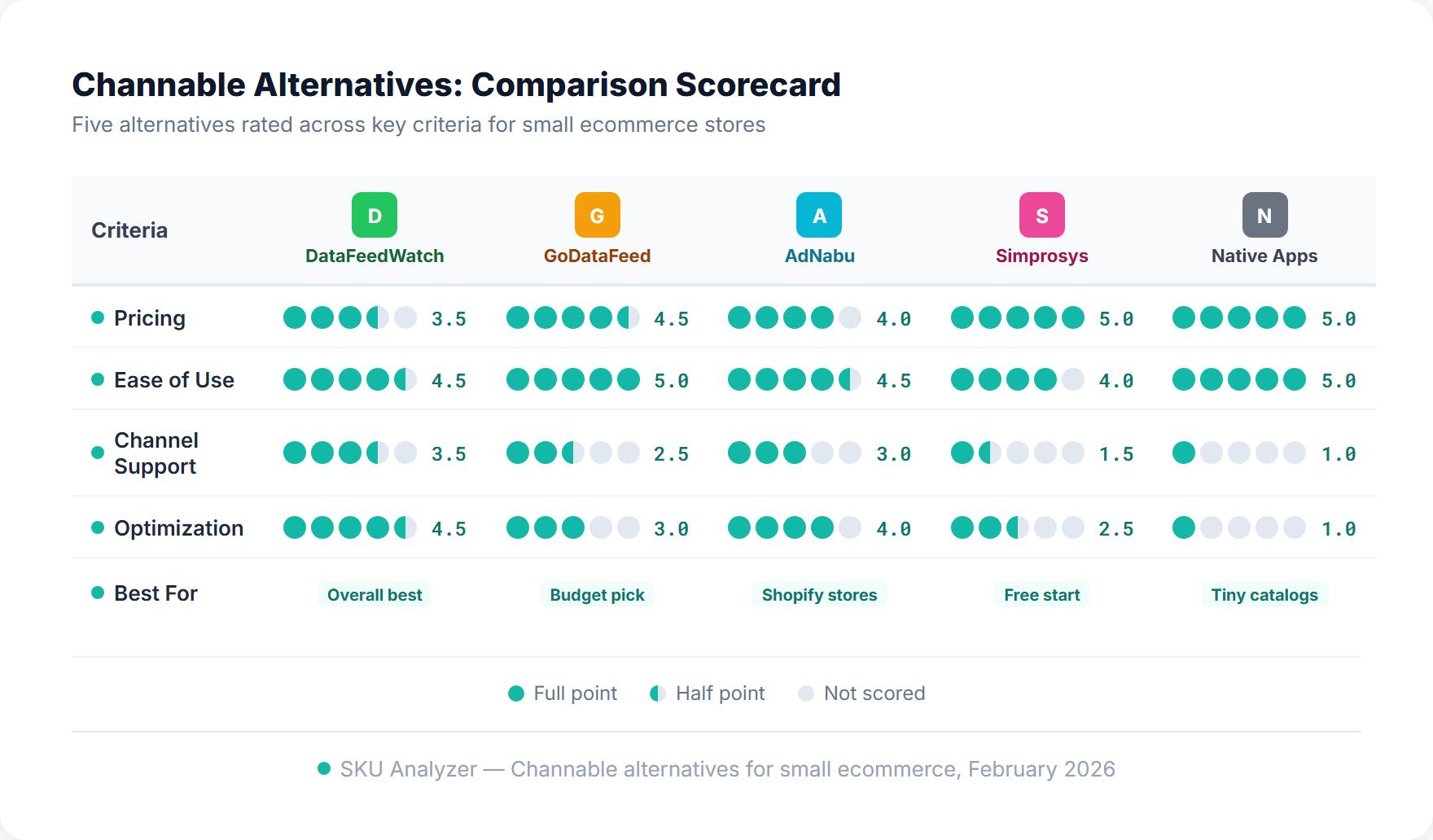
Here is how Channable stacks up against all five alternatives across the dimensions that matter most to small ecommerce stores. Channel counts are the vendors' own published claims — they are unaudited, they count different things, and at small-store scale they are the least useful column in the table. For a broader comparison of feed tools including enterprise options, see the full feed tools comparison.
| Tool | Starting Price | Channels | Ease of Use | Best For | Key Limitation |
|---|---|---|---|---|---|
| Channable | Core plan + paid modules | 3,000+ | Moderate | Agencies, EU sellers | PPC, marketplaces & repricing all cost extra |
| DataFeedWatch | $64/mo | 2,000+ | Easy | Google Shopping focus | Priciest entry point here |
| GoDataFeed | $39/mo | 200+ | Easy | Budget-conscious SMBs | $99/mo per marketplace channel |
| AdNabu | Free / $39.99/mo | Google, Meta, Bing, Pinterest, TikTok | Very Easy | Shopify stores, large catalogs | Shopify only |
| Simprosys | $4.99/mo (trial only, no free plan) | Google, Meta, Bing, Pinterest | Very Easy | Cheapest paid entry | Limited optimization |
| Native Apps | Free | 1-2 | Easiest | Tiny catalogs | No optimization tools |
How to Choose the Right Alternative
With five alternatives to consider, the decision comes down to three factors: your budget, your ecommerce platform, and how many channels you sell on.
By Budget
- $0/month: Native platform apps (Shopify Google Channel or WooCommerce feed plugin), or AdNabu's free Starter tier if you are on Shopify and under 100 products. This works for stores with clean product data and simple needs.
- $5-20/month: Simprosys, priced by catalog size. Basic optimization without a real commitment, and it works on WooCommerce and Wix as well as Shopify.
- $40-100/month: GoDataFeed at $39 for a single channel, or AdNabu Basic at $39.99 for unlimited Shopify products. Check GoDataFeed's per-marketplace fees before assuming $39 is the whole bill.
- $65-200/month: DataFeedWatch is the sweet spot for small stores that want real optimization power, including title A/B testing and custom label automation.
By Platform
- Shopify: AdNabu (native app, AI optimization, the only free tier here), Simprosys (cheapest paid), or DataFeedWatch (more advanced features).
- WooCommerce: Simprosys, GoDataFeed, or DataFeedWatch. AdNabu is not available for WooCommerce.
- Other platforms: DataFeedWatch or GoDataFeed, as both support a wide range of ecommerce platforms.
By Channel Needs
- Google Shopping only: Any tool on this list works. Start with the cheapest option and upgrade when needed.
- Google + Meta (Facebook/Instagram): AdNabu, Simprosys, DataFeedWatch, or GoDataFeed all handle both.
- Google + Amazon + more: GoDataFeed or DataFeedWatch. Both support the major US channels.
- Many marketplaces: At this point, you may actually need Channable — but price the marketplace module in, not just the Core plan. See the Feedonomics vs Channable comparison and marketplace feed tools guide for multi-channel options.
Quick Recommendations
Smallest budget possible? Simprosys at $4.99, or AdNabu free if you are on Shopify and under 100 products. Best overall value? DataFeedWatch. Shopify and want it simple? AdNabu. Not sure you need a tool yet? Start with your platform's native app and upgrade when feed quality limits your growth.
Frequently Asked Questions
What's the cheapest Channable alternative that still works well?
Simprosys, at $4.99/month for up to 500 products, on Shopify, WooCommerce, Wix, or Shopline. If you are on Shopify and under 100 products, AdNabu's Starter tier is free outright. GoDataFeed at $39/month is the cheapest tool with a full rules engine and real marketplace coverage, and native platform apps like Shopify's Google Channel cost nothing extra if you can live without feed optimization.
Which of these tools actually has a free plan?
Only AdNabu, whose Starter tier is $0/month for up to 100 products in a single target country. Simprosys is often described as having a free plan, including in earlier versions of this guide, but it runs a 21-day free trial and then charges from $4.99/month. DataFeedWatch (15 days) and GoDataFeed (14 days) are also trials, not free tiers. The genuinely free option for most stores is their ecommerce platform's own Google Shopping app.
Can I switch from Channable to DataFeedWatch without losing data?
Yes. DataFeedWatch imports your existing product feed directly from your ecommerce platform (Shopify, WooCommerce, etc.), so you will not lose any product data. You will need to recreate your feed rules and transformations manually since those do not transfer between tools. Plan for 1-2 hours of setup time to rebuild your rules and map your fields.
Do I need a feed tool if I only sell on Google Shopping?
Not always. If you have fewer than 500 products and use Shopify or WooCommerce with their native Google Shopping plugins, you can manage without a separate tool. A dedicated feed tool becomes worth it when you need title optimization rules, custom label automation, or when feed errors in Google Merchant Center are costing you disapprovals and lost impressions.
Is AdNabu better than Channable for Shopify stores?
For Shopify-only stores selling on Google Shopping and Meta, AdNabu is often the better choice. It is built natively for Shopify, costs less, and includes AI-powered optimization tailored to the Shopify ecosystem. Channable is the better pick if you sell on several marketplaces or need its PPC automation — but note that PPC is a paid Channable module rather than part of the Core plan, so factor in the real total before treating it as a reason to pay more.
When should I upgrade from a basic tool to Channable?
Consider upgrading to Channable (or a similar mid-tier tool like DataFeedWatch) when you start selling on three or more channels, when your catalog grows past 1,000 products, when you need advanced rules like dynamic pricing or conditional attribute mapping, or when you are spending enough on ads that even small feed quality improvements would pay for the tool many times over. Price the modules you actually need — Core alone is feed management and rules; marketplaces, PPC, repricing, and Creatives are each billed separately.
Conclusion
Channable is a great platform, but it is not the right fit for every store. If you are a small ecommerce business looking for something simpler and more affordable, here is a quick summary:
- Best overall alternative: DataFeedWatch. Strong Google Shopping optimization, title A/B testing, and custom label automation at $64-200/month.
- Best for tight budgets: GoDataFeed. Covers the major channels from $39/month with a clean, no-frills interface — as long as you are not adding marketplaces at $99/month each.
- Best for Shopify stores: AdNabu. Native Shopify app with AI-powered optimization, a real free tier, and flat $39.99/month pricing with unlimited products.
- Cheapest paid entry: Simprosys, from $4.99/month, and the only budget option that also covers WooCommerce and Wix.
- Best genuinely free starting point: your platform's native Google Shopping app, or AdNabu's Starter tier on Shopify. Good enough for very small catalogs and single-channel selling.
Whichever tool you choose, remember that feed management is step one. Once your products are live and your feed is clean, you need to track how those products actually perform in your campaigns. Are your top-spending SKUs generating returns? Which products are eating budget without converting?
SKU Analyzer answers those questions by connecting your Google Ads and Merchant Center data at the product level. It shows you exactly which SKUs drive revenue and which ones drain your budget, so you can focus your optimization efforts where they will make the biggest difference. Combined with a solid feed tool, you will have both sides of the equation covered: clean data going in and clear performance insights coming out. The Shopping analytics guide covers tracking product-level performance in more depth.